
npm install echarts -S
或者使用淘宝的镜像
npm install -g cnpm --registry=https://registry.npm.taobao.org
cnpm install echarts -S
import echarts from ‘echarts‘
Vue.prototype.$echarts = echarts
<div class="BrokenLine" id="BrokenLine" ></div>
.BrokenLine {
    display: inline-block;
    min-width: 200px;
    height: 400px;
    width: 50%;
  }
methods: {
      DoEchart() {
     // 这里我是部分引入,用哪种图就引入哪种,也可以全部引入
        var echarts = require(‘echarts/lib/echarts‘);
        // 引入柱状图
        require(‘echarts/lib/chart/bar‘);
        // 引入提示框和标题组件
        require(‘echarts/lib/component/tooltip‘);
        require(‘echarts/lib/component/title‘);
        var BrokenLine = echarts.init(document.getElementById(‘BrokenLine‘));
        // 绘制图表
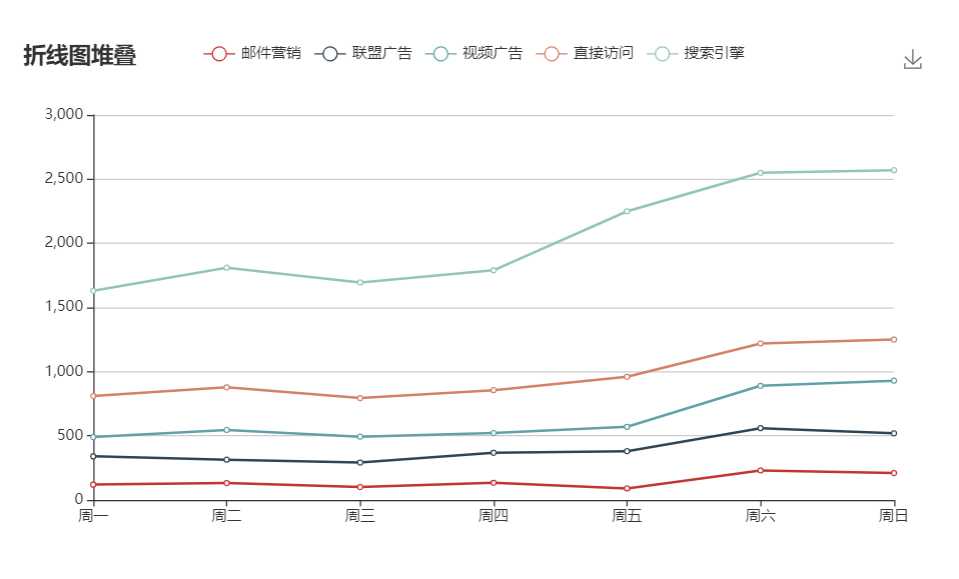
        BrokenLine.setOption({
          title: {
            text: ‘折线图堆叠‘
          },
          tooltip: {
            trigger: ‘axis‘
          },
          legend: {
            data: [‘邮件营销‘, ‘联盟广告‘, ‘视频广告‘, ‘直接访问‘, ‘搜索引擎‘]
          },
          grid: {
            left: ‘3%‘,
            right: ‘4%‘,
            bottom: ‘3%‘,
            containLabel: true
          },
          toolbox: {
            feature: {
              saveAsImage: {}
            }
          },
          xAxis: {
            type: ‘category‘,
            boundaryGap: false,
            data: [‘周一‘, ‘周二‘, ‘周三‘, ‘周四‘, ‘周五‘, ‘周六‘, ‘周日‘]
          },
          yAxis: {
            type: ‘value‘
          },
          series: [{
              name: ‘邮件营销‘,
              type: ‘line‘,
              stack: ‘总量‘,
              data: [120, 132, 101, 134, 90, 230, 210]
            },
            {
              name: ‘联盟广告‘,
              type: ‘line‘,
              stack: ‘总量‘,
              data: [220, 182, 191, 234, 290, 330, 310]
            },
            {
              name: ‘视频广告‘,
              type: ‘line‘,
              stack: ‘总量‘,
              data: [150, 232, 201, 154, 190, 330, 410]
            },
            {
              name: ‘直接访问‘,
              type: ‘line‘,
              stack: ‘总量‘,
              data: [320, 332, 301, 334, 390, 330, 320]
            },
            {
              name: ‘搜索引擎‘,
              type: ‘line‘,
              stack: ‘总量‘,
              data: [820, 932, 901, 934, 1290, 1330, 1320]
            }
          ]
        });
      }
}
 mounted() {
    this.DoEchart();
 }
参考资料:https://www.jianshu.com/p/cf0a54374419
原文:https://www.cnblogs.com/adongyo/p/11599823.html