
TensorFlow Lite 是用于移动设备和嵌入式设备的轻量级解决方案。TensorFlow Lite 支持 Android、iOS 甚至树莓派等多种平台。
TensorFlow 生成的模型是无法直接给移动端使用的,需要离线转换成.tflite文件格式。
tflite 存储格式是 flatbuffers。
FlatBuffers 是由Google开源的一个免费软件库,用于实现序列化格式。它类似于Protocol Buffers、Thrift、Apache Avro。
因此,如果要给移动端使用的话,必须把 TensorFlow 训练好的 protobuf 模型文件转换成 FlatBuffers 格式。官方提供了 toco 来实现模型格式的转换。
TensorFlow Lite 提供了 C ++ 和 Java 两种类型的 API。无论哪种 API 都需要加载模型和运行模型。
而 TensorFlow Lite 的 Java API 使用了 Interpreter 类(解释器)来完成加载模型和运行模型的任务。后面的例子会看到如何使用 Interpreter。
    // The tensorflow lite file
    private lateinit var tflite: Interpreter

    // Input byte buffer
    private lateinit var inputBuffer: ByteBuffer

    // Output array [batch_size, 10]
    private lateinit var mnistOutput: Array<FloatArray>

    init {

        try {
            tflite = Interpreter(loadModelFile(activity))

            inputBuffer = ByteBuffer.allocateDirect(
                    BYTE_SIZE_OF_FLOAT * DIM_BATCH_SIZE * DIM_IMG_SIZE_X * DIM_IMG_SIZE_Y * DIM_PIXEL_SIZE)
            inputBuffer.order(ByteOrder.nativeOrder())
            mnistOutput = Array(DIM_BATCH_SIZE) { FloatArray(NUMBER_LENGTH) }
            Log.d(TAG, "Created a Tensorflow Lite MNIST Classifier.")
        } catch (e: IOException) {
            Log.e(TAG, "IOException loading the tflite file failed.")
        }

    }
从 asserts 文件中加载 mnist.tflite 模型:
    /**
     * Load the model file from the assets folder
     */
    @Throws(IOException::class)
    private fun loadModelFile(activity: Activity): MappedByteBuffer {

        val fileDescriptor = activity.assets.openFd(MODEL_PATH)
        val inputStream = FileInputStream(fileDescriptor.fileDescriptor)
        val fileChannel = inputStream.channel
        val startOffset = fileDescriptor.startOffset
        val declaredLength = fileDescriptor.declaredLength
        return fileChannel.map(FileChannel.MapMode.READ_ONLY, startOffset, declaredLength)
    }
真正识别手写数字是在 classify() 方法:
val digit = mnistClassifier.classify(Bitmap.createScaledBitmap(paintView.bitmap, PIXEL_WIDTH, PIXEL_WIDTH, false))
classify() 方法包含了预处理用于初始化 inputBuffer、运行 mnist 模型、识别出数字。
    /**
     * Classifies the number with the mnist model.
     *
     * @param bitmap
     * @return the identified number
     */
    fun classify(bitmap: Bitmap): Int {

        if (tflite == null) {
            Log.e(TAG, "Image classifier has not been initialized; Skipped.")
        }

        preProcess(bitmap)
        runModel()
        return postProcess()
    }

    /**
     * Converts it into the Byte Buffer to feed into the model
     *
     * @param bitmap
     */
    private fun preProcess(bitmap: Bitmap?) {

        if (bitmap == null || inputBuffer == null) {
            return
        }

        // Reset the image data
        inputBuffer.rewind()

        val width = bitmap.width
        val height = bitmap.height

        // The bitmap shape should be 28 x 28
        val pixels = IntArray(width * height)
        bitmap.getPixels(pixels, 0, width, 0, 0, width, height)

        for (i in pixels.indices) {
            // Set 0 for white and 255 for black pixels
            val pixel = pixels[i]
            // The color of the input is black so the blue channel will be 0xFF.
            val channel = pixel and 0xff
            inputBuffer.putFloat((0xff - channel).toFloat())
        }
    }

    /**
     * Run the TFLite model
     */
    private fun runModel() = tflite.run(inputBuffer, mnistOutput)

    /**
     * Go through the output and find the number that was identified.
     *
     * @return the number that was identified (returns -1 if one wasn‘t found)
     */
    private fun postProcess(): Int {

        for (i in 0 until mnistOutput[0].size) {
            val value = mnistOutput[0][i]
            if (value == 1f) {
                return i
            }
        }

        return -1
    }
对于 Android 有一个地方需要注意,必须在 app 模块的 build.gradle 中添加如下的语句,否则无法加载模型。
android {
    ......
    aaptOptions {
        noCompress "tflite"
    }
}
效果:
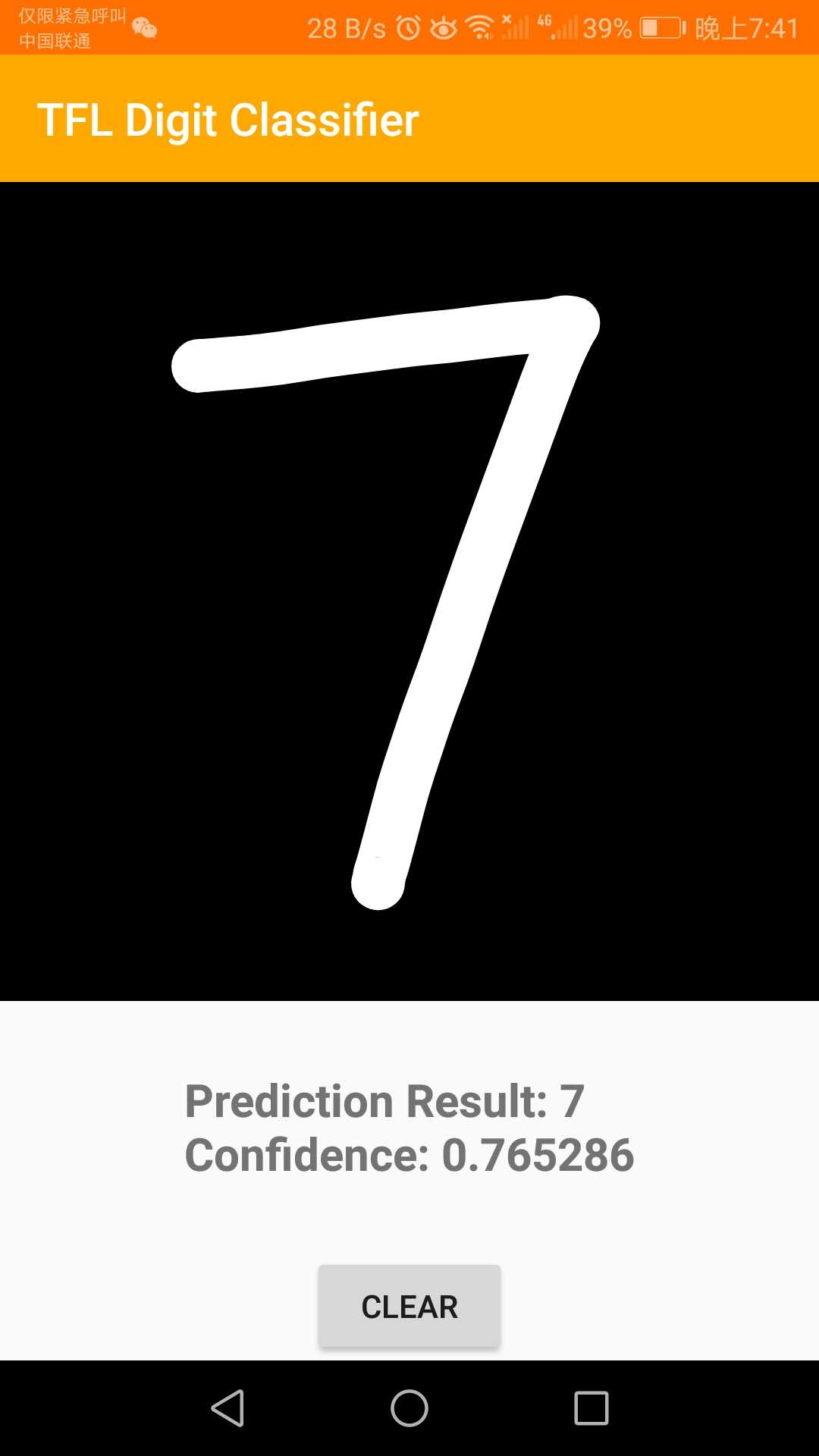
本文 demo 的 github 地址:https://github.com/fengzhizi715/TFLite-MnistDemo
当然,也可以跑一下官方的例子:https://github.com/tensorflow/tensorflow/tree/master/tensorflow/lite/examples/android/app
虽然准确度都不咋地。。。
更多有趣的TensorFlow Lite示例:https://www.tensorflow.org/lite/examples/
原文:https://www.cnblogs.com/lfri/p/11767265.html