
fimport requests,  matplotlib, re
import matplotlib.pyplot as plt
from bs4 import BeautifulSoup


def ahtml(url):
    a = {‘User-Agent‘: ‘Mozilla/5.0 (Windows NT 10.0; Win64; x64) AppleWebKit/537.36 (KHTML, like Gecko) Chrome/73.0.3683.75 Safari/537.36‘}
    try:
        data = requests.get(url, headers=a)
        data.raise_for_status()
        data.encoding = data.apparent_encoding
        return data.text
    except:
        return " "

#获取商品代码
def getcommodity(coms):
    for i in range(1, 3):
        html = ahtml(‘https://www.c5game.com/dota.html?rarity=immortal&page={}‘.format(i))
        #bs4格式化html页面
        soup = BeautifulSoup(html, "html.parser")
        #遍历span标签内a标签的字符串
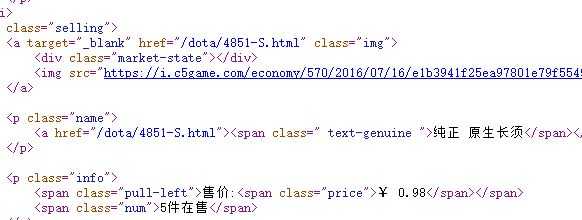
        for span in soup.find_all("p", attrs="name"):
            #将字符串放进列表
            temp = span.a.attrs[‘href‘]
            #正则过滤href中的元素
            temp1 = temp.split(‘/‘)[2]
            temp2 = temp1.split(‘-‘)[0]
            coms.append(temp2)
    return coms

#待会遍历列表放mid进来
def getprice(coms):
    count = []
    html = ahtml(‘https://www.c5game.com/dota/history/{}.html‘.format(coms))
    #bs4格式化html页面
    soup = BeautifulSoup(html, "html.parser")
    #遍历span标签内a标签的字符串
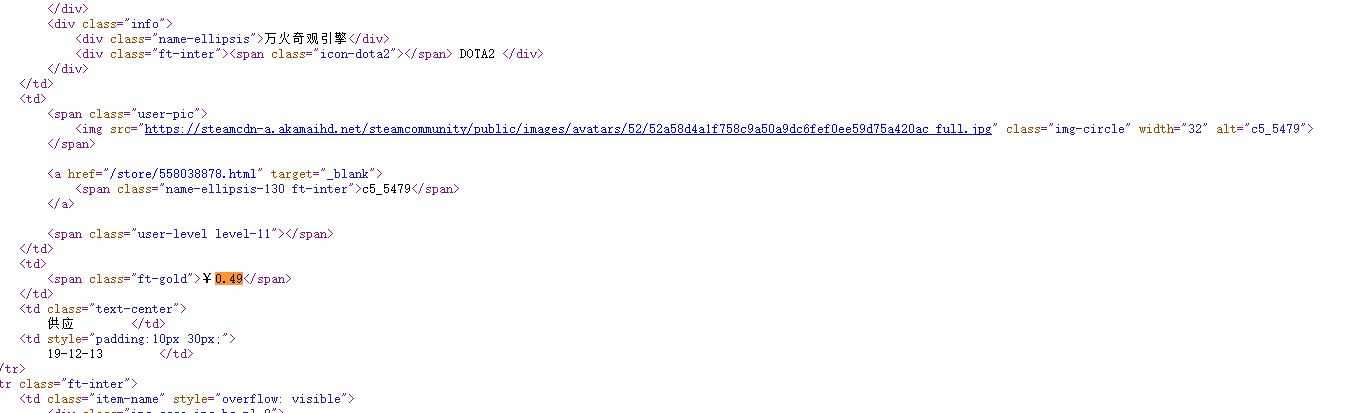
    span = soup.find_all("span", attrs="ft-gold")
    i = 0
    while i < 8:
        # 将字符串放进列表
        temp = span[i].string
        #取¥后的值
        count.append(eval(temp.split(‘¥‘)[1]))
        i += 1
    return count

def getyear(coms):
    count = []
    html = ahtml(‘https://www.c5game.com/dota/history/{}.html‘.format(coms))
    #bs4格式化html页面
    soup = BeautifulSoup(html, "html.parser")
    span = soup.find_all("td")
    i = 0
    while i < 8:
        try:
            num = re.findall(r"\d{2}[/-]\d{2}[/-]\d{2}", span.string)
            count.append(num)
            i += 1
        except:
            continue
    return count


def getname(coms):
    name = []
    html = ahtml(‘https://www.c5game.com/dota/history/{}.html‘.format(coms))
    #bs4格式化html页面
    soup = BeautifulSoup(html, "html.parser")
    span = soup.find_all("div", attrs="name-ellipsis")
    #将字符串放进列表
    name.append(span[0].string)
    return name


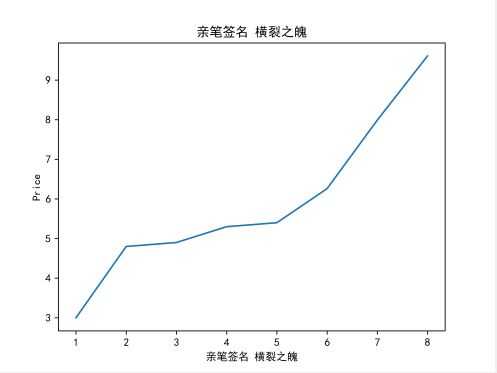
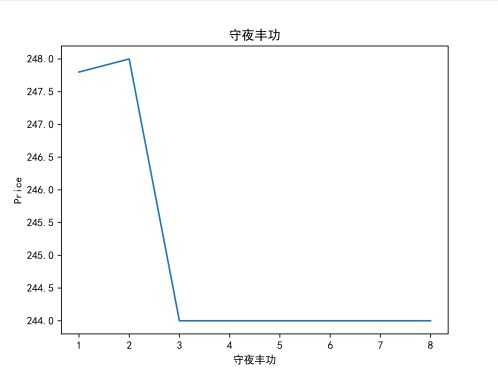
def ChartBroken(x, y, doc):
    plt.figure()
    plt.plot(x, y)
    #y轴
    plt.ylabel(‘Price‘)
    #x轴
    plt.xlabel(‘Times‘)
    #标题名
    plt.title(doc)
    #保存文件
    plt.savefig(doc, dpi=600)
    plt.show()

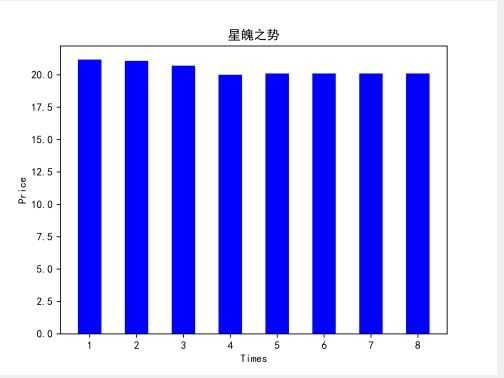
def ChartBar(x, y, doc):
    plt.figure()
    plt.bar(left=x, height=y, color=‘b‘, width=0.5)
    plt.ylabel(‘Price‘)
    plt.xlabel(‘Times‘)
    plt.title(doc)
    # 保存程序结果,数据持久化
    plt.savefig(doc, dpi=600)
    plt.show()


#修正pandas绘图中文乱码问题
matplotlib.rcParams[‘font.sans-serif‘] = [‘SimHei‘]
matplotlib.rcParams[‘font.family‘]=‘sans-serif‘
matplotlib.rcParams[‘axes.unicode_minus‘] = False

#主函数
def main():
    a = []
    comslist = getcommodity(a)[0:3]
    i = 0
    while i < 3:
        name = getname(comslist[i])
        print(name)
        price = getprice(comslist[i])
        print(price)
        ChartBroken([1, 2, 3, 4, 5, 6, 7, 8], price, name[0])
        ChartBar([1, 2, 3, 4, 5, 6, 7, 8], price, name[0])
        i += 1

if __name__ == ‘__main__‘:
  main()
1.数据爬取与采集
def getcommodity(coms):
    for i in range(1, 3):
        html = ahtml(‘https://www.c5game.com/dota.html?rarity=immortal&page={}‘.format(i))
        #bs4格式化html页面
        soup = BeautifulSoup(html, "html.parser")
def getprice(coms):
    count = []
    html = ahtml(‘https://www.c5game.com/dota/history/{}.html‘.format(coms))
    #bs4格式化html页面
    soup = BeautifulSoup(html, "html.parser")
 for span in soup.find_all("p", attrs="name"):
            #将字符串放进列表
            temp = span.a.attrs[‘href‘]
            #正则过滤href中的元素
            temp1 = temp.split(‘/‘)[2]
            temp2 = temp1.split(‘-‘)[0]
            coms.append(temp2)
    return coms
def ChartBroken(x, y, doc):
    plt.figure()
    plt.plot(x, y)
    #y轴
    plt.ylabel(‘Price‘)
    #x轴
    plt.xlabel(‘Times‘)
    #标题名
    plt.title(doc)
    #保存文件
    plt.savefig(doc, dpi=600)
    plt.show()

def ChartBar(x, y, doc):
    plt.figure()
    plt.bar(left=x, height=y, color=‘b‘, width=0.5)
    plt.ylabel(‘Price‘)
    plt.xlabel(‘Times‘)
    plt.title(doc)
    # 保存程序结果,数据持久化
    plt.savefig(doc, dpi=600)
    plt.show()
def ChartBroken(x, y, doc):
    plt.figure()
    plt.plot(x, y)
    #y轴
    plt.ylabel(‘Price‘)
    #x轴
    plt.xlabel(‘Times‘)
    #标题名
    plt.title(doc)
    #保存文件
    plt.savefig(doc, dpi=600)
    plt.show()

def ChartBar(x, y, doc):
    plt.figure()
    plt.bar(left=x, height=y, color=‘b‘, width=0.5)
    plt.ylabel(‘Price‘)
    plt.xlabel(‘Times‘)
    plt.title(doc)
    # 保存程序结果,数据持久化
    plt.savefig(doc, dpi=600)
    plt.show()
原文:https://www.cnblogs.com/gjz0417/p/12043983.html