
该篇文章分享如何将Python Web服务融入到Spring Cloud微服务体系中,并调用其服务,Python Web框架用的是Flask
Sidecar+ Flask,在这里,我们会使用Sidecar将Python接口注册到SpringCloud中,将Python接口当作Java接口进行调用(通过SpringCloud去调用Sidecar,然后通过Sidecar去转发我们的程序请求)
Sidecar是SpringCloud提供的一个可将第三方的rest接口集成到SpringCloud中的工具manage.pyimport json
from flask import Flask, Response, request, make_response, jsonify
app = Flask(__name__)
@app.route("/health")
def health():
result = {'status': 'UP'}
return Response(json.dumps(result), mimetype='application/json')
@app.route("/getUser")
def getUser():
result = {'username': 'python', 'password': 'python'}
return Response(json.dumps(result), mimetype='application/json')
@app.errorhandler(404)
def not_found(error):
return make_response(jsonify({'error': 'Not found'}), 404)
if __name__ == "__main__":
app.run(host="0.0.0.0", port=3000)大致说下上述代码,Python服务监听3000端口,health方法用于给Sidecar提供健康接口,用于实时向Sidecar提供自己的健康状态,getUser是Python向外界提供的服务
python manage.py runserver<dependency>
<groupId>org.springframework.cloud</groupId>
<artifactId>spring-cloud-starter-eureka</artifactId>
</dependency>
<dependency>
<groupId>org.springframework.cloud</groupId>
<artifactId>spring-cloud-netflix-sidecar</artifactId>
</dependency>
<dependency>
<groupId>org.springframework.boot</groupId>
<artifactId>spring-boot-starter-test</artifactId>
<scope>test</scope>
</dependency>SidecarApplication.javaimport org.springframework.boot.SpringApplication;
import org.springframework.boot.autoconfigure.SpringBootApplication;
import org.springframework.cloud.netflix.sidecar.EnableSidecar;
@EnableSidecar
@SpringBootApplication
public class SidecarApplication {
public static void main(String[] args) {
SpringApplication.run(SidecarApplication.class, args);
}
}application.ymlspring:
profiles:
active: "dev"
application:
name: demo-sidecar
sidecar:
port: 3000
health-uri: http://localhost:${sidecar.port}/health
ribbon:
ConnectTimeout: 50000
ReadTimeout: 50000
hystrix:
command:
default:
execution:
isolation:
thread:
timeoutInMilliseconds: 10000
server:
port: 8326
eureka:
client:
healthcheck:
enabled: true
service-url:
defaultZone: http://${registry.host:localhost}:${registry.port:8761}/eureka/
registry:
host: localhost
port: 31091大致说下上述代码,main方法要使用@EnableSidecar注解,sidecar port代表监听Python运行的端口,server port代表Sidecar运行的端口,spring application name代表Sidecar的服务名,sidecar health-uri是Python健康接口,指向python的健康服务
@SpringBootApplication
public class DemoServerApplication {

    public static void main(String[] args) {
        SpringApplication.run(DemoServerApplication.class, args);
    }

    @Bean
    @LoadBalanced
    RestTemplate restTemplate() {
        return new RestTemplate();
    }
}RestTemplateController.javaimport org.springframework.beans.factory.annotation.Autowired;
import org.springframework.web.bind.annotation.RequestMapping;
import org.springframework.web.bind.annotation.RestController;
import org.springframework.web.client.RestTemplate;
@RestController
public class RestTemplateController {
@Autowired
private RestTemplate restTemplate;
@RequestMapping("/java-user")
public String JavaUser() {
return "{'username': 'java', 'password': 'java'}" ;
}
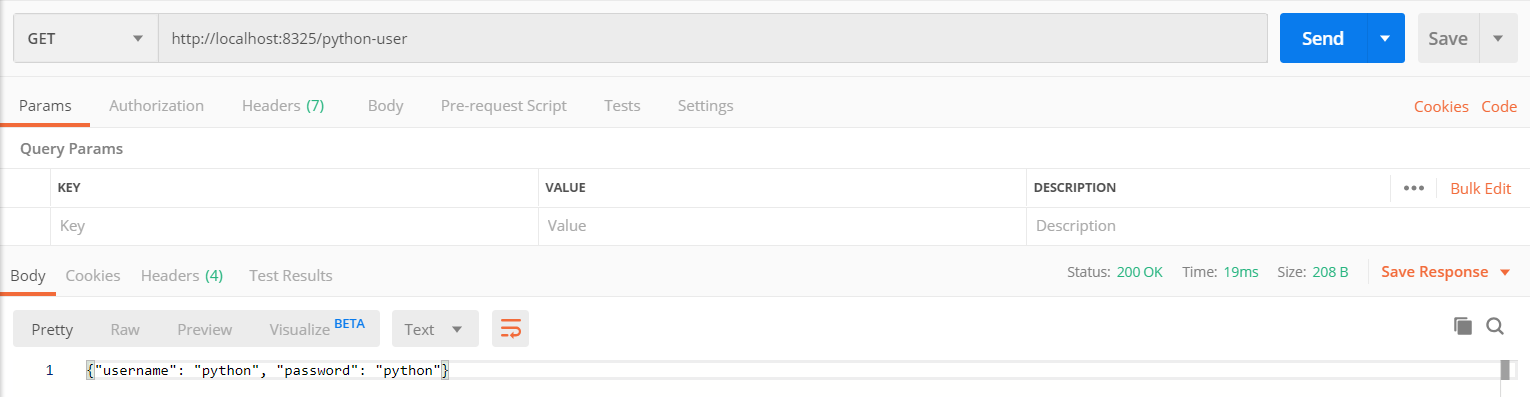
@RequestMapping("/python-user")
public String PythonUser() {
return restTemplate.getForEntity("http://demo-sidecar/getUser", String.class).getBody();
// return restTemplate.getForEntity("http://localhost:3000/getUser", String.class).getBody();
}
}@LoadBalanced用于开启负载均衡,在这里有两种调用方式,使用和不使用@LoadBalanced@LoadBalanced注解后,RestTemplate可以直接调用服务名@Bean
@LoadBalanced
RestTemplate restTemplate() {
return new RestTemplate();
}
++++++++++++++++++++++++++++++
return restTemplate.getForEntity("http://demo-sidecar/getUser", String.class).getBody();@LoadBalanced注解,RestTemplate调用的就是固定的IP+PORT@Bean
// @LoadBalanced
RestTemplate restTemplate() {
return new RestTemplate();
}
++++++++++++++++++++++++++++++
return restTemplate.getForEntity("http://localhost:3000/getUser", String.class).getBody();
congfig类中需添加注解@EnableFeignClients,具体使用请百度SidecarController.java@RestController
public class SidecarController {
private SidecarAPIClient sidecarAPIClient;
@Autowired
public SidecarController(SidecarAPIClient sidecarAPIClient) {
this.sidecarAPIClient = sidecarAPIClient;
}
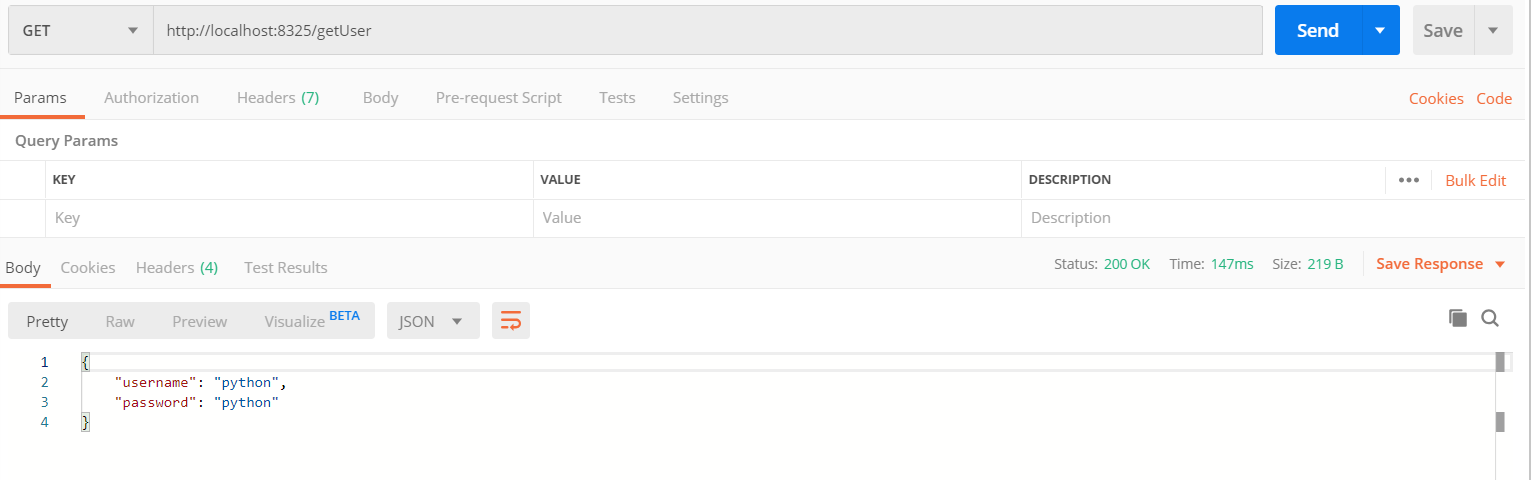
@GetMapping("/getUser")
public Object getUser() {
return this.sidecarAPIClient.getUser();
}
}SidecarAPIClient.java@FeignClient(name="demo-sidecar", configuration = FeignConfigure.class)
public interface SidecarAPIClient {
@GetMapping("/getUser")
Object getUser();
}FeignConfigure.javaimport feign.Logger;
import feign.codec.Encoder;
import feign.form.spring.SpringFormEncoder;
import org.springframework.beans.factory.ObjectFactory;
import org.springframework.beans.factory.annotation.Autowired;
import org.springframework.boot.autoconfigure.web.HttpMessageConverters;
import org.springframework.cloud.netflix.feign.support.SpringEncoder;
import org.springframework.context.annotation.Bean;
import org.springframework.context.annotation.Configuration;
@Configuration
public class FeignConfigure {
@Bean
Logger.Level feignLoggerLevel() {
return Logger.Level.FULL;
}
@Autowired
private ObjectFactory<HttpMessageConverters> messageConverters;
@Bean
public Encoder feignFormEncoder() {
return new SpringFormEncoder(new SpringEncoder(messageConverters));
}
}
Sidecar是一个用于监听非JVM应用程序(可以是Python或者Node或者Php等等)的一个工具,通过Sidecar可以实现Java和第三方应用程序的双向交互Sidecar报告自己的状态,告诉Sidecar自己还在运行着。Sidecar应用程序必须和第三方应用程序运行在同一台电脑上,也就是说他们之间是localhost,不能是IP访问SpringCloud 整合Python 感谢大佬
end
原文:https://www.cnblogs.com/maggieq8324/p/12099849.html