
EGL定义
是OpenGL EL和本地窗口系统的接口,不同平台上EGL配置是不一样的,而OpenGL的调用方式是一致的,OpenGL跨平台就是依赖于EGL接口
EGL环境创建目的
当我们需要把同一个场景渲染到不同的Surface上是,此时系统GLSurfaceView就不能满足需求了,需要自己创建EGL环境来实现渲染操作。
OpenGL整体是一个状态机,通过改变状态就可以改变后续的渲染方式,而EGLcontext(EGL上下文)保持所有的状态,因此可以通过共享EGLContext来实现同一个场景渲染到不同Surface上
GLSurfaceView有一个EglHelper
实例:创建自己的EglHelper
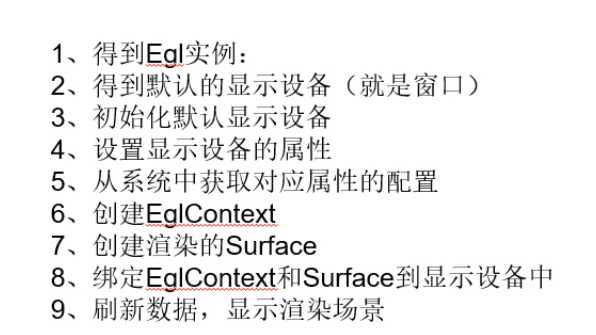
可参考GLSurfaceView里面的EglHelper方法
第一步:创建EglHelper类
public class EglHelper {

    private EGL10 mEgl;
    private EGLDisplay mEglDisplay;
    private EGLContext mEglContext;
    private EGLSurface mEglSurface;

    public void initEgl(Surface surface, EGLContext eglContext)
    {

        //1、
        mEgl = (EGL10) EGLContext.getEGL();

        //2、
        mEglDisplay = mEgl.eglGetDisplay(EGL10.EGL_DEFAULT_DISPLAY);
        if (mEglDisplay == EGL10.EGL_NO_DISPLAY) {
            throw new RuntimeException("eglGetDisplay failed");
        }

        //3、
        int[] version = new int[2];
        if(!mEgl.eglInitialize(mEglDisplay, version)) {
            throw new RuntimeException("eglInitialize failed");
        }

        //4、
        int [] attrbutes = new int[]{
                EGL10.EGL_RED_SIZE, 8,
                EGL10.EGL_GREEN_SIZE, 8,
                EGL10.EGL_BLUE_SIZE, 8,
                EGL10.EGL_ALPHA_SIZE, 8,
                EGL10.EGL_DEPTH_SIZE, 8,
                EGL10.EGL_STENCIL_SIZE, 8,
                EGL10.EGL_RENDERABLE_TYPE, 4,
                EGL10.EGL_NONE};

        int[] num_config = new int[1];
        if(!mEgl.eglChooseConfig(mEglDisplay, attrbutes, null, 1, num_config))
        {
            throw new IllegalArgumentException("eglChooseConfig failed");
        }

        int numConfigs = num_config[0];
        if (numConfigs <= 0) {
            throw new IllegalArgumentException(
                    "No configs match configSpec");
        }

        //5、
        EGLConfig[] configs = new EGLConfig[numConfigs];
        if (!mEgl.eglChooseConfig(mEglDisplay, attrbutes, configs, numConfigs,
                num_config)) {
            throw new IllegalArgumentException("eglChooseConfig#2 failed");
        }

        //6、
        if(eglContext != null)
        {
            mEglContext = mEgl.eglCreateContext(mEglDisplay, configs[0], eglContext, null);
        }
        else
        {
            mEglContext = mEgl.eglCreateContext(mEglDisplay, configs[0], EGL10.EGL_NO_CONTEXT, null);
        }

        //7、
        mEglSurface = mEgl.eglCreateWindowSurface(mEglDisplay, configs[0], surface, null);

        //8、
        if(!mEgl.eglMakeCurrent(mEglDisplay, mEglSurface, mEglSurface, mEglContext))
        {
            throw new RuntimeException("eglMakeCurrent fail");
        }
    }

    public boolean swapBuffers()
    {
        if(mEgl != null)
        {
            return mEgl.eglSwapBuffers(mEglDisplay, mEglSurface);
        }
        else
        {
            throw new RuntimeException("egl is null");
        }
    }

    public EGLContext getmEglContext() {
        return mEglContext;
    }

    public void destoryEgl()
    {
        if(mEgl != null)
        {
            mEgl.eglMakeCurrent(mEglDisplay, EGL10.EGL_NO_SURFACE,
                    EGL10.EGL_NO_SURFACE,
                    EGL10.EGL_NO_CONTEXT);

            mEgl.eglDestroySurface(mEglDisplay, mEglSurface);
            mEglSurface = null;

            mEgl.eglDestroyContext(mEglDisplay, mEglContext);
            mEglContext = null;

            mEgl.eglTerminate(mEglDisplay);
            mEglDisplay = null;
            mEgl = null;
        }
    }

}
修改MainActivity代码
      surfaceView = findViewById(R.id.surfaceview);
        surfaceView.getHolder().addCallback(new SurfaceHolder.Callback() {
            @Override
            public void surfaceCreated(SurfaceHolder holder) {

            }

            @Override
            public void surfaceChanged(final SurfaceHolder holder, int format, final int width, final int height) {
                new Thread() {
                    @Override
                    public void run() {
                        super.run();
                        //初始化EGL
                        EglHelper eglHelper = new EglHelper();
                        eglHelper.initEgl(holder.getSurface(),null);
                        while(true){
                            //设置窗口大小
                            GLES20.glViewport(0,0,width,height);
                            //清除颜色缓冲区
                            GLES20.glClear(GLES20.GL_COLOR_BUFFER_BIT);
                            //使用指定颜色清屏
                            GLES20.glClearColor(1.0f,1.0f,0.0f,1.0f);
                            //自动刷新
                            eglHelper.swapBuffers();
                            try {
                                Thread.sleep(16);
                            }catch (InterruptedException e){
                                e.printStackTrace();
                            }
                        }
                    }
                }.start();
            }

            @Override
            public void surfaceDestroyed(SurfaceHolder holder) {

            }
        });
修改layout
<SurfaceView
       android:id="@+id/surfaceview"
       android:layout_width="match_parent"
       android:layout_height="match_parent"></SurfaceView>
原文:https://www.cnblogs.com/cxj1821/p/12037560.html