首页 > 其他 > 详细

将numpy.ndarray写入excel

时间:2020-01-03 10:44:22      阅读:965      评论:0      收藏:0      [点我收藏+]

引言

  很多情况下,我们可以将数据结果保存到txt文件中便于后续查看或者再处理,然而为了进行汇报、论文撰写等工作,我们将数据放入表格,为后续整理会提供极大的便利。我们可以利用pandas库进行numpy.ndarray数据保存到excel。

函数说明

pandas.DataFrame.to_excel

DataFrame.to_excel(self, excel_writer, sheet_name=‘Sheet1‘, na_rep=‘‘, float_format=None, columns=None, header=True, index=True, index_label=None, startrow=0, startcol=0, engine=None, merge_cells=True, encoding=None, inf_rep=‘inf‘, verbose=True, freeze_panes=None)[source]

Write object to an Excel sheet.

To write a single object to an Excel .xlsx file it is only necessary to specify a target file name. To write to multiple sheets it is necessary to create an ExcelWriter object with a target file name, and specify a sheet in the file to write to.

Multiple sheets may be written to by specifying unique sheet_name. With all data written to the file it is necessary to save the changes. Note that creating an ExcelWriter object with a file name that already exists will result in the contents of the existing file being erased.

Parameters:
excel_writer : str or ExcelWriter object

File path or existing ExcelWriter.

sheet_name : str, default ‘Sheet1’

Name of sheet which will contain DataFrame.

na_rep : str, default ‘’

Missing data representation.

float_format : str, optional

Format string for floating point numbers. For example float_format="%.2f" will format 0.1234 to 0.12.

columns : sequence or list of str, optional

Columns to write.

header : bool or list of str, default True

Write out the column names. If a list of string is given it is assumed to be aliases for the column names.

index : bool, default True

Write row names (index).

index_label : str or sequence, optional

Column label for index column(s) if desired. If not specified, and header and indexare True, then the index names are used. A sequence should be given if the DataFrame uses MultiIndex.

startrow : int, default 0

Upper left cell row to dump data frame.

startcol : int, default 0

Upper left cell column to dump data frame.

engine : str, optional

Write engine to use, ‘openpyxl’ or ‘xlsxwriter’. You can also set this via the options io.excel.xlsx.writer, io.excel.xls.writer, and io.excel.xlsm.writer.

merge_cells : bool, default True

Write MultiIndex and Hierarchical Rows as merged cells.

encoding : str, optional

Encoding of the resulting excel file. Only necessary for xlwt, other writers support unicode natively.

inf_rep : str, default ‘inf’

Representation for infinity (there is no native representation for infinity in Excel).

verbose : bool, default True

Display more information in the error logs.

freeze_panes : tuple of int (length 2), optional

Specifies the one-based bottommost row and rightmost column that is to be frozen.

New in version 0.20.0..

例子

 1 import numpy as np
 2 import pandas as pd 
 3 
 4 data = np.random.randn(2, 3).astype(np.float32)
 5 dataFrame = pd.DataFrame(data, 
 6                         index=[‘row 1‘, ‘row 2‘],
 7                         columns=[‘col 1‘, ‘col 2‘, ‘col 3‘]) # 说明行和列的索引名
 8 
 9 dataFrame2 = dataFrame.copy()
10 
11 with pd.ExcelWriter(‘test.xlsx‘) as writer: # 一个excel写入多页数据
12     dataFrame.to_excel(writer, sheet_name=‘page1‘, float_format=‘%.6f‘)
13     dataFrame2.to_excel(writer, sheet_name=‘page2‘, float_format=‘%.6f‘)

结果:
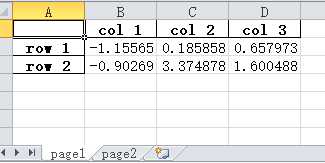
技术分享图片


将numpy.ndarray写入excel

原文:https://www.cnblogs.com/qinduanyinghua/p/12143584.html

踩
(0)
赞
(0)
   
举报
评论 一句话评论(0)
关于我们 - 联系我们 - 留言反馈 - 联系我们:wmxa8@hotmail.com
© 2014 bubuko.com 版权所有
打开技术之扣,分享程序人生!