
1:新建项目后,新增两个组件:
ng g component relations/footer (子组件)
ng g component relations/home (父组件)
2:引用
在app.component.html中引用home标签:<app-home></app-home>
在home.component.html中引用footer标签:<app-footer></app-footer>
3:实现目标:
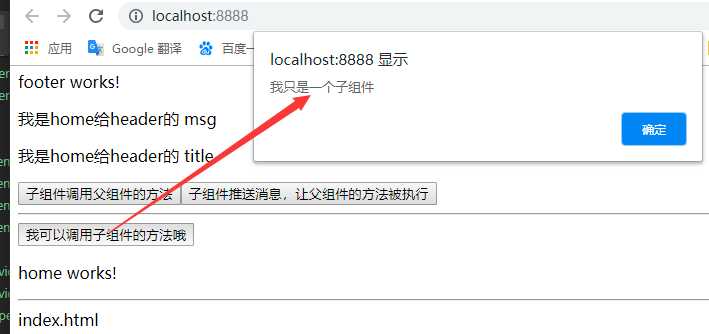
父组件调用子组件信息:ViewChild(上一篇有写)
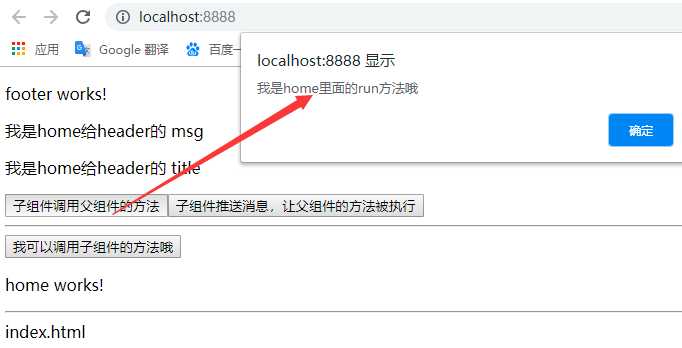
子组件调用父组件信息新:Input
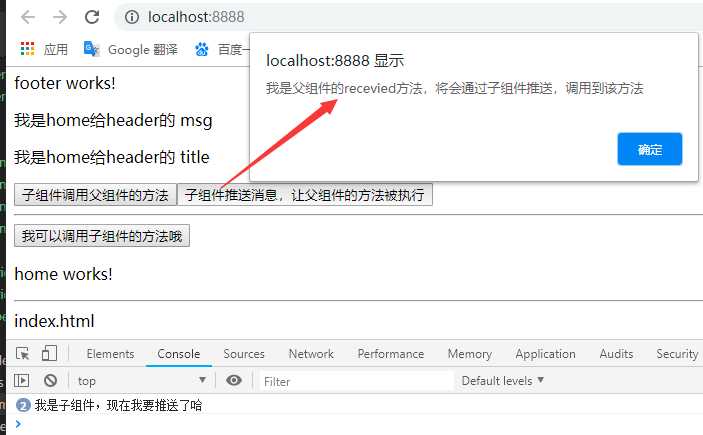
子组件推送信息给父组件:Output,EventEmitter
home.component.ts

 1 import { Component, OnInit,ViewChild } from ‘@angular/core‘;
 2
 3 @Component({
 4   selector: ‘app-home‘,
 5   templateUrl: ‘./home.component.html‘,
 6   styleUrls: [‘./home.component.css‘]
 7 })
 8 export class HomeComponent implements OnInit {
 9
10   @ViewChild("footer",{static:true}) footer:any;
11   public msg: any = "我是home给header的 msg";
12
13   public title: any = "我是home给header的 title";
14   constructor() { }
15
16   ngOnInit() {
17   }
18
19   run() {
20     alert("我是home里面的run方法哦");
21   }
22
23   recevied(e) {
24
25     console.log(e);
26     alert("我是父组件的recevied方法,将会通过子组件推送,调用到该方法");
27   }
28
29   getFooterMethod(){
30     this.footer.getData();
31   }
32 }
home.component.html
1 <!-- 这里改了app-header->app-header2 标签 调用失败-->
2 <!-- <app-header2 [title]="title" [msg]="msg"></app-header2> -->
3
4 <app-footer [title]="title" [msg]="msg" [run]=‘run‘ (son)="recevied($event)" #footer></app-footer>
5
6 <button (click)="getFooterMethod()">我可以调用子组件的方法哦</button>
7 <p>home works!</p>
8 <hr>
footer.component.ts
import { Component, OnInit ,Input,Output,EventEmitter} from ‘@angular/core‘;

@Component({
  selector: ‘app-footer‘,
  templateUrl: ‘./footer.component.html‘,
  styleUrls: [‘./footer.component.css‘]
})
export class FooterComponent implements OnInit {
  @Output() private son:any= new EventEmitter();
  @Input() msg:any;

  @Input() title:any;

  @Input() run:any;
  constructor() { }

  ngOnInit() {
  }

  runParent(){
    this.run();
  }

  sendDataToParent(){
    this.son.emit("我是子组件,现在我要推送了哈");
  }

  getData(){
    alert("我只是一个子组件");
  }

}
footer.component.html
 1 <p>footer works!</p>
 2 <p>{{msg}}</p>
 3
 4 <p>{{title}}</p>
 5
 6
 7 <button (click)="runParent()"> 子组件调用父组件的方法</button>
 8
 9 <button (click)="sendDataToParent()"> 子组件推送消息,让父组件的方法被执行</button>
10 <hr>
4:效果图
Angular学习系列六:Input,Output实现组件之间传值
原文:https://www.cnblogs.com/hanliping/p/12153256.html
