
controller层:
query.setPageSize(9);//传入每页要显示的数据条数
PageInfo<List<PhonesGroupVO>> page = itPhonesGroupSV.selectPhonesGroup(query);
model.addAttribute("pageInfo", page);
model.addAttribute("flag", 1);
逻辑层:
@Override
public PageInfo<List<PhonesGroupVO>> selectPhonesGroup(PhonesGroupVO phonesGroupVO) throws Exception {
    PageInfo<List<PhonesGroupVO>> pageInfo=new PageInfo<List<PhonesGroupVO>>();
    if(null==phonesGroupVO){
        return null;
    }
    TPhonesGroupExample example=new TPhonesGroupExample();
    TPhonesGroupExample.Criteria criteria=example.createCriteria();

    if(StringUtils.isNotBlank(phonesGroupVO.getDataUserId())){
        criteria.andDataUserIdEqualTo(Long.valueOf(phonesGroupVO.getDataUserId()));
    }
    PageHelper.startPage(phonesGroupVO.getPageNo(),phonesGroupVO.getPageSize(),true);
    List<TPhonesGroupKey> tGroupslist=tPhonesGroupMapper.selectByExample(example);
    List<PhonesGroupVO> phonesGroupVOList=buildPhonesGroupVO(tGroupslist);
  //将要显示的数据条数按toIndex=5的维度重新切割分组:
//(这里参考了网上其他队友的方法,地址为:https://www.cnblogs.com/zrbfree/p/7738345.html)
  int listSize=phonesGroupVOList.size();
    int toIndex=5;

    List<List<PhonesGroupVO>> list=new ArrayList<List<PhonesGroupVO>>();
  for (int i = 0; i < listSize; i += toIndex) {
        if (i + toIndex > listSize) {
            toIndex = listSize - i;
        }
        List newList = phonesGroupVOList.subList(i, i + toIndex);
        list.add(newList);
    }
  //将分组集合传入pageInfo页面显示
    if(!CollectionUtils.isEmpty(phonesGroupVOList)){
        pageInfo=new PageInfo<List<PhonesGroupVO>>(list);
    }
    return pageInfo;
}

显示层:
<tbody th:if="${pageInfo?.list}">
 <tr th:each="groupList,loopStatus : ${pageInfo?.list}">
       <td id=‘number0‘ th:if="${flag}==0" th:each="group,loopStatus : ${groupList}" >
           <label th:text="${group?.phoneNo}"></label>
            <a id=‘edit0‘ href="javaScript:void(0);"
               th:data-phoneId="${group?.Id}"
               th:data-dataUserId="${group?.dataUserId}"
               th:onclick="groupAdd.showModify([[${group.phoneNo}]],this.getAttribute(‘data-phoneId‘),this.getAttribute(‘data-dataUserId‘))">
                编辑
            </a>
           <a id=‘delete0‘ href="javaScript:void(0);"
              th:data-phoneId="${group?.Id}"
              th:data-dataUserId="${group?.dataUserId}"
              th:onclick="groupAdd.deletePhone([[${group.phoneNo}]],this.getAttribute(‘data-phoneId‘),this.getAttribute(‘data-dataUserId‘))">
               删除
           </a>
       </td>
  </tr>
</tbody>

效果图:
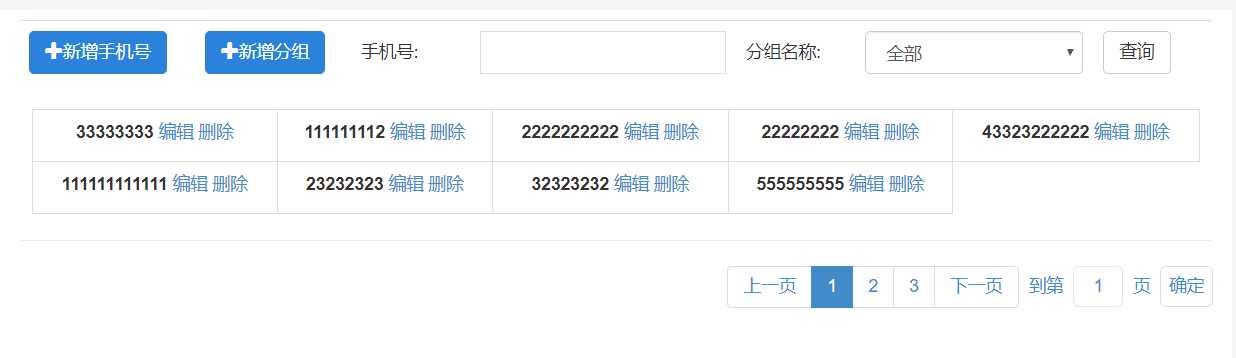
1.页面传入的pageSize是确定分页时每页展示的数据数量;切割的时候是将这个数量的数据重新分组,最后显示在页面上;
2.切割分组的时候,是按需要的维度来进行每一次循环;
3.显示的时候,第一层先取到pageInfo中的数据集,第二层才取到分割后的分组,第三层才是要显示的具体数据(即每个td);
原文:https://www.cnblogs.com/xuhk1819/p/12197214.html