
/**
 *  提示工具, 只要给元素添加data-tooltip属性,
 *  那么当鼠标移动到这个元素上的时候就会显示data-tooltip里的内容
 *  例如: <div data-tooltip="show content"  >hover</div>
 *  当鼠标移动到这个div标签上的时候就会显示"show content"
 */


// toolTip.js


(function toolTip() {

    createStyle();

    let tooltipElem;
    document.onmouseover = function (e) {
        var target = e.target;
        var toolHtml = target.dataset.tooltip;
        if (!toolHtml) {
            return;
        }
        tooltipElem = document.createElement(‘div‘);
        tooltipElem.className = "tooltip";
        tooltipElem.innerHTML = toolHtml;
        document.body.append(tooltipElem);

        document.onmousemove = function (e) {
            tooltipElem.style.left = e.clientX + ‘px‘;
            tooltipElem.style.top = e.clientY + ‘px‘;
        }

    };

    document.onmouseout = function () {
        if (tooltipElem) {
            tooltipElem.remove();
            tooltipElem = null;
        }
        document.onmousemove = null;
    }
})()


// 创建提示文本的样式, 可能不兼容IE浏览器, 建议直接把样式写在css文件里
function createStyle() {
    var styleEle = document.createElement(‘style‘);
    styleEle.type = ‘text/css‘;
    styleEle.innerHTML =
        `.tooltip {
        position: fixed;
        margin: 10px;
        padding: 10px 20px;
        border: 1px solid #b3c9ce;
        border-radius: 4px;
        text-align: left;
        font: italic 16px/1.3 arial, sans-serif;
        color: #333;
        background: #eee;
        box-shadow: 3px 3px 3px rgba(0, 0, 0, .3);
        z-index: 999999999;
    }`;
    document.head.appendChild(styleEle);
}
使用示例:
<!DOCTYPE html>
<html lang="en">
<head>
    <meta charset="UTF-8">
    <meta name="viewport" content="width=device-width, initial-scale=1.0">
    <title>Document</title>
    <style>
        div{
            height: 100px;
            line-height: 100px;
            border: 1px solid #000;
            font-size: 22px;
            text-align: center;
        }
    </style>
</head>
<body>
    <div data-tooltip="提示的文字"  >把鼠标移过来</div>
    <script src="./toolTip.js"></script>
</body>
</html>
在页面上的效果:
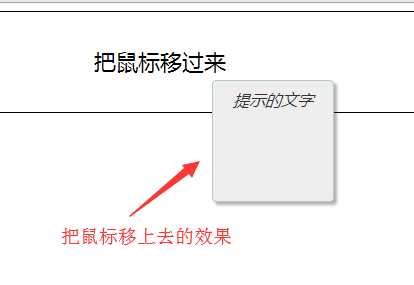
源码地址: https://github.com/1061186575/JS-Library
原文:https://www.cnblogs.com/zp106/p/12305106.html