

this.setData({ msg:‘xxx‘})picker 选择列表
input bindblur="函数名"data-xxxhtml导入
<include src=""/>js导入
<wxs src="./../test/test.wxs" module="test"/> 相对路径

<view>

  {{test.name}}

</view>
css导入 @import "common.wxss";
路由参数 :
onLoad: function(option){
    console.log(option.query)
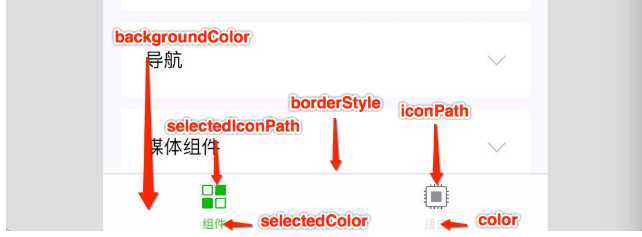
} enablePullDownRefresh:trueiconPath selectedIconPath 每个不同的单独设置
播放下载音乐
const innerAudioContext = wx.createInnerAudioContext()
      innerAudioContext.autoplay = true
      innerAudioContext.src = res.tempFilePath
      innerAudioContext.onPlay(() => {
        console.log('开始播放')
      })
      innerAudioContext.onError((res) => {
        console.log(res.errMsg)
        console.log(res.errCode)
      })
弹幕
<view class="section tc">
  <video id="myVideo" src="http://wxsnsdy.tc.qq.com/105/20210/snsdyvideodownload?filekey=30280201010421301f0201690402534804102ca905ce620b1241b726bc41dcff44e00204012882540400&bizid=1023&hy=SH&fileparam=302c020101042530230204136ffd93020457e3c4ff02024ef202031e8d7f02030f42400204045a320a0201000400"   enable-danmu danmu-btn controls></video>
  <view class="btn-area">
    <button bindtap="bindSendDanmu">发送弹幕</button>
  </view>
</view>
bindSendDanmu() {
this.data.videoContext.sendDanmu({
text: '6666',
color:'#00b26a'
})
},
onReady: function () {
this.data.videoContext = wx.createVideoContext('myVideo')
},查找元素
const query = wx.createSelectorQuery();
     //        定义选择器,查找元素位置
query.select('#bottom').boundingClientRect()
query.exec(ele=>ele);html导入
<include src=""/>js导入
<wxs src="./../test/test.wxs" module="test"/> 相对路径

<view>

  {{test.name}}

</view>
css导入 @import "common.wxss";
路由参数 :
onLoad: function(option){
    console.log(option.query)
} enablePullDownRefresh:true### 组件
#### 接收数据
properties: {
    text:{
      type:Number,
      value:888
    }
  }
### 组件wxml的slot
在组件的wxml中可以包含 slot 节点,用于承载组件使用者提供的wxml结构。
默认情况下,一个组件的wxml中只能有一个slot。需要使用多slot时,可以在组件js中声明启用。
Component({
  options: {
    multipleSlots: true // 在组件定义时的选项中启用多slot支持
  },
  properties: { /* ... */ },
  methods: { /* ... */ }
})
此时,可以在这个组件的wxml中使用多个slot,以不同的 name 来区分。
<!-- 组件模板 -->
<view class="wrapper">
  <slot name="before"></slot>
  <view>这里是组件的内部细节</view>
  <slot name="after"></slot>
</view>
使用时,用 slot 属性来将节点插入到不同的slot上。
<!-- 引用组件的页面模板 -->
<view>
  <component-tag-name>
    <!-- 这部分内容将被放置在组件 <slot name="before"> 的位置上 -->
    <view slot="before">这里是插入到组件slot name="before"中的内容</view>
    <!-- 这部分内容将被放置在组件 <slot name="after"> 的位置上 -->
    <view slot="after">这里是插入到组件slot name="after"中的内容</view>
  </component-tag-name>
</view>
#### 样式
:host 选择器#### 使用插件
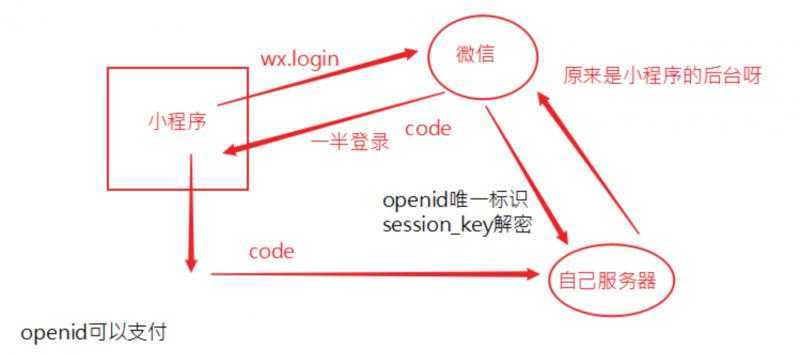
#### 登录
原文:https://www.cnblogs.com/qidaoxueyuan/p/12391000.html