
1. 如果不用 ajax 发送 PUT,我们可以通过设置一个隐藏域设置 _method 的值,如下:
	<form action="/emps" method="post">
		<input type="hidden" name="_method" value="PUT">
		<input type="text" name="username">
		<input type="password" name="password">
                <input type="submit"/>
	</form>
2. 控制层:
    @RequestMapping(value="/emps", method=RequestMethod.PUT)
	public String updateEmp(Employee employee) {
		System.out.println(employee);
		return "redirect:success.jsp";
	}
注意:这里如果采用请求转发的方式即 return "success.jsp",将会出现以下问题:(Tomcat 7.0 版本不会出现这个问题)
SpringMVC HTTP Status 405 - JSPs only permit GET POST or HEAD
采用重定向的方式可以避免这个问题。
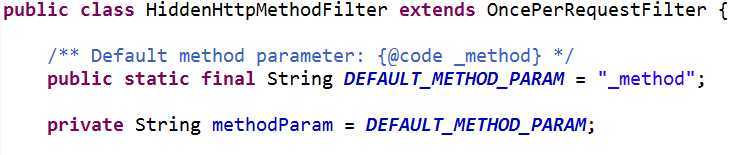
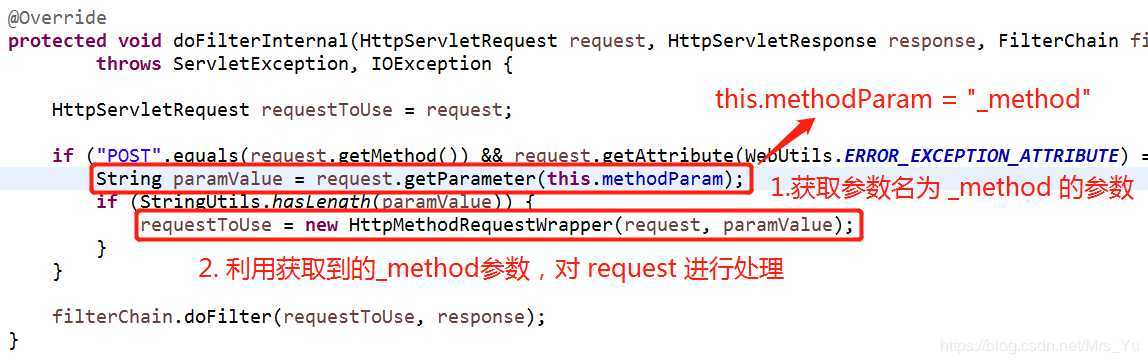
3. 这种方式发送 PUT 请求,还需在 web.xml 中配置一个 HiddenHttpMethodFilter 过滤器(如果使用Spring Boot 则会自动配置)
	<filter>
		<filter-name>HiddenHttpMethodFilter</filter-name>
		<filter-class>org.springframework.web.filter.HiddenHttpMethodFilter</filter-class>
	</filter>
	<filter-mapping>
		<filter-name>HiddenHttpMethodFilter</filter-name>
		<url-pattern>/*</url-pattern>
	</filter-mapping>
        /* 删除员工 */
		function deleteEmp(empId){
			$.ajax({
				url : "emps",
				data : {_method : "DELETE", empId : empId},
				type : "POST",
				success : function(result){

				}
			})
		}
发送表单 ajax 请求:
$("#updateBtn").click(function(){
			$.ajax({
				url : "emps",
				data : $("#updateEmpFormNode").serialize()+"&_method=put",
				type : "post",
				success : function(result){
					alert(result);
				}
			})

		})
1. 把上述第二点的表单更新改写为如下:
$("#updateBtn").click(function(){
			$.ajax({
				url : "emps",
				data : $("#updateEmpFormNode").serialize(),
				type : "PUT",
				success : function(result){
					alert(result);
				}
			})

		})
出错:

	<filter>
		<filter-name>HttpPutFormContentFilter</filter-name>
		<filter-class>org.springframework.web.filter.HttpPutFormContentFilter</filter-class>
	</filter>
	<filter-mapping>
		<filter-name>HttpPutFormContentFilter</filter-name>
		<url-pattern>/*</url-pattern>
	</filter-mapping>
2.2 HttpPutFormContentFilter 的作用;将请求体中的数据解析包装成一个map。
2.3 request被重新包装,request.getParameter()被重写,就会从自己封装的map中取数据
1.仍然使用put和delete请求,直接指定 ajax 请求中的 type 为 put/delete(不带 _method 参数),并且需要传递参数的时候data需要设置为json字符串。(SpringBoot环境中不需要配置任何东西,其他未知)
                 var jsonstr = {"id":1,"name":"zsw"};
                 $.ajax({
                     url:"/update",
                     type:"PUT",
                     contentType:"application/json",//设置请求参数类型为json字符串
                     data:JSON.stringify(jsonstr),//将json对象转换成json字符串发送
                     dataType:"json",
                     success:function(result){
                         alert(result);
                     },
                 });
客户端需要使用@RequestBody标注
    @RequestMapping(value = "update",method = RequestMethod.PUT)
    public String update(@RequestBody  Book book){
        System.out.println(book);
        return BookClient.update(book);
    }
拓展:
Ajax请求($.ajax()为例)中data属性传参数的形式
参考链接:
https://blog.csdn.net/Mrs_Yu/article/details/92376069
https://blog.csdn.net/liuyuanjiang109/article/details/78972644
通过 Ajax 发送 PUT、DELETE 请求的两种实现方式
原文:https://www.cnblogs.com/wwct/p/12396799.html