
常见Ribbon的负载均衡策略:
RoundRobinRule:轮询策略,所有请求被依次分发到每台应用服务器上,每个节点具备相同的配置,以循环的方式选择服务器,默认值
RandomRule:随机策略,Ribbon会随机从服务器列表中选择一个进行访问
WeightedResponseTimeRule:加权的轮询策略,对各个服务器响应时间进行加权处理,然后在采用轮询的方式来获取相应的服务器
源地址哈希(Hash)策略:将请求来源的IP地址进行Hash计算,得到对应的服务器,这样来自同一个IP的请求总在同一个服务器上处理
AvailabilityFilteringRule:过滤策略,先过滤出故障的或并发请求大于阈值的一部分服务实例,然后再以线性轮询的方式从过滤后的实例清单中选出一个
1)服务提供者请参考Eureka注册中心
2)创建gradle模块ribbon-service并添加如下依赖
dependencies {
   compile group: ‘org.springframework.boot‘, name: ‘spring-boot-starter-web‘

   compile group: ‘org.springframework.cloud‘, name: ‘spring-cloud-starter-netflix-eureka-client‘, version: ‘2.1.5.RELEASE‘

   compile group: ‘org.springframework.cloud‘, name: ‘spring-cloud-starter-netflix-ribbon‘
}
3)编写application.yaml,配置服务消费者代码
server:
  port: 8000
spring:
  application:
    name: ribbon-service
eureka:
  instance:
    hostname: localhost
  client:
    fetch-registry: true
    register-with-eureka: true
    service-url:
      defaultZone: http://localhost:8761/eureka/
service-url:
  eureka-client: http://eureka-client
4)在启动类上实例化一个RestTemplate Bean,并在RestTemplate方法上添加@LoadBalanced注解
package org.wesson.springcloud.ribbon;

import org.springframework.boot.SpringApplication;
import org.springframework.boot.autoconfigure.SpringBootApplication;
import org.springframework.cloud.client.discovery.EnableDiscoveryClient;
import org.springframework.cloud.client.loadbalancer.LoadBalanced;
import org.springframework.context.annotation.Bean;
import org.springframework.web.client.RestTemplate;

@EnableDiscoveryClient
@SpringBootApplication
public class RibbonServiceApplication {

    @Bean
    @LoadBalanced
    public RestTemplate restTemplate() {
        return new RestTemplate();
    }

    public static void main(String[] args) {
        SpringApplication.run(RibbonServiceApplication.class, args);
    }

}
@LoadBalanced注解含义:开启客户端负载均衡功能。
通过yaml配置文件配置了 eureka-client 的 http 请求地址,请求方式变成了 http://eureka-client/。而 eureka-client 是微服务的主机名,当Eureka 和 Ribbon 配合使用时,自动将主机名映射成微服务的网络地址。然后再Controller使用@Value注解读取配置自定义属性。
package org.wesson.springcloud.ribbon.controller;

import org.slf4j.Logger;
import org.slf4j.LoggerFactory;
import org.springframework.beans.factory.annotation.Autowired;
import org.springframework.beans.factory.annotation.Value;
import org.springframework.cloud.client.ServiceInstance;
import org.springframework.cloud.client.loadbalancer.LoadBalancerClient;
import org.springframework.web.bind.annotation.GetMapping;
import org.springframework.web.bind.annotation.RequestMapping;
import org.springframework.web.bind.annotation.RestController;
import org.springframework.web.client.RestTemplate;

@RestController
@RequestMapping("/client")
public class EurekaClientRibbonController {

    private static final Logger LOGGER = LoggerFactory.getLogger(EurekaClientRibbonController.class);

    @Autowired
    private RestTemplate restTemplate;

    @Autowired
    private LoadBalancerClient loadBalancerClient;

    @Value("${service-url.eureka-client}")
    private String eurekaClientUrl;

    @GetMapping("/info")
    public String info(String username) {
        // getForObject请求方法
        return restTemplate.getForObject(eurekaClientUrl + "/client/info?username=" + username, String.class);
    }

    @GetMapping("/log-info-instance")
    public void logInfo() {
        ServiceInstance serviceInstance = this.loadBalancerClient.choose("eureka-client");
        // 打印当前选择的是哪个节点
        EurekaClientRibbonController.LOGGER.info("{}:{}:{}", serviceInstance.getServiceId(),serviceInstance.getHost(), serviceInstance.getPort());
    }

}
在 logInfo() 方法中使用 LoadBalancerClient 的 API 更加直观地获取当前选择的微服务节点。
Step1:运行 eureka-server 启动类,端口为8761
Step2:运行 eureka-client 启动类2个实例,端口为8081、8082
Step3:运行 ribbon-service 启动类,端口为8000
Step4:先访问http://localhost:8761/,结果如下图:

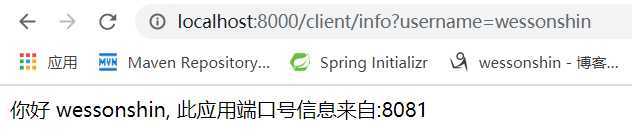

可以看出,此时请求会以循环的方式分布到两个微服务节点上,说明已经实现了轮询负载均衡策略。
SpringCloud:Ribbon集成REST实现负载均衡
原文:https://www.cnblogs.com/wessonshin/p/12403800.html