
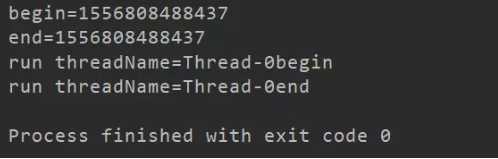
1.start()方法来启动线程,无需等待run方法体代码执行完毕,可以直接继续执行下面的代码;
jvm通过调用Thread类的start()方法来启动一个线程, 这时此线程是处于就绪状态, 并没有运行。
然后通过此Thread类调用方法run()来完成其运行操作的, 这里方法run()称为线程体,它包含了要执行的这个线程的内容, run方法运行结束, 此线程终止。
然后其他线程再抢cpu的控制权接着执行,这是真正实现了多线程。
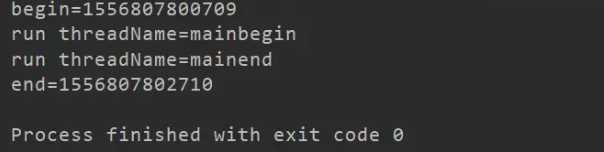
2.run()方法当作普通方法的方式调用。程序还是要顺序执行,要等待run方法体执行完毕后,才可继续执行下面的代码; 程序中只有主线程——这一个线程,其程序执行路径还是只有一条。这并非多线程,还只是单线程。
public class MyThread1 extends Thread {
    @Override
    public void run() {
        try {
            System.out.println("run threadName="+ this.currentThread().getName()+"begin");
            Thread.sleep(2000);
            System.out.println("run threadName="+this.currentThread().getName()+"end");
        } catch (InterruptedException e) {
            e.printStackTrace();
        }
    }
}
public class Run1 {
    public static void main(String[] args) {
        final MyThread1 myThread1 = new MyThread1();
        System.out.println("begin="+System.currentTimeMillis());
        myThread1.run();
        System.out.println("end="+System.currentTimeMillis());
    }
}
public class Run2 {
    public static void main(String[] args) {
        final MyThread1 myThread2 = new MyThread1();
        System.out.println("begin="+System.currentTimeMillis());
        myThread2.start();
        System.out.println("end="+System.currentTimeMillis());
    }
}
原文:https://www.cnblogs.com/weigy/p/12409575.html