
1.figure语法及操作
(1)figure语法说明
figure(num=None, figsize=None, dpi=None, facecolor=None, edgecolor=None, frameon=True)
num:图像编号或名称,数字为编号 ,字符串为名称
figsize:指定figure的宽和高,单位为英寸;
dpi参数指定绘图对象的分辨率,即每英寸多少个像素,缺省值为80 ? ? ?1英寸等于2.5cm,A4纸是 21*30cm的纸张?
facecolor:背景颜色
edgecolor:边框颜色
frameon:是否显示边框
(2)例子:
import matplotlib.pyplot as plt
创建自定义图像
fig=plt.figure(figsize=(4,3),facecolor=‘blue‘)
plt.show()
2.subplot创建单个子图
(1) subplot语法
subplot(nrows,ncols,sharex,sharey,subplot_kw,**fig_kw)
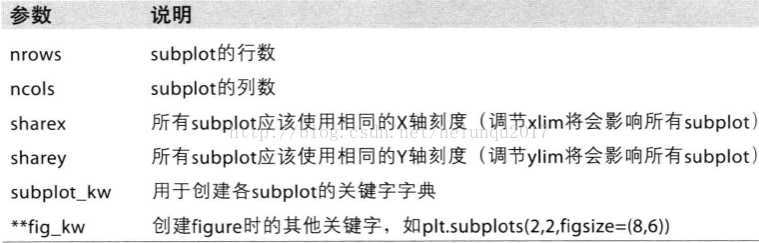
subplot可以规划figure划分为n个子图,但每条subplot命令只会创建一个子图 ,参考下面例子。
?
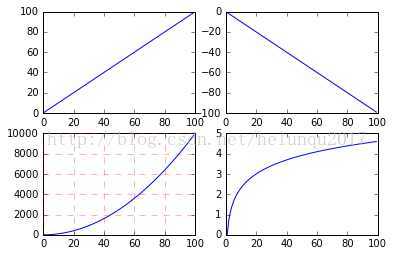
(2)例子
import numpy as np ?
import matplotlib.pyplot as plt ?
x = np.arange(0, 100) ?
plt.subplot(221) ?
plt.plot(x, x) ?
plt.subplot(222) ?
plt.plot(x, -x) ?
?#作图3
plt.subplot(223) ?
plt.plot(x, x ** 2) ?
plt.grid(color=‘r‘, linestyle=‘--‘, linewidth=1,alpha=0.3)
plt.subplot(224) ?
plt.plot(x, np.log(x)) ?
plt.show() ?
?
3.subplots创建多个子图
(1)subplots语法
subplots参数与subplots相似
?
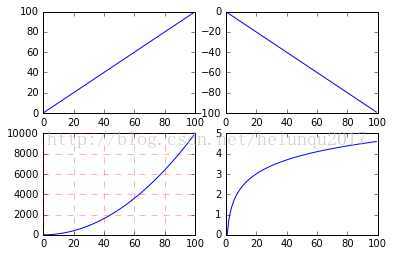
(2)例子
import numpy as np ?
import matplotlib.pyplot as plt
x = np.arange(0, 100) ?
fig,axes=plt.subplots(2,2)
ax1=axes[0,0]
ax2=axes[0,1]
ax3=axes[1,0]
ax4=axes[1,1]
ax1.plot(x, x) ?
ax2.plot(x, -x)
?#作图3
ax3.plot(x, x ** 2)
ax3.grid(color=‘r‘, linestyle=‘--‘, linewidth=1,alpha=0.3)
ax4.plot(x, np.log(x)) ?
plt.show()?
?
?
4.面向对象API:add_subplots与add_axes新增子图或区域
add_subplot与add_axes都是面对象figure编程的,pyplot api中没有此命令
?
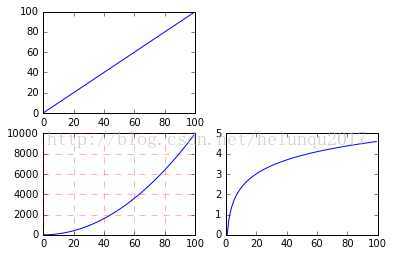
(1)add_subplot新增子图
add_subplot的参数与subplots的相似
?
import numpy as np ?
import matplotlib.pyplot as plt ?
x = np.arange(0, 100) ?
fig=plt.figure()
ax1=fig.add_subplot(2,2,1) ? ? ?
ax1.plot(x, x)?
ax3=fig.add_subplot(2,2,3)
ax3.plot(x, x ** 2)
ax3.grid(color=‘r‘, linestyle=‘--‘, linewidth=1,alpha=0.3)
ax4=fig.add_subplot(2,2,4)
ax4.plot(x, np.log(x)) ?
plt.show()
?
?
可以用来做一些子图。。。图中图。。。
(2)add_axes新增子区域
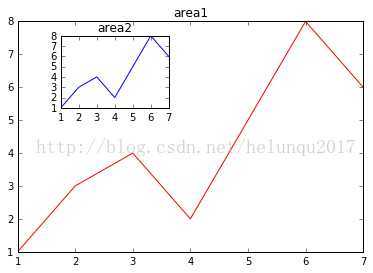
add_axes为新增子区域,该区域可以座落在figure内任意位置,且该区域可任意设置大小
add_axes参数可参考官方文档:http://matplotlib.org/api/_as_gen/matplotlib.figure.Figure.html#matplotlib.figure.Figure
?
import numpy as np ?
import matplotlib.pyplot as plt ?
fig = plt.figure()
?
x = [1, 2, 3, 4, 5, 6, 7]
y = [1, 3, 4, 2, 5, 8, 6]
?
left, bottom, width, height = 0.1, 0.1, 0.8, 0.8
ax1 = fig.add_axes([left, bottom, width, height])
ax1.plot(x, y, ‘r‘)
ax1.set_title(‘area1‘)
?
?
?
left, bottom, width, height = 0.2, 0.6, 0.25, 0.25
ax2 = fig.add_axes([left, bottom, width, height])
ax2.plot(x,y, ‘b‘)
ax2.set_title(‘area2‘)
plt.show()?
?
原文:https://www.cnblogs.com/enumx/p/12424811.html