
前面我们聊到了dockerfile的 FROM、COPY 、ADD、LABEL、MAINTAINER、ENV、ARG、WORKDIR、VOLUME、EXPOSE、RUN、CMD、ENTRYPOINT指令的使用和说明,回顾请参考https://www.cnblogs.com/qiuhom-1874/tag/Dockerfile/;今天我们来聊聊剩下的dockerfile指令的使用和说明;
1、USER:该指令用于指定运行image时的或运行dockerfile中任何RUN、CMD或ENTRYPOINT指令指定的程序时的用户名或UID;默认情况下,container的运行身份为root用户;语法格式 USER <UID>|<UserName>; 需要注意的是,<UID>可以为任意数字,但实践中其必须为/etc/passwd中某用户的有效UID,否则,docker run命令将运行失败;
示例:
1 2 3 4 5 6 7 8 9 10 11 12 13 14 15 16 | [root@node1 test]# cat Dockerfile FROM centos:7LABEL maintainer="qiuhom <qiuhom@linux-1874.com>"LABEL version="1.0"LABEL description="this is test file \ that label-values can span multiple lines."RUN useradd nginxUSER nginxCMD ["sleep","3000"][root@node1 test]# |
提示:以上dockerfile表示在镜像运行成容器时,以nginx用户运行 sleep 3000
验证:编译成镜像,启动为容器,然后进入到容器里看看sleep 3000 是否是nginx用户在运行?
1 2 3 4 5 6 7 8 9 10 11 12 13 14 15 16 17 18 19 20 21 22 23 24 25 26 27 28 29 30 31 32 33 34 35 36 37 38 39 40 41 42 43 44 45 46 47 48 | [root@node1 test]# docker build . -t test:v1Sending build context to Docker daemon 1.051MBStep 1/7 : FROM centos:7 ---> b5b4d78bc90cStep 2/7 : LABEL maintainer="qiuhom <qiuhom@linux-1874.com>" ---> Running in 0f503dae4448Removing intermediate container 0f503dae4448 ---> d31363b96f38Step 3/7 : LABEL version="1.0" ---> Running in 8dad05999903Removing intermediate container 8dad05999903 ---> 2281f36d7c3cStep 4/7 : LABEL description="this is test file \ that label-values can span multiple lines." ---> Running in d2be9ed44aeeRemoving intermediate container d2be9ed44aee ---> 8de872e222fbStep 5/7 : RUN useradd nginx ---> Running in 37bda6ba6b60Removing intermediate container 37bda6ba6b60 ---> dc681f95f5caStep 6/7 : USER nginx ---> Running in 97d2357826f9Removing intermediate container 97d2357826f9 ---> ed277ac0c482Step 7/7 : CMD ["sleep","3000"] ---> Running in 0ea578fa10bcRemoving intermediate container 0ea578fa10bc ---> 461f6ceabc88Successfully built 461f6ceabc88Successfully tagged test:v1[root@node1 test]# docker imagesREPOSITORY TAG IMAGE ID CREATED SIZEtest v1 461f6ceabc88 3 seconds ago 204MBcentos 7 b5b4d78bc90c 4 weeks ago 203MB[root@node1 test]# docker run --name t1 --rm -d test:v137e46346d6ca0ab05b67f5350d4c2a7b6b86b8d34c8d1622d78ef70b7d3dff86[root@node1 test]# docker ps CONTAINER ID IMAGE COMMAND CREATED STATUS PORTS NAMES37e46346d6ca test:v1 "sleep 3000" 3 seconds ago Up 2 seconds t1[root@node1 test]# docker exec -it t1 /bin/bash[nginx@37e46346d6ca /]$ ps auxUSER PID %CPU %MEM VSZ RSS TTY STAT START TIME COMMANDnginx 1 0.1 0.0 4364 352 ? Ss 10:02 0:00 sleep 3000nginx 6 0.4 0.0 11828 1808 pts/0 Ss 10:02 0:00 /bin/bashnginx 23 0.0 0.0 51756 1708 pts/0 R+ 10:02 0:00 ps aux[nginx@37e46346d6ca /]$ exitexit[root@node1 test]# |
提示:可以看到基于上面的dockerfile构建的镜像运行为容器,里面默认跑的进程就是我们在dockerfile中指定用户运行的进程;使用USER指定用户运行容器里的进程,需要注意该用户要对运行进程所需资源的所有权限;否则容器运行不起来;
2、HEALTHCHECK:该指令用于定义如何对容器做健康状态检测;运行为容器后,容器里的进程不挂掉,当然容器也就不会挂掉,但是存在一种情况,容器没有挂掉,容器里的进程无法正常提供服务了,这个时候我们就需要通过一定的手段,第一时间知道容器里的进程是否健康(是否能够正常提供服务);healthcheck指令就是用来定义如果去检测容器内部进程是否健康;语法格式HEALTHCHECK [OPTIONS] CMD command;其中CMD是固定格式,而后面的command是对容器里的进程做健康状态检查的命令;而options是用来指定对容器做健康状态检查的周期时间相关信息;--interval=DURATION (default: 30s),该选项用于指定对容器做健康状态检查的频率,默认是30s一次;--timeout=DURATION (default: 30s),该选项用于指定对容器内部的进程做健康状态检查的超时时长,默认是30秒;--start-period=DURATION (default: 0s)指定对容器中的进程做健康状态检查延迟时间,默认0表示不延迟;这里补充一点,之所以要延迟多少秒做健康状态检查是因为,docker运行为容器以后,会立刻把该容器的状态标记为running状态,而对于有些初始化比较慢的容器,如果马上对它做健康状态检查,可能是不健康的状态,这样一来我们对了解容器是否健康就不是很准确了;如果配合某些工具,很可能存在检测到容器不健康就把该容器删除,然后重新创建,以此重复;这样就会导致我们的容器启动不起来; --retries=N (default: 3)表示指定对容器做健康状态检查的重试次数,默认是3次;也就是说检查到容器不健康的前提或健康的前提,它都会检查3次,如果3次检查都是失败状态那么就标记该容器不健康;而对于我们指定的命令来讲,命令的返回值就决定了容器是否健康,通常命令返回值为0表示我们执行的命令正常退出,也就意味着容器是健康状态;命令返回值为1表示容器不健康;返回值为2我们通常都是保留不使用;HEALTHCHECK NONE就表示不对容器做健康状态检查;
示例:
1 2 3 4 5 6 7 8 9 10 11 12 13 14 15 16 17 18 19 | [root@node1 test]# cat Dockerfile FROM centos:7LABEL maintainer="qiuhom <qiuhom@linux-1874.com>"LABEL version="1.0"LABEL description="this is test file \ that label-values can span multiple lines."RUN yum install -y httpd ADD ok.html /var/www/html/CMD ["/usr/sbin/httpd","-DFOREGROUND"]HEALTHCHECK --interval=5s --timeout=5s --start-period=5s --retries=2 \ CMD curl -f http://localhost/ok.html || exit 1[root@node1 test]# |
提示:以上HEALTHCHECK指令表示每5秒检查一次,超时时长为5秒,延迟5秒开始检查,重试2次;如果curl -f http://localhost/ok.html这条命令正常返回0,那么就表示容器健康,否则就返回1,表示容器不健康;
验证:把以上dockerfile构建成镜像启动为容器,我们把ok.html删除或移动到别的目录,看看容器是否标记为不健康?
1 2 3 4 5 6 7 8 9 10 11 12 13 14 15 16 17 18 19 20 21 22 23 24 25 26 27 28 29 30 31 32 33 34 35 36 37 38 39 40 41 42 43 44 45 46 47 48 49 50 51 52 53 54 55 56 57 58 59 60 61 62 63 64 65 66 67 68 69 70 71 72 73 74 75 76 77 78 79 80 81 82 83 84 85 86 87 88 89 90 91 92 93 94 95 96 97 98 99 100 101 102 103 104 105 106 107 108 109 110 111 112 113 114 115 116 117 118 119 120 121 122 123 | [root@node1 test]# docker build . -t test:v1.1Sending build context to Docker daemon 1.052MBStep 1/8 : FROM centos:7 ---> b5b4d78bc90cStep 2/8 : LABEL maintainer="qiuhom <qiuhom@linux-1874.com>" ---> Using cache ---> d31363b96f38Step 3/8 : LABEL version="1.0" ---> Using cache ---> 2281f36d7c3cStep 4/8 : LABEL description="this is test file \ that label-values can span multiple lines." ---> Using cache ---> 8de872e222fbStep 5/8 : RUN yum install -y httpd ---> Running in 9964718a2c3eLoaded plugins: fastestmirror, ovlDetermining fastest mirrors * base: mirrors.bfsu.edu.cn * extras: mirrors.aliyun.com * updates: mirrors.aliyun.comResolving Dependencies--> Running transaction check---> Package httpd.x86_64 0:2.4.6-93.el7.centos will be installed--> Processing Dependency: httpd-tools = 2.4.6-93.el7.centos for package: httpd-2.4.6-93.el7.centos.x86_64--> Processing Dependency: system-logos >= 7.92.1-1 for package: httpd-2.4.6-93.el7.centos.x86_64--> Processing Dependency: /etc/mime.types for package: httpd-2.4.6-93.el7.centos.x86_64--> Processing Dependency: libaprutil-1.so.0()(64bit) for package: httpd-2.4.6-93.el7.centos.x86_64--> Processing Dependency: libapr-1.so.0()(64bit) for package: httpd-2.4.6-93.el7.centos.x86_64--> Running transaction check---> Package apr.x86_64 0:1.4.8-5.el7 will be installed---> Package apr-util.x86_64 0:1.5.2-6.el7 will be installed---> Package centos-logos.noarch 0:70.0.6-3.el7.centos will be installed---> Package httpd-tools.x86_64 0:2.4.6-93.el7.centos will be installed---> Package mailcap.noarch 0:2.1.41-2.el7 will be installed--> Finished Dependency ResolutionDependencies Resolved================================================================================ Package Arch Version Repository Size================================================================================Installing: httpd x86_64 2.4.6-93.el7.centos base 2.7 MInstalling for dependencies: apr x86_64 1.4.8-5.el7 base 103 k apr-util x86_64 1.5.2-6.el7 base 92 k centos-logos noarch 70.0.6-3.el7.centos base 21 M httpd-tools x86_64 2.4.6-93.el7.centos base 92 k mailcap noarch 2.1.41-2.el7 base 31 kTransaction Summary================================================================================Install 1 Package (+5 Dependent packages)Total download size: 24 MInstalled size: 32 MDownloading packages:warning: /var/cache/yum/x86_64/7/base/packages/apr-1.4.8-5.el7.x86_64.rpm: Header V3 RSA/SHA256 Signature, key ID f4a80eb5: NOKEYPublic key for apr-1.4.8-5.el7.x86_64.rpm is not installed--------------------------------------------------------------------------------Total 2.0 MB/s | 24 MB 00:12 Retrieving key from file:///etc/pki/rpm-gpg/RPM-GPG-KEY-CentOS-7Importing GPG key 0xF4A80EB5: Userid : "CentOS-7 Key (CentOS 7 Official Signing Key) <security@centos.org>" Fingerprint: 6341 ab27 53d7 8a78 a7c2 7bb1 24c6 a8a7 f4a8 0eb5 Package : centos-release-7-8.2003.0.el7.centos.x86_64 (@CentOS) From : /etc/pki/rpm-gpg/RPM-GPG-KEY-CentOS-7Running transaction checkRunning transaction testTransaction test succeededRunning transaction Installing : apr-1.4.8-5.el7.x86_64 1/6 Installing : apr-util-1.5.2-6.el7.x86_64 2/6 Installing : httpd-tools-2.4.6-93.el7.centos.x86_64 3/6 Installing : centos-logos-70.0.6-3.el7.centos.noarch 4/6 Installing : mailcap-2.1.41-2.el7.noarch 5/6 Installing : httpd-2.4.6-93.el7.centos.x86_64 6/6 Verifying : mailcap-2.1.41-2.el7.noarch 1/6 Verifying : apr-util-1.5.2-6.el7.x86_64 2/6 Verifying : httpd-2.4.6-93.el7.centos.x86_64 3/6 Verifying : apr-1.4.8-5.el7.x86_64 4/6 Verifying : httpd-tools-2.4.6-93.el7.centos.x86_64 5/6 Verifying : centos-logos-70.0.6-3.el7.centos.noarch 6/6Installed: httpd.x86_64 0:2.4.6-93.el7.centos Dependency Installed: apr.x86_64 0:1.4.8-5.el7 apr-util.x86_64 0:1.5.2-6.el7 centos-logos.noarch 0:70.0.6-3.el7.centos httpd-tools.x86_64 0:2.4.6-93.el7.centos mailcap.noarch 0:2.1.41-2.el7 Complete!Removing intermediate container 9964718a2c3e ---> a931e93eea06Step 6/8 : ADD ok.html /var/www/html/ ---> 97e61f41911dStep 7/8 : CMD ["/usr/sbin/httpd","-DFOREGROUND"] ---> Running in e91ccdef90c2Removing intermediate container e91ccdef90c2 ---> 7c8af9bb7eb3Step 8/8 : HEALTHCHECK --interval=5s --timeout=5s --start-period=5s --retries=2 CMD curl -f http://localhost/ok.html || exit 1 ---> Running in 80682ab087d3Removing intermediate container 80682ab087d3 ---> aa53cba15046Successfully built aa53cba15046Successfully tagged test:v1.1[root@node1 test]# docker imagesREPOSITORY TAG IMAGE ID CREATED SIZEtest v1.1 aa53cba15046 8 seconds ago 312MBtest v1 461f6ceabc88 57 minutes ago 204MBcentos 7 b5b4d78bc90c 4 weeks ago 203MB[root@node1 test]# docker run --name t1 --rm -d test:v1.1332590e683fcb29f60a28703548fce7aa83df715cbb840e1283472834867d6a1[root@node1 test]# docker psCONTAINER ID IMAGE COMMAND CREATED STATUS PORTS NAMES332590e683fc test:v1.1 "/usr/sbin/httpd -DF…" 3 seconds ago Up 2 seconds (health: starting) t1[root@node1 test]# docker psCONTAINER ID IMAGE COMMAND CREATED STATUS PORTS NAMES332590e683fc test:v1.1 "/usr/sbin/httpd -DF…" 7 seconds ago Up 6 seconds (healthy) t1[root@node1 test]# |
提示:可以看到基于我们写的dockerfile构建的镜像已经成功运行为容器,并且标记为healthy;接下来我们进入容器把ok.html干掉,然后在看看容器是否标记为不健康状态?
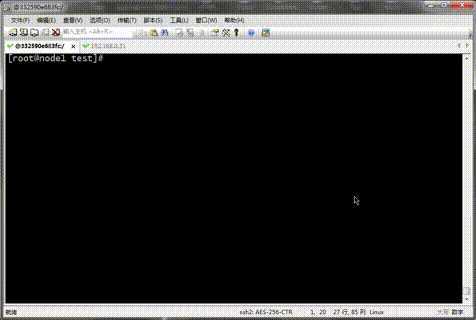
提示:从上面的信息可以看到我们把ok.html移除后,容器状态就变成不健康状态了;我们再把ok.html还原到原有位置,看看容器是否会从不健康转换为健康呢?
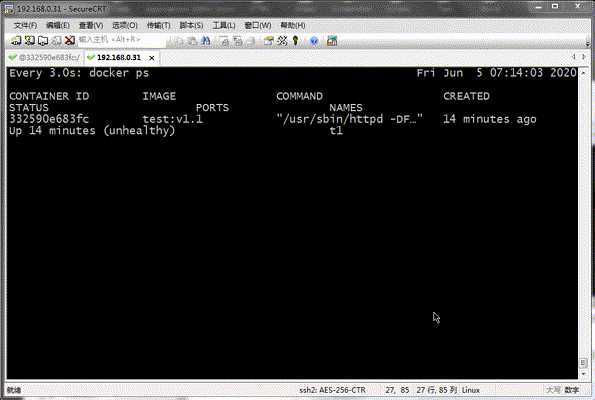
提示:可以看到把ok.html还原到/var/www/html/目录后,容器从不健康状态变为了健康状态;
3、SHELL:该指令用于指定默认shell,该指令开始到下一个SHELL中间的命令都是SHELL指定的shell 运行,所以SHELL指令在dockerfile中可出现多次,后面的SHELL指令指定的shell会覆盖前面所有SHELL指令指定的shell;默认在Linux上是["/bin/sh","-c"]在Windows上述["cmd","/s","/c"];SHELL指令必须是以json数组的格式定义;语法SHELL ["executable", "parameters"];
4、STOPSIGNAL:该指令用于定义停止容器的信号;默认停止容器是15号信号 SIGTERM;语法STOPSIGNAL signal
5、ONBUILD:该指令用于在Dockerfile中定义一个触发器;Dockerfile用于build映像文件,此映像文件亦可作为base image被另一个Dockerfile用作FROM指令的参数,并以之构建新的映像文件;在后面的这个Dockerfile中的FROM指令在build过程中被执行时,将会“触发”创建其base image的Dockerfile文件中的ONBUILD指令定义的触发器;用法格式ONBUILD <INSTRUCTION>;尽管任何指令都可注册成为触发器指令,但ONBUILD不能自我嵌套,且不会触发FROM和MAINTAINER指令;使用包含ONBUILD指令的Dockerfile构建的镜像应该使用特殊的标签,例如ruby:2.0-onbuild;在ONBUILD指令中使用ADD或COPY指令应该格外小心,因为新构建过程的上下文在缺少指定的源文件时会失败;
示例:
1 2 3 4 5 6 7 8 9 10 11 | [root@node1 test]# cat DockerfileFROM centos:7LABEL maintainer="qiuhom <qiuhom@linux-1874.com>"ONBUILD RUN yum install -y httpd[root@node1 test]# |
提示:以上dockerfile表示在本次构建镜像中不运行yum install -y httpd这条命令,而是在后面的dockerfile中以本dockerfile制作的进行作为基础继续时,yum install -y httpd这条命令就会被触发执行;简单讲onbuild就是指定dockerfile指令延迟执行;这里一定要记住一点onbuild指令后面一定是跟的是dockerfile指令;
验证:将上面的dockerfile编译镜像,看看yum install -y httpd 是否执行了?
1 2 3 4 5 6 7 8 9 10 11 12 13 14 | [root@node1 test]# docker build . -t test:v1.5Sending build context to Docker daemon 1.052MBStep 1/3 : FROM centos:7 ---> b5b4d78bc90cStep 2/3 : LABEL maintainer="qiuhom <qiuhom@linux-1874.com>" ---> Using cache ---> d31363b96f38Step 3/3 : ONBUILD RUN yum install -y httpd ---> Running in d3601fa1c3b7Removing intermediate container d3601fa1c3b7 ---> 370e3a843c3cSuccessfully built 370e3a843c3cSuccessfully tagged test:v1.5[root@node1 test]# |
提示:可以看到yum install -y httpd 这条命令并没有执行;
验证:将我们上面制作好的镜像作为基础镜像,再来制作其他镜像,看看yum install -y httpd 被执行?
1 2 3 4 5 6 7 8 9 10 11 12 13 14 15 16 17 18 19 20 21 22 23 24 25 26 27 28 29 30 31 32 33 34 35 36 37 38 39 40 41 42 43 44 45 46 47 48 49 50 51 52 53 54 55 56 57 58 59 60 61 62 63 64 65 66 67 68 69 70 71 72 73 74 75 76 77 78 79 80 81 82 83 84 85 86 87 88 89 90 91 92 93 94 95 96 97 98 99 100 101 102 | [root@node1 aaa]# pwd/root/test/aaa[root@node1 aaa]# lsDockerfile[root@node1 aaa]# cat Dockerfile FROM test:v1.5LABEL maintainer="qiuhom <admin@admin.com>"[root@node1 aaa]# docker build . -t myweb:v1Sending build context to Docker daemon 2.048kBStep 1/2 : FROM test:v1.5# Executing 1 build trigger ---> Running in cf93e9f03e89Loaded plugins: fastestmirror, ovlDetermining fastest mirrors * base: mirrors.huaweicloud.com * extras: mirrors.aliyun.com * updates: mirrors.aliyun.comResolving Dependencies--> Running transaction check---> Package httpd.x86_64 0:2.4.6-93.el7.centos will be installed--> Processing Dependency: httpd-tools = 2.4.6-93.el7.centos for package: httpd-2.4.6-93.el7.centos.x86_64--> Processing Dependency: system-logos >= 7.92.1-1 for package: httpd-2.4.6-93.el7.centos.x86_64--> Processing Dependency: /etc/mime.types for package: httpd-2.4.6-93.el7.centos.x86_64--> Processing Dependency: libaprutil-1.so.0()(64bit) for package: httpd-2.4.6-93.el7.centos.x86_64--> Processing Dependency: libapr-1.so.0()(64bit) for package: httpd-2.4.6-93.el7.centos.x86_64--> Running transaction check---> Package apr.x86_64 0:1.4.8-5.el7 will be installed---> Package apr-util.x86_64 0:1.5.2-6.el7 will be installed---> Package centos-logos.noarch 0:70.0.6-3.el7.centos will be installed---> Package httpd-tools.x86_64 0:2.4.6-93.el7.centos will be installed---> Package mailcap.noarch 0:2.1.41-2.el7 will be installed--> Finished Dependency ResolutionDependencies Resolved================================================================================ Package Arch Version Repository Size================================================================================Installing: httpd x86_64 2.4.6-93.el7.centos base 2.7 MInstalling for dependencies: apr x86_64 1.4.8-5.el7 base 103 k apr-util x86_64 1.5.2-6.el7 base 92 k centos-logos noarch 70.0.6-3.el7.centos base 21 M httpd-tools x86_64 2.4.6-93.el7.centos base 92 k mailcap noarch 2.1.41-2.el7 base 31 kTransaction Summary================================================================================Install 1 Package (+5 Dependent packages)Total download size: 24 MInstalled size: 32 MDownloading packages:warning: /var/cache/yum/x86_64/7/base/packages/apr-1.4.8-5.el7.x86_64.rpm: Header V3 RSA/SHA256 Signature, key ID f4a80eb5: NOKEYPublic key for apr-1.4.8-5.el7.x86_64.rpm is not installed--------------------------------------------------------------------------------Total 7.2 MB/s | 24 MB 00:03 Retrieving key from file:///etc/pki/rpm-gpg/RPM-GPG-KEY-CentOS-7Importing GPG key 0xF4A80EB5: Userid : "CentOS-7 Key (CentOS 7 Official Signing Key) <security@centos.org>" Fingerprint: 6341 ab27 53d7 8a78 a7c2 7bb1 24c6 a8a7 f4a8 0eb5 Package : centos-release-7-8.2003.0.el7.centos.x86_64 (@CentOS) From : /etc/pki/rpm-gpg/RPM-GPG-KEY-CentOS-7Running transaction checkRunning transaction testTransaction test succeededRunning transaction Installing : apr-1.4.8-5.el7.x86_64 1/6 Installing : apr-util-1.5.2-6.el7.x86_64 2/6 Installing : httpd-tools-2.4.6-93.el7.centos.x86_64 3/6 Installing : centos-logos-70.0.6-3.el7.centos.noarch 4/6 Installing : mailcap-2.1.41-2.el7.noarch 5/6 Installing : httpd-2.4.6-93.el7.centos.x86_64 6/6 Verifying : mailcap-2.1.41-2.el7.noarch 1/6 Verifying : apr-util-1.5.2-6.el7.x86_64 2/6 Verifying : httpd-2.4.6-93.el7.centos.x86_64 3/6 Verifying : apr-1.4.8-5.el7.x86_64 4/6 Verifying : httpd-tools-2.4.6-93.el7.centos.x86_64 5/6 Verifying : centos-logos-70.0.6-3.el7.centos.noarch 6/6Installed: httpd.x86_64 0:2.4.6-93.el7.centos Dependency Installed: apr.x86_64 0:1.4.8-5.el7 apr-util.x86_64 0:1.5.2-6.el7 centos-logos.noarch 0:70.0.6-3.el7.centos httpd-tools.x86_64 0:2.4.6-93.el7.centos mailcap.noarch 0:2.1.41-2.el7 Complete!Removing intermediate container cf93e9f03e89 ---> a89914bda4b5Step 2/2 : LABEL maintainer="qiuhom <admin@admin.com>" ---> Running in e175e0542b5eRemoving intermediate container e175e0542b5e ---> 4f406abeaab7Successfully built 4f406abeaab7Successfully tagged myweb:v1[root@node1 aaa]# |
提示:可以看到在我们的dockerfile中并没有写 RUN yum install -y httpd ,但build时却执行了 yum install -y httpd ;这是因为onbuild指令被触发了;我们可以理解为如果我们制作的镜像有onbuild指令指定的命令,那么该镜像被其他dockerfile 作为基础镜像时(或者被其他docker FROM指令引用时)onbuild指定就会被激活,被执行;
原文:https://www.cnblogs.com/lonelyxmas/p/13139079.html