
修改值时报错
update kh_khxx
set kh_name=‘上海‘ where kh_no = 1;
报错信息:17:20:30 update kh_khxx set kh_name=‘上海‘ where kh_no = 1 Error Code: 1175. You are using safe update mode and you tried to update a table without a WHERE that uses a KEY column. To disable safe mode, toggle the option in Preferences -> SQL Editor and reconnect. 0.000 sec

原因:
这是因为MySql运行在safe-updates模式下,该模式会导致非主键条件下无法执行update或者delete命令。
show variables like ‘SQL_SAFE_UPDATES‘;查看开关状态。
执行命令SET SQL_SAFE_UPDATES = 0;修改下数据库模式
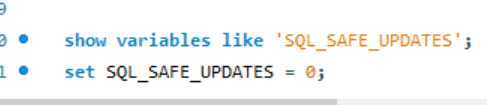
再执行修改语句就可以了。
原文:https://www.cnblogs.com/xiaoqingSister/p/13170045.html