
废话不多说,直接上代码
1 pom 添加
<dependency>
            <groupId>io.springfox</groupId>
            <artifactId>springfox-swagger2</artifactId>
            <version>2.5.0</version>
        </dependency>
        <dependency>
            <groupId>io.springfox</groupId>
            <artifactId>springfox-swagger-ui</artifactId>
            <version>2.5.0</version>
        </dependency>
2 增加SwaggerConfig
package com.test.service1;
/**
 * Date: 2020/6/24 11:36
 *
 * @author Tyler
 */

import io.swagger.annotations.ApiOperation;
import org.springframework.context.annotation.Bean;
import org.springframework.context.annotation.Configuration;
import springfox.documentation.builders.ApiInfoBuilder;
import springfox.documentation.builders.PathSelectors;
import springfox.documentation.builders.RequestHandlerSelectors;
import springfox.documentation.service.ApiInfo;
import springfox.documentation.spi.DocumentationType;
import springfox.documentation.spring.web.plugins.Docket;
import springfox.documentation.swagger2.annotations.EnableSwagger2;

/**
 *@author Tyler
 *@date 2020/6/24
 */

@Configuration
@EnableSwagger2
public class SwaggerConfig {
    @Bean
    public Docket createRestApi() {
        return new Docket(DocumentationType.SWAGGER_2)
                .apiInfo(apiInfo())
                .select()
                .apis(RequestHandlerSelectors.withMethodAnnotation(ApiOperation.class))
                .paths(PathSelectors.any())
                .build();
    }

    private ApiInfo apiInfo() {
        return new ApiInfoBuilder()
                .title("API Document")
                .description("API Document")
                .version("1.0")
                .build();
    }
}
3 controller 添加注解
注意:paramType="query" 这个不加,获取不到参数
@RestController
@RequestMapping("test")
public class TestController {
    @Autowired
    testService testService;

    @ApiOperation(value = "/hello", notes = "测试hello")
    @ApiImplicitParams({
            @ApiImplicitParam(paramType="query",name = "str",value="str",dataType = "String")
            ,@ApiImplicitParam(paramType="query",name = "age",value="hello age",dataType = "Integer")})
    @GetMapping(value = "/hello")
    public String hello(String str,Integer age){
        String s =str+":" +age;
        return s;
    }

    @PostMapping(value="/test")
    @ApiOperation(value = "/test", notes = "test")
    @ApiImplicitParams(@ApiImplicitParam(paramType="query",name = "str",value="str"))
    public Page<Test> test(String str)
    {
        Page<Test> page=testService.findList("t3");
        return page;
    }


}
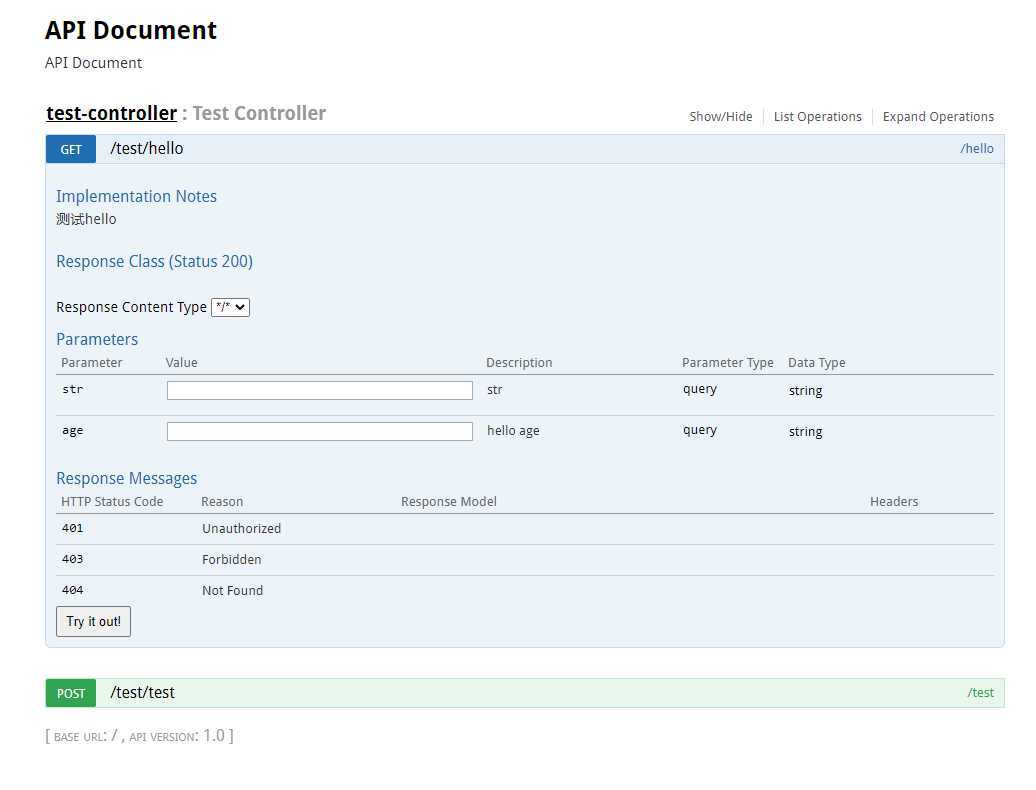
4 运行 http://localhost:9040/swagger-ui.html#
注意:修改成自己的端口
原文:https://www.cnblogs.com/hanjun0612/p/13218429.html