
(1)删除xavier上的teamviewer
sudo apt-get purge teamviewer-host
(2)去https://www.teamviewer.com/it/download/linux/下载teamviewer-host_14.1.3399_armhf.deb安装包
(3)添加armhf架构
sudo dpkg --add-architecture armhf
sudo apt update
sudo apt install libxtst6:armhf
(4)注册并登录teamviewer
sudo teamviewer --daemon enable
sudo service teamviewerd start
teamviewer
(5)bug修复
第一个bug:
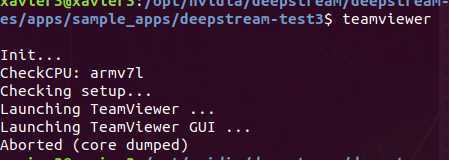
遇到这个错误,修改teamviewer的安装文件,
cd /opt/teamviewer/tv_bin/script/
sudo gedit tvw_main
修改88、89行如下:

重新运行。
第二个bug:
xaviewer架构不支持armhf架构,可执行如下命令:
sudo apt-get purge teamviewer-host
sudo apt --fix-broken install
sudo apt-get install -f
sudo dpkg -i --force-overwrite libegl-mesa0_19.2.8-0ubuntu0_18.04.3_armhf.deb /var/cache/apt/archives/libegl-mesa0_19.2.8-0ubuntu0~18.04.3_armhf.deb(根据自己系统版本而定)
sudo apt install -f libgl1-mesa-dri
sudo apt-get install -f
如上,便可成功安装tv.
存在问题:
xaviewer重启后,teamviewer登录失败,需要卸载重装。
原文:https://www.cnblogs.com/zhibei/p/13300481.html