

ngnix-->conf中
server {
		listen	80;
		server_name 10.9.240.9;

		location / {
			proxy_pass   http://localhost:8080;
					}
		}
https://github.com/vuejs/vue-cli/issues/179
style-loder 无法自己设置publicpath, 所以只能在ExtractTextPlugin后的css目录路径 和 webpack.base.conf做文章的,
解決的办法有两个,

一个在办法是在webpack.base.conf 里设置assetsPublicPath:‘/‘ 根目录,assetsSubDirectory: ‘./在服务器中的相对路径/static‘,
config/index.js
    assetsSubDirectory: ‘AbsolutePath/projectPath/static‘,
    assetsPublicPath: ‘/‘,
还有一个是在ExtractTextPlugin,css目录路径,把脱离出来的css路径裸在项目路径,在webpack.prod.conf中设置,
    // 不需要提到static/css 中
    //new ExtractTextPlugin(utils.assetsPath(‘css/[name].[contenthash].css‘)),
    new ExtractTextPlugin(‘[name].[contenthash].css‘),
config/index.js

  assetsSubDirectory: ‘static‘,
    assetsPublicPath: ‘./‘,
两种方法都可以解决css 中img问题,
在知道项目的绝对路径可以用一方法,
不知道项目的绝对路径可以用二方法,(只是css文件裸在youproject中)^-^
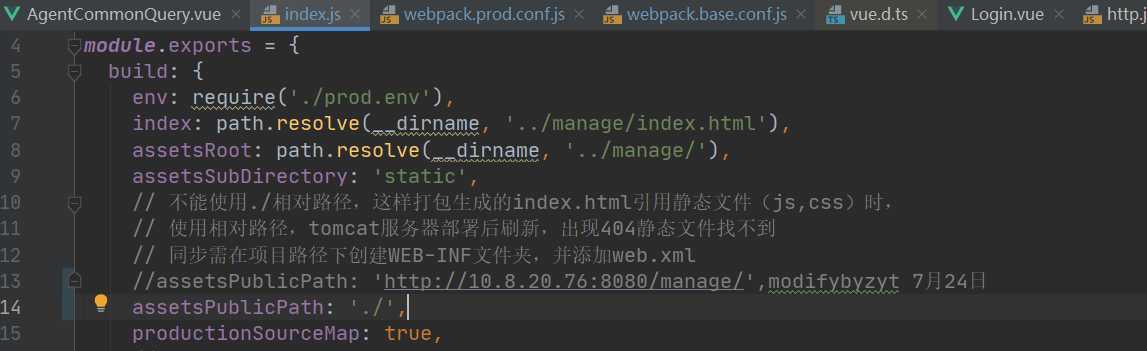
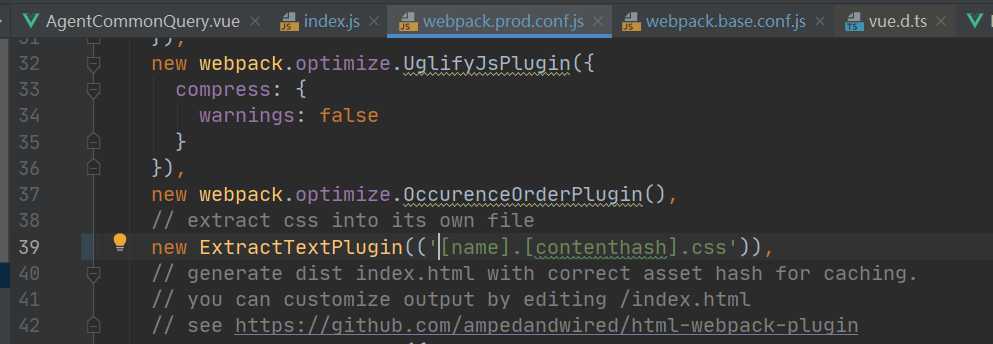
原因说明:这样的话,编译的index.html中的引用就是通过相对路径来引用的,如果写成10.9.111.111 就是绝对路径来引用的
atzhang
Vue项目发布的问题--http://localhost:8088/static/fonts/fontawesome-webfont.af7ae50.woff2
原文:https://www.cnblogs.com/zytcomeon/p/13371346.html