
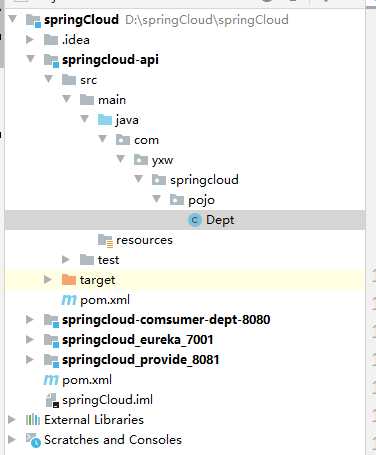
1.首先创建一个spring项目,取名为springCloud。
导入pom文件
<?xml version="1.0" encoding="UTF-8"?>
<project xmlns="http://maven.apache.org/POM/4.0.0"
         xmlns:xsi="http://www.w3.org/2001/XMLSchema-instance"
         xsi:schemaLocation="http://maven.apache.org/POM/4.0.0 http://maven.apache.org/xsd/maven-4.0.0.xsd">
    <modelVersion>4.0.0</modelVersion>

    <groupId>org.example</groupId>
    <artifactId>springCloud</artifactId>
    <version>1.0-SNAPSHOT</version>

    <modules>
        <module>springcloud-api</module>
        <module>springcloud_provide_8081</module>
        <module>springcloud-comsumer-dept-8080</module>
        <module>springcloud_eureka_7001</module>
    </modules>

    <!--    打包方式 pom-->
    <packaging>pom</packaging>

    <properties>
        <junit.version>4.13</junit.version>
        <lombok.version>1.18.12</lombok.version>
        <log4j.version>1.2.17</log4j.version>
    </properties>

<!--    管理-->
    <dependencyManagement>
        <dependencies>
<!--            springcloud依赖-->
            <dependency>
                <groupId>org.springframework.cloud</groupId>
                <artifactId>spring-cloud-dependencies</artifactId>
                <version>Greenwich.SR1</version>
                <type>pom</type>
                <scope>import</scope>
            </dependency>

<!--            spring-boot依赖-->
            <dependency>
                <groupId>org.springframework.boot</groupId>
                <artifactId>spring-boot-dependencies</artifactId>
                <version>2.1.7.RELEASE</version>
                <type>pom</type>
                <scope>import</scope>
            </dependency>

<!--            数据库-->
            <dependency>
                <groupId>mysql</groupId>
                <artifactId>mysql-connector-java</artifactId>
                <version>8.0.20</version>
            </dependency>
            <dependency>
                <groupId>com.alibaba</groupId>
                <artifactId>druid</artifactId>
                <version>1.1.23</version>
            </dependency>
<!--            spring-boot 启动器-->
            <dependency>
                <groupId>org.mybatis.spring.boot</groupId>
                <artifactId>mybatis-spring-boot-starter</artifactId>
                <version>2.1.3</version>
            </dependency>
<!--            <dependency>-->
<!--                <groupId>com.baomidou</groupId>-->
<!--                <artifactId>mybatis-plus-boot-starter</artifactId>-->
<!--                <version>3.3.1</version>-->
<!--            </dependency>-->
            <!--lombok-->
            <dependency>
                <groupId>org.projectlombok</groupId>
                <artifactId>lombok</artifactId>
                <version>${lombok.version}</version>
            </dependency>

<!--            日志和测试-->
<!--            junt-->
            <dependency>
                <groupId>junit</groupId>
                <artifactId>junit</artifactId>
                <version>${junit.version}</version>
                <scope>test</scope>
            </dependency>
<!--            log4j-->
            <dependency>
                <groupId>log4j</groupId>
                <artifactId>log4j</artifactId>
                <version>${log4j.version}</version>
            </dependency>
<!--            logback-->
            <dependency>
                <groupId>ch.qos.logback</groupId>
                <artifactId>logback-core</artifactId>
                <version>1.2.3</version>
            </dependency>
        </dependencies>
    </dependencyManagement>

<!--    <build>-->
<!--        <plugins>-->
<!--            <plugin>-->
<!--                <groupId>org.springframework.boot</groupId>-->
<!--                <artifactId>spring-boot-maven-plugin</artifactId>-->
<!--            </plugin>-->
<!--        </plugins>-->
<!--    </build>-->


</project>
2.在springCloud中在创建一个spring-boot项目为我们的实体层,取名无所谓我这里是springcloud-api。
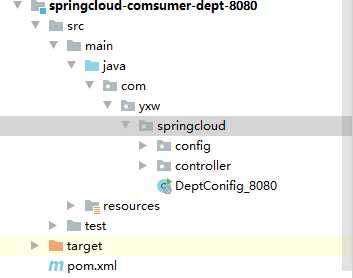
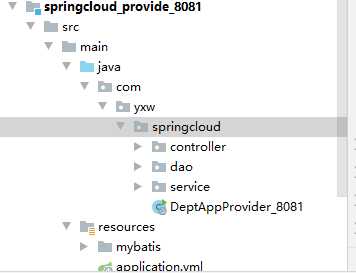
3.新建一个消费者项目,和服务提供者项目。
<?xml version="1.0" encoding="UTF-8"?>
<project xmlns="http://maven.apache.org/POM/4.0.0"
         xmlns:xsi="http://www.w3.org/2001/XMLSchema-instance"
         xsi:schemaLocation="http://maven.apache.org/POM/4.0.0 http://maven.apache.org/xsd/maven-4.0.0.xsd">
    <parent>
        <artifactId>springCloud</artifactId>
        <groupId>org.example</groupId>
        <version>1.0-SNAPSHOT</version>
    </parent>
    <modelVersion>4.0.0</modelVersion>

    <artifactId>springcloud-comsumer-dept-8080</artifactId>

    <dependencies>
        <dependency>
            <groupId>org.example</groupId>
            <artifactId>springcloud-api</artifactId>
            <version>1.0-SNAPSHOT</version>
        </dependency>
        <dependency>
            <groupId>org.springframework.boot</groupId>
            <artifactId>spring-boot-starter-web</artifactId>
        </dependency>
        <dependency>
            <groupId>org.springframework.boot</groupId>
            <artifactId>spring-boot-devtools</artifactId>
        </dependency>
    </dependencies>

</project>
<?xml version="1.0" encoding="UTF-8"?>
<project xmlns="http://maven.apache.org/POM/4.0.0"
         xmlns:xsi="http://www.w3.org/2001/XMLSchema-instance"
         xsi:schemaLocation="http://maven.apache.org/POM/4.0.0 http://maven.apache.org/xsd/maven-4.0.0.xsd">
    <parent>
        <artifactId>springCloud</artifactId>
        <groupId>org.example</groupId>
        <version>1.0-SNAPSHOT</version>
    </parent>
    <modelVersion>4.0.0</modelVersion>

    <artifactId>springcloud_provide_8081</artifactId>

    <dependencies>
        <dependency>
            <groupId>org.example</groupId>
            <artifactId>springcloud-api</artifactId>
            <version>1.0-SNAPSHOT</version>
        </dependency>
        <dependency>
            <groupId>junit</groupId>
            <artifactId>junit</artifactId>
        </dependency>
        <dependency>
            <groupId>mysql</groupId>
            <artifactId>mysql-connector-java</artifactId>
        </dependency>
        <dependency>
            <groupId>com.alibaba</groupId>
            <artifactId>druid</artifactId>
        </dependency>

        <dependency>
            <groupId>ch.qos.logback</groupId>
            <artifactId>logback-core</artifactId>
        </dependency>
        <dependency>
            <groupId>org.mybatis.spring.boot</groupId>
            <artifactId>mybatis-spring-boot-starter</artifactId>
        </dependency>

        <dependency>
            <groupId>org.springframework.boot</groupId>
            <artifactId>spring-boot-starter-web</artifactId>
        </dependency>

        <dependency>
            <groupId>org.springframework.boot</groupId>
            <artifactId>spring-boot-test</artifactId>
        </dependency>

        <dependency>
            <groupId>org.springframework.boot</groupId>
            <artifactId>spring-boot-starter-web</artifactId>
        </dependency>

        <dependency>
            <groupId>org.springframework.boot</groupId>
            <artifactId>spring-boot-starter-jetty</artifactId>
        </dependency>

        <dependency>
            <groupId>org.springframework.boot</groupId>
            <artifactId>spring-boot-devtools</artifactId>
        </dependency>

    </dependencies>
</project>
4.在服务提供者项目中编写自己的mapper,dao,service,controller层。
5.在消费者项目编写一个配置文件。
package com.yxw.springcloud.config;

import org.springframework.context.annotation.Bean;
import org.springframework.context.annotation.Configuration;
import org.springframework.web.client.RestTemplate;

@Configuration
public class ConfigBean {

    @Bean
    public RestTemplate restTemplate(){
        return new RestTemplate();
    }
}
6.在消费者项目中使用即可!
package com.yxw.springcloud.controller;

import org.springframework.beans.factory.annotation.Autowired;
import org.springframework.stereotype.Controller;
import org.springframework.web.bind.annotation.RequestMapping;
import org.springframework.web.bind.annotation.RestController;
import org.springframework.web.client.RestTemplate;

@RestController
public class DeptConfigController {
    // 消费者
    // restTemplate ...

    private static final String URL = "http://localhost:8081/";

    @Autowired
    private RestTemplate restTemplate;

    @RequestMapping("/aa")
    public String s(){
        return restTemplate.getForObject(URL +"dd", String.class);
    }

}
原文:https://www.cnblogs.com/yiMro/p/13451794.html