
maven依赖配置
    <parent>
        <groupId>org.springframework.boot</groupId>
        <artifactId>spring-boot-starter-parent</artifactId>
        <version>1.5.9.RELEASE</version>
    </parent>
    <dependencies>
        <dependency>
            <groupId>org.springframework.boot</groupId>
            <artifactId>spring-boot-starter-web</artifactId>
        </dependency>
    </dependencies>
启动类
/**
*  @SpringBootApplication 来标注一个主程序类,说明这是一个Spring Boot应用
*/
@SpringBootApplication
public class HelloWorldMainApplication {
    public static void main(String[] args) {
        // Spring应用启动起来
        SpringApplication.run(HelloWorldMainApplication.class,args);
    }
}
简化部署。SpringBoot内嵌Tomcat;将这个应用打成jar包,直接使用java -jar的命令进行执行;
<!-- 这个插件,可以将应用打包成一个可执行的jar包;-->
    <build>
        <plugins>
            <plugin>
                <groupId>org.springframework.boot</groupId>
                <artifactId>spring-boot-maven-plugin</artifactId>
            </plugin>
        </plugins>
    </build>
@Target(ElementType.TYPE)
@Retention(RetentionPolicy.RUNTIME)
@Documented
@Inherited
@SpringBootConfiguration
@EnableAutoConfiguration
@ComponentScan(excludeFilters = {
      @Filter(type = FilterType.CUSTOM, classes = TypeExcludeFilter.class),
      @Filter(type = FilterType.CUSTOM, classes = AutoConfigurationExcludeFilter.class) })
public @interface SpringBootApplication {
@SpringBootApplication: Spring Boot应用标注在某个类上说明这个类是SpringBoot的主配置类,SpringBoot就应该运行这个类的main方法来启动SpringBoot应用;
SpringBootApplication源码
@Target(ElementType.TYPE)
@Retention(RetentionPolicy.RUNTIME)
@Documented
@Inherited
@SpringBootConfiguration
@EnableAutoConfiguration
@ComponentScan(excludeFilters = {
      @Filter(type = FilterType.CUSTOM, classes = TypeExcludeFilter.class),
      @Filter(type = FilterType.CUSTOM, classes = AutoConfigurationExcludeFilter.class) })
public @interface SpringBootApplication {
@SpringBootConfiguration:Spring Boot的配置类;
? 标注在某个类上,表示这是一个Spring Boot的配置类;
? 其里面的@Configuration:配置类上来标注这个注解;
? 配置类 ----- 配置文件;配置类也是容器中的一个组件;@Component
@EnableAutoConfiguration:开启自动配置功能;
? 以前我们需要配置的东西,Spring Boot帮我们自动配置;@EnableAutoConfiguration告诉SpringBoot开启自动配置功能;这样自动配置才能生效;
@AutoConfigurationPackage
@Import(EnableAutoConfigurationImportSelector.class)
public @interface EnableAutoConfiguration {
@AutoConfigurationPackage:自动配置包
// Spring的底层注解@Import:给容器中导入一个组件;导入的组件由AutoConfigurationPackages.Registrar.class;将主配置类
//(@SpringBootApplication标注的类)的所在包及下面所有子包里面的所有组件扫描到Spring容器
@Import(AutoConfigurationPackages.Registrar.class)
public @interface AutoConfigurationPackage {
@Import(EnableAutoConfigurationImportSelector.class);给容器中导入组件
? 将所有需要导入的组件以全类名的方式返回;这些组件就会被添加到容器中;
? 会给容器中导入非常多的自动配置类(xxxAutoConfiguration);就是给容器中导入这个场景需要的所有组件,并配置好这些组件; 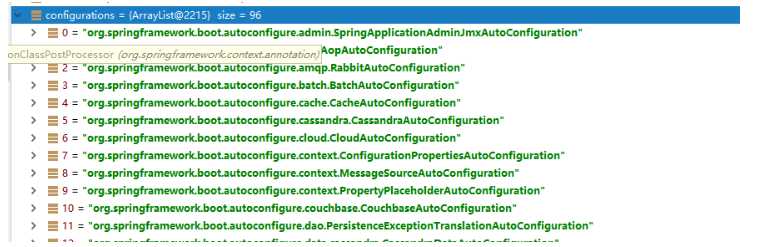
有了自动配置类,免去了我们手动编写配置注入功能组件等 工作;
? SpringFactoriesLoader.loadFactoryNames(EnableAutoConfiguration.class,classLoader);
==Spring Boot在启动的时候从类路径下的META-INF/spring.factories中获取EnableAutoConfiguration指定的值,将这些值作为自动配置类导入到容器中,自动配置类就生效,帮我们进行自动配置工作;==以前我们需要自己配置的东西,自动配置类都帮我们;
J2EE的整体整合解决方案和自动配置都在spring-boot-autoconfigure-1.5.9.RELEASE.jar;
resources文件夹中目录结构
k:(空格)v:表示一对键值对(空格必须有);
以空格的缩进来控制层级关系;只要是左对齐的一列数据,都是同一个层级的。属性和值也是大小写敏感;
server:
    port: 8081
    path: /hello
配置文件
javaBean:
/**
* 将配置文件中配置的每一个属性的值,映射到这个组件中
* @ConfigurationProperties:告诉SpringBoot将本类中的所有属性和配置文件中相关的配置进行绑定;
*      prefix = "person":配置文件中哪个下面的所有属性进行一一映射
*
* 只有这个组件是容器中的组件,才能容器提供的@ConfigurationProperties功能;
*
*/
@Component
@ConfigurationProperties(prefix = "person")
public class Person {

    private String lastName;
  private Integer age;
    private Boolean boss;
    private Date birth;

    private Map<String,Object> maps;
    private List<Object> lists;
    private Dog dog;
我们可以导入配置文件处理器,以后编写配置就有提示了
<!--导入配置文件处理器,配置文件进行绑定就会有提示-->
  	<dependency>
  		<groupId>org.springframework.boot</groupId>
  		<artifactId>spring-boot-configuration-processor</artifactId>
  		<optional>true</optional>
  	</dependency>
@Value获取值和@ConfigurationProperties获取值比较
| @ConfigurationProperties | @Value | |
|---|---|---|
| 功能 | 批量注入配置文件中的属性 | 一个个指定 |
| 松散绑定(松散语法,即大写用 -或__表示) | 支持 | 不支持 |
| SpEL 。如@Value(“#{10*5}“) | 不支持 | 支持 |
| JSR303数据校验(如@Email) | 支持 | 不支持 |
| 复杂类型封装。如 @Value(“$”) | 支持 | 不支持 |
配置文件yml还是properties他们都能获取到值;
如果说,我们只是在某个业务逻辑中需要获取一下配置文件中的某项值,使用@Value;
如果说,我们专门编写了一个javaBean来和配置文件进行映射,我们就直接使用@ConfigurationProperties;
@PropertySource(value = {“classpath:xxx.properties”}) :加载properties配置文件 ,让配置文件里的数据生效
@ImportResource(locations = {“classpath: xxx.xml”}) :加载Spring的xml配置文件,让其生效
SpringBoot推荐的配置方式:注解,代替xml配置文件
在主配置文件编写的时候,文件名可以是 application-.properties/yml。默认使用application.properties的配置;
yml支持多文档模式
server:
  port: 8081
spring:
  profiles:
    active: prod  # active:激活该生产环境
---
server:
  port: 8083
spring:
  profiles: dev
---
server:
  port: 8084
spring:
  profiles: prod  #指定属于哪个环境
激活指定profile:
? 1、在配置文件中指定 spring.profiles.active=dev
? 2、命令行:
? java -jar spring-boot-02-config-0.0.1-SNAPSHOT.jar --spring.profiles.active=dev;
? 可以直接在测试的时候,配置传入命令行参数
? 3、虚拟机参数;在Run/Debug Configurations里的VM options配置参数:
? -Dspring.profiles.active=dev
springboot 启动会扫描以下位置的application.properties或者application.yml文件作为Spring boot的默认配置文件
–file:./config/
–file:./
–classpath:/config/
–classpath:/
优先级由高到底,高优先级的配置会覆盖低优先级的配置;
SpringBoot会从这四个位置全部加载主配置文件;互补配置;
我们还可以通过spring.config.location来改变默认的配置文件位置
项目打包好以后,我们可以使用命令行参数的形式,启动项目的时候来指定配置文件的新位置;指定配置文件和默认加载的这些配置文件共同起作用形成互补配置;
java -jar spring-boot-02-config-02-0.0.1-SNAPSHOT.jar --spring.config.location=G:/application.properties
外部配置加载顺序:
1.命令行参数。如在命令行打包时最后加上:--server.port=8086 --server.context-path=/xxx (可以配置项目访问路径)
由jar包外向jar包内进行寻找;
优先加载带profile
6.jar包外部的application-.properties或application.yml(带spring.profile)配置文件
7.jar包内 部的application-.properties或application.yml(带spring.profile)配置文件
再来加载不带profile
8.jar包外部的application.properties或application.yml(不带spring.profile)配置文件
9.jar包内部的application.properties或application.yml(不带spring.profile)配置文件
其他具体配置参考:参考官方文档
@SpringBootApplication ? EnableAutoConfiguration ? EnableAutoConfigurationImportSelector.class
1)、SpringBoot启动的时候加载主配置类,开启了自动配置功能 @EnableAutoConfiguration
2)、@EnableAutoConfiguration 作用:
利用EnableAutoConfigurationImportSelector给容器中导入一些组件
可以查看EnableAutoConfigurationImportSelector的父类中的selectImports()方法的内容;
List
// getCandidateConfigurations方法:
SpringFactoriesLoader.loadFactoryNames()
扫描所有jar包类路径下  META-INF/spring.factories
把扫描到的这些文件的内容包装成properties对象
从properties中获取到EnableAutoConfiguration.class类(类名)对应的值,然后把他们添加在容器中
将 类路径下 META-INF/spring.factories 里面配置的所有EnableAutoConfiguration的值加入到了容器中;
每一个这样的 xxxAutoConfiguration类都是容器中的一个组件,都加入到容器中;用他们来做自动配置;
3)、每一个自动配置类进行自动配置功能;
4)、以**HttpEncodingAutoConfiguration(Http编码自动配置)**为例解释自动配置原理;
@Configuration   //表示这是一个配置类,以前编写的配置文件一样,也可以给容器中添加组件

//启动指定类的ConfigurationProperties功能;将配置文件中对应的值和HttpEncodingProperties绑定;把HttpEncodingProperties加入到ioc容器中
@EnableConfigurationProperties(HttpEncodingProperties.class)

//Spring底层@Conditional注解,如果满足指定的条件,整个配置类里面的配置就会生效;判断当前应用是否是web应用,如果是,当前配置类生效
@ConditionalOnWebApplication

//判断当前项目有没有这个类CharacterEncodingFilter;SpringMVC中进行乱码解决的过滤器;有这个类当前配置类就生效
@ConditionalOnClass(CharacterEncodingFilter.class)

//判断配置文件中是否存在某个配置  spring.http.encoding.enabled;如果不存在,判断也是成立的
//即使我们配置文件中不配置pring.http.encoding.enabled=true,也是默认生效的;
@ConditionalOnProperty(prefix = "spring.http.encoding", value = "enabled", matchIfMissing = true)

public class HttpEncodingAutoConfiguration {
  	//他已经和SpringBoot的配置文件映射了
  	private final HttpEncodingProperties properties;

   //只有一个有参构造器的情况下,参数的值就会从容器中拿
  	public HttpEncodingAutoConfiguration(HttpEncodingProperties properties) {
  	this.properties = properties;
  }

    @Bean   //给容器中添加一个组件,这个组件的某些值需要从properties中获取
  @ConditionalOnMissingBean(CharacterEncodingFilter.class) //判断容器没有这个组件,没有则执行该方法
  public CharacterEncodingFilter characterEncodingFilter() {
  	CharacterEncodingFilter filter = new OrderedCharacterEncodingFilter();
  	filter.setEncoding(this.properties.getCharset().name());
  	filter.setForceRequestEncoding(this.properties.shouldForce(Type.REQUEST));
  	filter.setForceResponseEncoding(this.properties.shouldForce(Type.RESPONSE));
  	return filter;
}
根据当前不同的条件判断,决定这个配置类是否生效?
一但这个配置类生效;这个配置类就会给容器中添加各种组件;这些组件的属性是从对应的properties类中获取的,这些类里面的每一个属性又是和配置文件绑定的;
5)、所有在配置文件中能配置的属性都是在xxxxProperties类中封装者‘;配置文件能配置什么就可以参照某个功能对应的这个属性类
@ConfigurationProperties(prefix = "spring.http.encoding")  //从配置文件中获取指定的值和bean的属性进行绑定
public class HttpEncodingProperties {

public static final Charset DEFAULT_CHARSET = Charset.forName("UTF-8");
SpringBoot精髓:
? 1)、SpringBoot启动会加载大量的自动配置类
? 2)、我们看我们需要的功能有没有SpringBoot默认写好的自动配置类;
? 3)、我们再来看这个自动配置类中到底配置了哪些组件;(只要我们要用的组件有,我们就不需要再来配置了)
? 4)、给容器中自动配置类添加组件的时候,会从properties类中获取某些属性。我们就可以在配置文件中指定这些属性的值;
xxxxAutoConfigurartion:自动配置类;给容器中添加组件
xxxxProperties:封装配置文件中相关属
作用:必须是@Conditional指定的条件成立,才给容器中添加组件,配置配里面的所有内容才生效;
| @Conditional扩展注解 | 作用(判断是否满足当前指定条件) |
|---|---|
| @ConditionalOnJava | 系统的java版本是否符合要求 |
| @ConditionalOnBean | 容器中存在指定Bean; |
| @ConditionalOnMissingBean | 容器中不存在指定Bean; |
| @ConditionalOnExpression | 满足SpEL表达式指定 |
| @ConditionalOnClass | 系统中有指定的类 |
| @ConditionalOnMissingClass | 系统中没有指定的类 |
| @ConditionalOnSingleCandidate | 容器中只有一个指定的Bean,或者这个Bean是首选Bean |
| @ConditionalOnProperty | 系统中指定的属性是否有指定的值 |
| @ConditionalOnResource | 类路径下是否存在指定资源文件 |
| @ConditionalOnWebApplication | 当前是web环境 |
| @ConditionalOnNotWebApplication | 当前不是web环境 |
| @ConditionalOnJndi | JNDI存在指定项 |
自动配置类必须在一定的条件下才能生效;
我们怎么知道哪些自动配置类生效;
我们可以通过在application配置文件中启用 debug=true属性;来让控制台打印自动配置报告,这样我们就可以很方便的知道哪些自动配置类生效;
=========================
AUTO-CONFIGURATION REPORT
=========================


Positive matches:(自动配置类启用的)
-----------------

   DispatcherServletAutoConfiguration matched:
      - @ConditionalOnClass found required class ‘org.springframework.web.servlet.DispatcherServlet‘; @ConditionalOnMissingClass did not find unwanted class (OnClassCondition)
      - @ConditionalOnWebApplication (required) found StandardServletEnvironment (OnWebApplicationCondition)
	...

Negative matches:(没有启动,没有匹配成功的自动配置类)
-----------------

   ActiveMQAutoConfiguration:
      Did not match:
         - @ConditionalOnClass did not find required classes ‘javax.jms.ConnectionFactory‘, ‘org.apache.activemq.ActiveMQConnectionFactory‘ (OnClassCondition)

   AopAutoConfiguration:
      Did not match:
         - @ConditionalOnClass did not find required classes ‘org.aspectj.lang.annotation.Aspect‘, ‘org.aspectj.lang.reflect.Advice‘ (OnClassCondition)
     ...
SpringBoot:底层是Spring框架,Spring框架默认是用JCL;‘
? SpringBoot选用 SLF4j和logback;
以后开发的时候,日志记录方法的调用,不应该来直接调用日志的实现类,而是调用日志抽象层里面的方法;
给系统里面导入slf4j的jar和 logback的实现jar
import org.slf4j.Logger;
import org.slf4j.LoggerFactory;

public class HelloWorld {
  public static void main(String[] args) {
    Logger logger = LoggerFactory.getLogger(HelloWorld.class);
    logger.info("Hello World");
  }
}
图示;
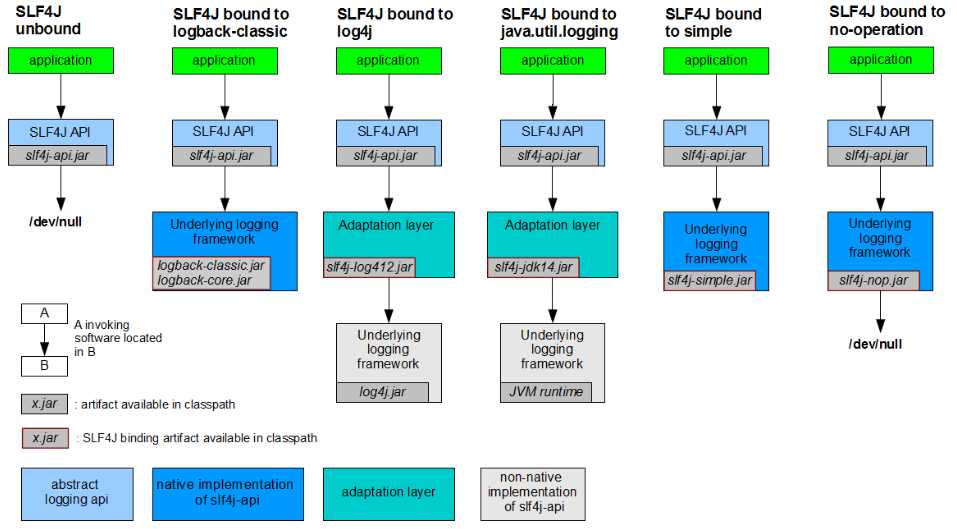
每一个日志的实现框架都有自己的配置文件。使用slf4j以后,配置文件还是做成日志实现框架自己本身的配置文件;
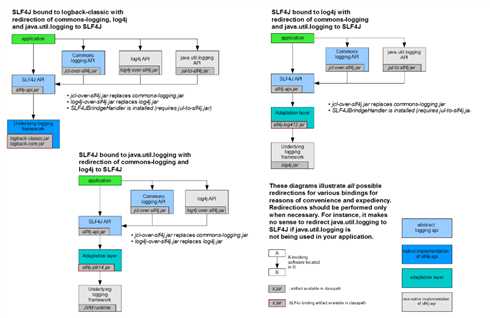
如何让系统中所有的日志都统一到slf4j;
1、将系统中其他日志框架先排除出去;
2、用中间包来替换原有的日志框架;
3、我们导入slf4j其他的实现
SpringBoot使用它来做日志功能;
	<dependency>
			<groupId>org.springframework.boot</groupId>
			<artifactId>spring-boot-starter-logging</artifactId>
		</dependency>
底层依赖关系
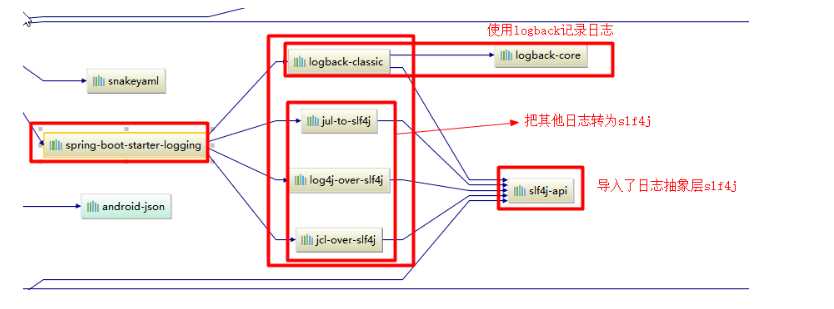
总结:
? 1)、SpringBoot底层也是使用slf4j+logback的方式进行日志记录
? 2)、SpringBoot也把其他的日志都替换成了slf4j;
? 3)、中间替换包?
@SuppressWarnings("rawtypes")
public abstract class LogFactory {

    static String UNSUPPORTED_OPERATION_IN_JCL_OVER_SLF4J = "http://www.slf4j.org/codes.html#unsupported_operation_in_jcl_over_slf4j";

    static LogFactory logFactory = new SLF4JLogFactory();
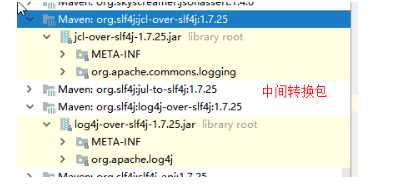
? 4)、如果我们要引入其他框架?一定要把这个框架的默认日志依赖移除掉?
? Spring框架用的是commons-logging;
		<dependency>
			<groupId>org.springframework</groupId>
			<artifactId>spring-core</artifactId>
			<exclusions>
				<exclusion>
					<groupId>commons-logging</groupId>
					<artifactId>commons-logging</artifactId>
				</exclusion>
			</exclusions>
		</dependency>
SpringBoot能自动适配所有的日志,而且底层使用slf4j+logback的方式记录日志,引入其他框架的时候,只需要把这个框架依赖的日志框架排除掉即可;
SpringBoot默认帮我们配置好了日志;
	//记录器
	Logger logger = LoggerFactory.getLogger(getClass());
	@Test
	public void contextLoads() {
		//日志的级别;
		//由低到高   trace<debug<info<warn<error
		//可以调整输出的日志级别;日志就只会在这个级别以以后的高级别生效
		logger.trace("这是trace日志...");
		logger.debug("这是debug日志...");
		//SpringBoot默认给我们使用的是info级别的,没有指定级别的就用SpringBoot默认规定的级别;root级别
		logger.info("这是info日志...");
		logger.warn("这是warn日志...");
		logger.error("这是error日志...");
	}
    日志输出格式:
		%d表示日期时间,
		%thread表示线程名,
		%-5level:级别从左显示5个字符宽度
		%logger{50} 表示logger名字最长50个字符,否则按照句点分割。
		%msg:日志消息,
		%n是换行符
    -->
    %d{yyyy-MM-dd HH:mm:ss.SSS} [%thread] %-5level %logger{50} - %msg%n
SpringBoot修改日志的默认配置
logging.level.com.atguigu=trace
#logging.path=
# 不指定路径在当前项目下生成springboot.log日志
# 可以指定完整的路径;
#logging.file=G:/springboot.log
# 在当前磁盘的根路径下创建spring文件夹和里面的log文件夹;使用?spring.log 作为默认文件
logging.path=/spring/log
#  在控制台输出的日志的格式
logging.pattern.console=%d{yyyy-MM-dd} [%thread] %-5level %logger{50} - %msg%n
# 指定文件中日志输出的格式
logging.pattern.file=%d{yyyy-MM-dd} === [%thread] === %-5level === %logger{50} ==== %msg%n
| logging.file | logging.path | Example | Description |
|---|---|---|---|
| (none) | (none) | 只在控制台输出 | |
| 指定文件名 | (none) | my.log | 输出日志到my.log文件 |
| (none) | 指定目录 | /var/log | 输出到指定目录的 spring.log 文件中 |
给类路径下放上每个日志框架自己的配置文件即可;SpringBoot就不使用他默认配置的了
| Logging System | Customization |
|---|---|
| Logback | logback-spring.xml, logback-spring.groovy, logback.xml or logback.groovy |
| Log4j2 | log4j2-spring.xml or log4j2.xml |
| JDK (Java Util Logging) | logging.properties |
logback.xml:直接就被日志框架识别了;
logback-spring.xml:日志框架就不直接加载日志的配置项,由SpringBoot解析日志配置,可以使用SpringBoot的高级Profile功能
<springProfile name="staging">
    <!-- configuration to be enabled when the "staging" profile is active -->
  	可以指定某段配置只在某个环境下生效
</springProfile>
如:
<appender name="stdout" class="ch.qos.logback.core.ConsoleAppender">
        <!--
        日志输出格式:
			%d表示日期时间,
			%thread表示线程名,
			%-5level:级别从左显示5个字符宽度
			%logger{50} 表示logger名字最长50个字符,否则按照句点分割。
			%msg:日志消息,
			%n是换行符
(最后要在application.properties配置文件里激活:spring.profiles.active=dev。也可以在Run/Debug Configuration的program arguments配置)
        -->
        <layout class="ch.qos.logback.classic.PatternLayout">
            <springProfile name="dev">
                <pattern>%d{yyyy-MM-dd HH:mm:ss.SSS} ----> [%thread] ---> %-5level %logger{50} - %msg%n</pattern>
            </springProfile>
            <springProfile name="!dev">
                <pattern>%d{yyyy-MM-dd HH:mm:ss.SSS} ==== [%thread] ==== %-5level %logger{50} - %msg%n</pattern>
            </springProfile>
        </layout>
    </appender>
如果使用logback.xml作为日志配置文件,还要使用profile功能,会有以下错误
no applicable action for [springProfile]
可以按照slf4j的日志适配图,进行相关的切换;
slf4j+log4j的方式;
<dependency>
  <groupId>org.springframework.boot</groupId>
  <artifactId>spring-boot-starter-web</artifactId>
  <exclusions>
    <exclusion>
      <artifactId>logback-classic</artifactId>
      <groupId>ch.qos.logback</groupId>
    </exclusion>
    <exclusion>
      <artifactId>log4j-over-slf4j</artifactId>
      <groupId>org.slf4j</groupId>
    </exclusion>
  </exclusions>
</dependency>

<dependency>
  <groupId>org.slf4j</groupId>
  <artifactId>slf4j-log4j12</artifactId>
</dependency>
切换为log4j2
   <dependency>
            <groupId>org.springframework.boot</groupId>
            <artifactId>spring-boot-starter-web</artifactId>
            <exclusions>
                <exclusion>
                    <artifactId>spring-boot-starter-logging</artifactId>
                    <groupId>org.springframework.boot</groupId>
                </exclusion>
            </exclusions>
        </dependency>

<dependency>
  <groupId>org.springframework.boot</groupId>
  <artifactId>spring-boot-starter-log4j2</artifactId>
</dependency>
使用SpringBoot;
1)、创建SpringBoot应用,选中我们需要的模块;
2)、SpringBoot已经默认将这些场景配置好了,只需要在配置文件中指定少量配置就可以运行起来
3)、自己编写业务代码;
自动配置原理?
这个场景SpringBoot帮我们配置了什么?能不能修改?能修改哪些配置?能不能扩展?xxx
xxxxAutoConfiguration:帮我们给容器中自动配置组件;
@EnableConfigurationProperties(xxxProperties.class):将xxxProperties.class的属性与配置文件xxx.propertiess里的配置信息 绑定
xxxxProperties:配置类来封装配置文件的内容;
@ConfigurationProperties(prefix = "spring.resources", ignoreUnknownFields = false)
public class ResourceProperties implements ResourceLoaderAware {
  //可以设置和静态资源有关的参数,缓存时间等
	WebMvcAuotConfiguration:
		@Override
		public void addResourceHandlers(ResourceHandlerRegistry registry) {
			if (!this.resourceProperties.isAddMappings()) {
				logger.debug("Default resource handling disabled");
				return;
			}
			Integer cachePeriod = this.resourceProperties.getCachePeriod();
			if (!registry.hasMappingForPattern("/webjars/**")) {
				customizeResourceHandlerRegistration(
						registry.addResourceHandler("/webjars/**")
								.addResourceLocations(
										"classpath:/META-INF/resources/webjars/")
						.setCachePeriod(cachePeriod));
			}
			String staticPathPattern = this.mvcProperties.getStaticPathPattern();
          	//静态资源文件夹映射
			if (!registry.hasMappingForPattern(staticPathPattern)) {
				customizeResourceHandlerRegistration(
						registry.addResourceHandler(staticPathPattern)
								.addResourceLocations(
										this.resourceProperties.getStaticLocations())
						.setCachePeriod(cachePeriod));
			}
		}

        //配置欢迎页映射
		@Bean
		public WelcomePageHandlerMapping welcomePageHandlerMapping(
				ResourceProperties resourceProperties) {
			return new WelcomePageHandlerMapping(resourceProperties.getWelcomePage(),
					this.mvcProperties.getStaticPathPattern());
		}

       //配置喜欢的图标
		@Configuration
		@ConditionalOnProperty(value = "spring.mvc.favicon.enabled", matchIfMissing = true)
		public static class FaviconConfiguration {

			private final ResourceProperties resourceProperties;

			public FaviconConfiguration(ResourceProperties resourceProperties) {
				this.resourceProperties = resourceProperties;
			}

			@Bean
			public SimpleUrlHandlerMapping faviconHandlerMapping() {
				SimpleUrlHandlerMapping mapping = new SimpleUrlHandlerMapping();
				mapping.setOrder(Ordered.HIGHEST_PRECEDENCE + 1);
              	//所有  **/favicon.ico
				mapping.setUrlMap(Collections.singletonMap("**/favicon.ico",
						faviconRequestHandler()));
				return mapping;
			}

			@Bean
			public ResourceHttpRequestHandler faviconRequestHandler() {
				ResourceHttpRequestHandler requestHandler = new ResourceHttpRequestHandler();
				requestHandler
						.setLocations(this.resourceProperties.getFaviconLocations());
				return requestHandler;
			}

		}
1)、所有 /webjars/** ,都去 classpath:/META-INF/resources/webjars/ 找资源;
? webjars:以jar包的方式引入静态资源;
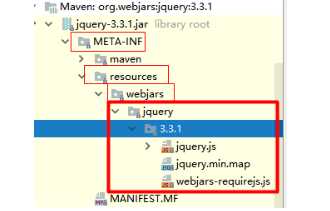
localhost:8080/webjars/jquery/3.3.1/jquery.js
<!--引入jquery-webjar-->在访问的时候只需要写webjars下面资源的名称即可
		<dependency>
			<groupId>org.webjars</groupId>
			<artifactId>jquery</artifactId>
			<version>3.3.1</version>
		</dependency>
2)、"/**" 访问当前项目的任何资源,都去(静态资源的文件夹)找映射
"classpath:/META-INF/resources/",
"classpath:/resources/",
"classpath:/static/",
"classpath:/public/"
"/":当前项目的根路径
localhost:8080/xxx 请求如果没有controller处理,则去静态资源文件夹里面找xxx
3)、欢迎页; 静态资源文件夹下的所有index.html页面;被"/**"映射;
? localhost:8080/ 找index页面
4)、所有的 **/favicon.ico 都是在静态资源文件下找;
JSP、Velocity、Freemarker、Thymeleaf
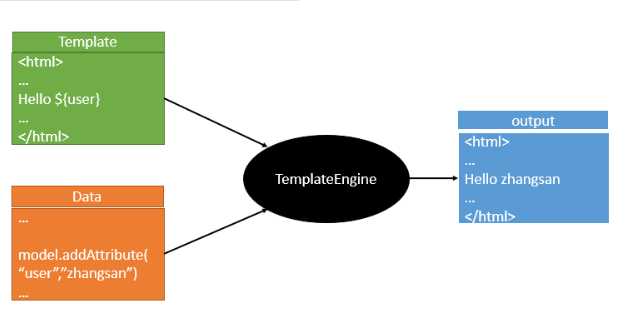
SpringBoot推荐的Thymeleaf;
语法更简单,功能更强大;
		<dependency>
			<groupId>org.springframework.boot</groupId>
			<artifactId>spring-boot-starter-thymeleaf</artifactId>
          	2.1.6
		</dependency>
切换thymeleaf版本
<properties>
		<thymeleaf.version>3.0.9.RELEASE</thymeleaf.version>
		<!-- 布局功能的支持程序  thymeleaf3主程序  layout2以上版本 -->
		<!-- thymeleaf2   layout1-->
		<thymeleaf-layout-dialect.version>2.2.2</thymeleaf-layout-dialect.version>
  </properties>
@ConfigurationProperties(prefix = "spring.thymeleaf")
public class ThymeleafProperties {
	private static final Charset DEFAULT_ENCODING = Charset.forName("UTF-8");
	private static final MimeType DEFAULT_CONTENT_TYPE = MimeType.valueOf("text/html");
	public static final String DEFAULT_PREFIX = "classpath:/templates/";
	public static final String DEFAULT_SUFFIX = ".html";
只要我们把HTML页面放在classpath:/templates/,thymeleaf就能自动渲染;
使用:
1、导入thymeleaf的名称空间
<html lang="en" xmlns:th="http://www.thymeleaf.org">
2、使用thymeleaf语法;
<html lang="en" xmlns:th="http://www.thymeleaf.org">
<head>
    <meta charset="UTF-8">
    <title>Title</title>
</head>
<body>
    <h1>成功!</h1>
    <!--th:text 将div里面的文本内容设置。hello从controller对应的方法参数map中获取,类似ModelAndView -->
    <div th:text="${hello}">这是显示欢迎信息</div>
</body>
</html>
1)、th:text;改变当前元素里面的文本内容;
? th:任意html属性;来替换原生属性的值
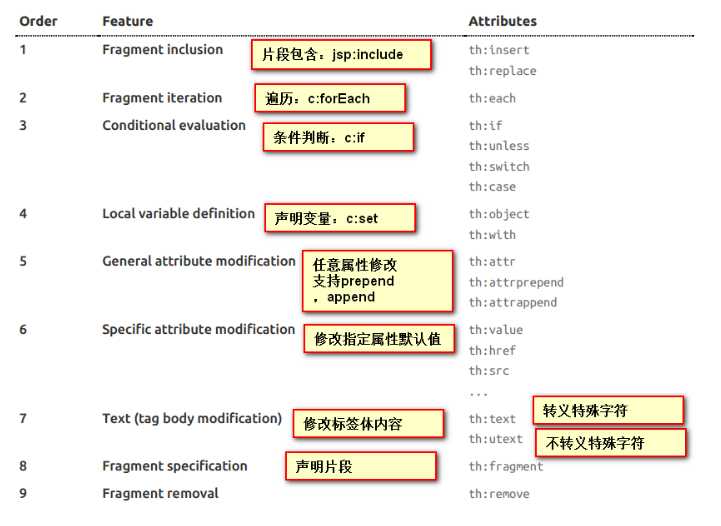
2)、表达式?
Simple expressions:(表达式语法)
    Variable Expressions: ${...}:获取变量值;OGNL;
    		1)、获取对象的属性、调用方法
    		2)、使用内置的基本对象:
    			#ctx : the context object.
    			#vars: the context variables.
                #locale : the context locale.
                #request : (only in Web Contexts) the HttpServletRequest object.
                #response : (only in Web Contexts) the HttpServletResponse object.
                #session : (only in Web Contexts) the HttpSession object.
                #servletContext : (only in Web Contexts) the ServletContext object.

                ${session.foo}
            3)、内置的一些工具对象:
#execInfo : information about the template being processed.
#messages : methods for obtaining externalized messages inside variables expressions, in the same way as they would be obtained using #{…} syntax.
#uris : methods for escaping parts of URLs/URIs
#conversions : methods for executing the configured conversion service (if any).
#dates : methods for java.util.Date objects: formatting, component extraction, etc.
#calendars : analogous to #dates , but for java.util.Calendar objects.
#numbers : methods for formatting numeric objects.
#strings : methods for String objects: contains, startsWith, prepending/appending, etc.
#objects : methods for objects in general.
#bools : methods for boolean evaluation.
#arrays : methods for arrays.
#lists : methods for lists.
#sets : methods for sets.
#maps : methods for maps.
#aggregates : methods for creating aggregates on arrays or collections.
#ids : methods for dealing with id attributes that might be repeated (for example, as a result of an iteration).

    Selection Variable Expressions: *{...}:选择表达式:和${}在功能上是一样;
    	补充:配合 th:object="${session.user}:如:
   <div th:object="${session.user}">
        <p>Name: <span th:text="*{firstName}">Sebastian</span>.</p>
        <p>Surname: <span th:text="*{lastName}">Pepper</span>.</p>
        <p>Nationality: <span th:text="*{nationality}">Saturn</span>.</p>
    </div>

    遍历:
    <span th:each="user:${users}"> [[${user}]] </span> // ‘[[]]’ 会转义字符,‘[()]’不会转义字符

    Message Expressions: #{...}:获取国际化内容
    Link URL Expressions: @{...}:定义URL;
    		@{/order/process(execId=${execId},execType=‘FAST‘)}  // 项目地址前的url可忽略
    Fragment Expressions: ~{...}:片段引用表达式
    		<div th:insert="~{commons :: main}">...</div>

Literals(字面量)
      Text literals: ‘one text‘ , ‘Another one!‘ ,…
      Number literals: 0 , 34 , 3.0 , 12.3 ,…
      Boolean literals: true , false
      Null literal: null
      Literal tokens: one , sometext , main ,…
Text operations:(文本操作)
    String concatenation: +
    Literal substitutions: |The name is ${name}|
Arithmetic operations:(数学运算)
    Binary operators: + , - , * , / , %
    Minus sign (unary operator): -
Boolean operations:(布尔运算)
    Binary operators: and , or
    Boolean negation (unary operator): ! , not
Comparisons and equality:(比较运算)
    Comparators: > , < , >= , <= ( gt , lt , ge , le )
    Equality operators: == , != ( eq , ne )
Conditional operators:条件运算(三元运算符)
    If-then: (if) ? (then)
    If-then-else: (if) ? (then) : (else)
    Default: (value) ?: (defaultvalue)
Special tokens:
    No-Operation: _
官方文档:https://docs.spring.io/spring-boot/docs/1.5.10.RELEASE/reference/htmlsingle/#boot-features-developing-web-applications
Spring Boot 自动配置好了SpringMVC
以下是SpringBoot对SpringMVC的默认配置:(WebMvcAutoConfiguration)
Inclusion of ContentNegotiatingViewResolver and BeanNameViewResolver beans.
Support for serving static resources, including support for WebJars (see below).静态资源文件夹路径,webjars
Static index.html support. 静态首页访问
Custom Favicon support (see below). favicon.ico
自动注册了 of Converter, GenericConverter, Formatter beans.
Formatter 格式化器; 2017.12.17===Date; @Bean
@ConditionalOnProperty(prefix = "spring.mvc", name = "date-format")//在文件中配置日期格式化的规则
public Formatter<Date> dateFormatter() {
return new DateFormatter(this.mvcProperties.getDateFormat());//日期格式化组件
}
? 自己添加的格式化器转换器,我们只需要放在容器中即可
Support for HttpMessageConverters (see below).
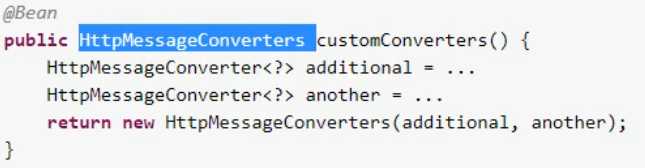
HttpMessageConverter:SpringMVC用来转换Http请求和响应的;User---Json;
HttpMessageConverters 是从容器中确定;获取所有的HttpMessageConverter;
自己给容器中添加HttpMessageConverter,只需要将自己的组件注册容器中(@Bean,@Component) 如:
Automatic registration of MessageCodesResolver (see below).定义错误代码生成规则
Automatic use of a ConfigurableWebBindingInitializer bean (see below).
我们可以配置一个ConfigurableWebBindingInitializer来替换默认的;(添加到容器)
初始化WebDataBinder;
请求数据=====JavaBean;
org.springframework.boot.autoconfigure.web:web的所有自动配置场景;
If you want to keep Spring Boot MVC features, and you just want to add additional MVC configuration (interceptors, formatters, view controllers etc.) you can add your own @Configuration class of type WebMvcConfigurerAdapter, but without @EnableWebMvc. If you wish to provide custom instances of RequestMappingHandlerMapping, RequestMappingHandlerAdapter or ExceptionHandlerExceptionResolver you can declare a WebMvcRegistrationsAdapter instance providing such components.
If you want to take complete control of Spring MVC, you can add your own @Configuration annotated with @EnableWebMvc.
     <mvc:view-controller path="/hello" view-name="success"/>
    <mvc:interceptors>
        <mvc:interceptor>
            <mvc:mapping path="/hello"/>
            <bean></bean>
        </mvc:interceptor>
    </mvc:interceptors>
编写一个配置类(@Configuration),是WebMvcConfigurerAdapter类型;不能标注@EnableWebMvc;
既保留了所有的自动配置,也能用我们扩展的配置;
//使用WebMvcConfigurerAdapter可以来扩展SpringMVC的功能,所有WebMvcConfigurerAdapter一起起作用
@Configuration
public class MyMvcConfig extends WebMvcConfigurerAdapter {

    @Override
    public void addViewControllers(ViewControllerRegistry registry) {
       // super.addViewControllers(registry);
        //浏览器发送 /atguigu 请求来到 success
        registry.addViewController("/atguigu").setViewName("success");
    }
}
原理:
? 1)、WebMvcAutoConfiguration是SpringMVC的自动配置类
? 2)、在做其他自动配置时会导入;@Import(EnableWebMvcConfiguration.class)
    @Configuration
	public static class EnableWebMvcConfiguration extends DelegatingWebMvcConfiguration {
      private final WebMvcConfigurerComposite configurers = new WebMvcConfigurerComposite();

	 //从容器中获取所有的WebMvcConfigurer
      @Autowired(required = false)
      public void setConfigurers(List<WebMvcConfigurer> configurers) {
          if (!CollectionUtils.isEmpty(configurers)) {
              this.configurers.addWebMvcConfigurers(configurers);
            	//一个参考实现;将所有的WebMvcConfigurer相关配置都来一起调用;
            	@Override
             // public void addViewControllers(ViewControllerRegistry registry) {
              //    for (WebMvcConfigurer delegate : this.delegates) {
               //       delegate.addViewControllers(registry);
               //   }
              }
          }
	}
? 3)、容器中所有的WebMvcConfigurer都会一起起作用;
? 4)、我们的配置类也会被调用;
? 效果:SpringMVC的自动配置和我们的扩展配置都会起作用;
模式:
? 1)、SpringBoot在自动配置很多组件的时候,先看容器中有没有用户自己配置的(@Bean、@Component)如果有就用用户配置的,如果没有,才自动配置;如果有些组件可以有多个(ViewResolver)将用户配置的和自己默认的组合起来;
? 2)、在SpringBoot中会有非常多的xxxConfigurer帮助我们进行扩展配置
? 3)、在SpringBoot中会有很多的xxxCustomizer帮助我们进行定制配置
//使用WebMvcConfigurer可以来扩展SpringMVC的功能
@Configuration
public class MyMvcConfig implements WebMvcConfigurer {
    //所有的WebMvcConfigurerAdapter组件都会一起起作用
    @Bean //将组件注册在容器
    public WebMvcConfigurerAdapter webMvcConfigurerAdapter(){
        WebMvcConfigurerAdapter adapter = new WebMvcConfigurerAdapter() {
            @Override
            public void addViewControllers(ViewControllerRegistry registry) {
                registry.addViewController("/").setViewName("login");
                registry.addViewController("/index.html").setViewName("login");
            }
        };
        return adapter;
    }
}
1)、编写国际化配置文件,抽取页面需要显示的国际化消息
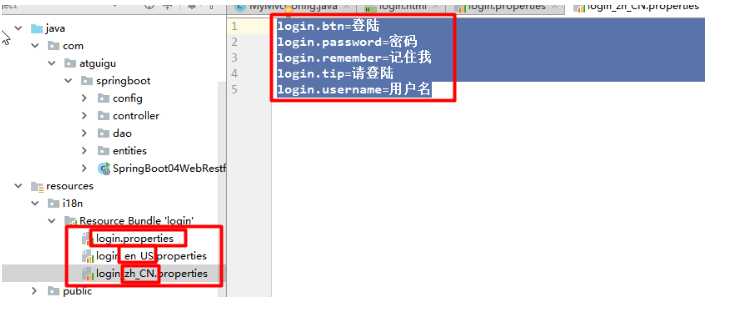
2)、SpringBoot底层自动配置好了管理国际化资源文件的组件;
@ConfigurationProperties(prefix = "spring.messages")
public class MessageSourceAutoConfiguration {
     //我们的配置文件可以直接放在类路径下叫messages.properties;
	private String basename = "messages";

    @Bean
	public MessageSource messageSource() {
		ResourceBundleMessageSource messageSource = new ResourceBundleMessageSource();
		if (StringUtils.hasText(this.basename)) {
            //设置国际化资源文件的基础名(去掉语言国家代码_en_US)
			messageSource.setBasenames(StringUtils.commaDelimitedListToStringArray(
					StringUtils.trimAllWhitespace(this.basename)));
		}
		if (this.encoding != null) {
			messageSource.setDefaultEncoding(this.encoding.name());
		}
		messageSource.setFallbackToSystemLocale(this.fallbackToSystemLocale);
		messageSource.setCacheSeconds(this.cacheSeconds);
		messageSource.setAlwaysUseMessageFormat(this.alwaysUseMessageFormat);
		return messageSource;
	}
3)、去页面获取国际化的值;标签内 # 获取国际化配置文件的数据 ,$ 从后台获取数据 ,@ 发送后台请求
	<body class="text-center">
		<form class="form-signin" action="dashboard.html" th:action="@{/user/login}" method="post">
			<img class="mb-4" th:src="@{/asserts/img/bootstrap-solid.svg}" src="asserts/img/bootstrap-solid.svg" alt="" width="72" height="72">
			<h1 class="h3 mb-3 font-weight-normal" th:text="#{login.tip}">Please sign in</h1>
			<!--判断-->
			<p style="color: red" th:text="${msg}" th:if="${not #strings.isEmpty(msg)}"></p>
			<label class="sr-only" th:text="#{login.username}">Username</label>
			<input type="text"  name="username" class="form-control" placeholder="Username" th:placeholder="#{login.username}" required="" autofocus="">
			<label class="sr-only" th:text="#{login.password}">Password</label>
			<input type="password" name="password" class="form-control" placeholder="Password" th:placeholder="#{login.password}" required="">
			<div class="checkbox mb-3">
				<label>
          			<input type="checkbox" value="remember-me"/> [[#{login.remember}]]
        		</label>
			</div>
			<button class="btn btn-lg btn-primary btn-block" type="submit" th:text="#{login.btn}">Sign in</button>
			<p class="mt-5 mb-3 text-muted">? 2017-2018</p>
			<a class="btn btn-sm" th:href="@{/index.html(l=‘zh_CN‘)}">中文</a>
			<a class="btn btn-sm" th:href="@{/index.html(l=‘en_US‘)}">English</a>
		</form>
	</body>
效果:根据浏览器语言设置的信息切换了国际化;
原理:
? 国际化Locale(区域信息对象);LocaleResolver(获取区域信息对象);
		@Bean
		@ConditionalOnMissingBean
		@ConditionalOnProperty(prefix = "spring.mvc", name = "locale")
		public LocaleResolver localeResolver() {
            // 从配置文件获取并解析区域信息
			if (this.mvcProperties.getLocaleResolver() == WebMvcProperties.LocaleResolver.FIXED) {
				return new FixedLocaleResolver(this.mvcProperties.getLocale());
			}
            // 默认从请求头中获取并解析区域信息
			AcceptHeaderLocaleResolver localeResolver = new AcceptHeaderLocaleResolver();
			localeResolver.setDefaultLocale(this.mvcProperties.getLocale());
			return localeResolver;
		}
默认的就是根据请求头带来的区域信息获取Locale进行国际化
4)、点击链接切换国际化
/**
 * 可以在url地址上携带区域信息
 */
public class MyLocaleResolver implements LocaleResolver {
    @Override
    public Locale resolveLocale(HttpServletRequest request) {
        String l = request.getParameter("l");
        Locale locale = Locale.getDefault();  // 若url上的参数没有带区域信息 l,则使用请求头的
        if(!StringUtils.isEmpty(l)){
            String[] split = l.split("_");
            locale = new Locale(split[0],split[1]);
        }
        return locale;
    }

    @Override
    public void setLocale(HttpServletRequest request, HttpServletResponse response, Locale locale) {

    }
}

 @Bean
    public LocaleResolver localeResolver(){
        return new MyLocaleResolver();
    }
}
开发期间模板引擎页面修改以后,要实时生效
1)、禁用模板引擎的缓存
# 禁用缓存, 防止开发测试期间的修改短时间内没有生效
spring.thymeleaf.cache=false
2)、页面修改完成以后ctrl+f9:重新编译;
登陆错误消息的显示(当msg不为空时才有效)
<p style="color: red" th:text="${msg}" th:if="${not #strings.isEmpty(msg)}"></p>
拦截器
/**
 * 登陆检查,
 */
public class LoginHandlerInterceptor implements HandlerInterceptor {
    //目标方法执行之前
    @Override
    public boolean preHandle(HttpServletRequest request, HttpServletResponse response, Object handler) throws Exception {
        Object user = request.getSession().getAttribute("loginUser");
        if(user == null){
            //未登陆,返回登陆页面
            request.setAttribute("msg","没有权限请先登陆");
            request.getRequestDispatcher("/index.html").forward(request,response);
            return false;
        }else{
            //已登陆,放行请求
            return true;
        }
    }

    @Override
    public void postHandle(HttpServletRequest request, HttpServletResponse response, Object handler, ModelAndView modelAndView) throws Exception {

    }

    @Override
    public void afterCompletion(HttpServletRequest request, HttpServletResponse response, Object handler, Exception ex) throws Exception {

    }
}
注册拦截器
  //所有的WebMvcConfigurerAdapter组件都会一起起作用
    @Bean //将组件注册在容器
    public WebMvcConfigurerAdapter webMvcConfigurerAdapter(){
        WebMvcConfigurerAdapter adapter = new WebMvcConfigurerAdapter() {
            @Override
            public void addViewControllers(ViewControllerRegistry registry) {
                registry.addViewController("/").setViewName("login");
                registry.addViewController("/index.html").setViewName("login"); // 设置View映射信息
                registry.addViewController("/main.html").setViewName("dashboard"); // 请求成功后到dashboard.html页面
            }

            //注册拦截器
            @Override
            public void addInterceptors(InterceptorRegistry registry) {
                //super.addInterceptors(registry);
                //静态资源;  *.css , *.js
                //SpringBoot已经做好了静态资源映射
                registry.addInterceptor(new LoginHandlerInterceptor()).addPathPatterns("/**")
                        .excludePathPatterns("/index.html","/","/user/login"); // 拦截除了登录页面之外的请求到preHandle方法处理请求
            }
        };
        return adapter;
    }
实验要求:
1)、RestfulCRUD:CRUD满足Rest风格;
URI: /资源名称/资源标识 HTTP请求方式区分对资源CRUD操作
添加:POST 修改:PUT 查询:GET 删除:DELETE
1、抽取公共片段
<div th:fragment="copy">
© 2011 The Good Thymes Virtual Grocery
</div>
2、引入公共片段
<div th:insert="~{footer :: copy}"></div>
~{templatename::selector}:模板名::选择器
~{templatename::fragmentname}:模板名::片段名
3、默认效果:
insert的公共片段在div标签中
如果使用th:insert等属性进行引入,可以不用写~{}:
行内写法可以加上:[[~{}]];[(~{})];
三种引入公共片段的th属性:
th:insert:将公共片段整个插入到声明引入的元素中
th:replace:将声明引入的元素替换为公共片段
th:include:将被引入的片段的内容包含进这个标签中
<footer th:fragment="copy">
© 2011 The Good Thymes Virtual Grocery
</footer>
引入方式
<html lang="en" xmlns:th="http://www.thymeleaf.org"> 引入th名称空间
<div th:insert="footer :: copy"></div>
<div th:replace="footer :: copy"></div>
<div th:include="footer :: copy"></div>
效果
<div>
<footer>
© 2011 The Good Thymes Virtual Grocery
</footer>
</div>
<footer>
© 2011 The Good Thymes Virtual Grocery
</footer>
<div>
© 2011 The Good Thymes Virtual Grocery
</div>
引入片段的时候传入参数:
<nav class="col-md-2 d-none d-md-block bg-light sidebar" id="sidebar">
    <div class="sidebar-sticky">
        <ul class="nav flex-column">
            <li class="nav-item">
                <a class="nav-link active"  <!-- 判断变量activeUri后设置a标签是否高亮 -->
                   th:class="${activeUri==‘main.html‘?‘nav-link active‘:‘nav-link‘}"
                   href="#" th:href="@{/main.html}">
                    <svg xmlns="http://www.w3.org/2000/svg" width="24" height="24" viewBox="0 0 24 24" fill="none" stroke="currentColor" stroke-width="2" stroke-linecap="round" stroke-linejoin="round" class="feather feather-home">
                        <path d="M3 9l9-7 9 7v11a2 2 0 0 1-2 2H5a2 2 0 0 1-2-2z"></path>
                        <polyline points="9 22 9 12 15 12 15 22"></polyline>
                    </svg>
                    Dashboard <span class="sr-only">(current)</span>
                </a>
            </li>

<!--引入侧边栏;传入参数高亮判断变量activeUri-->
<div th:replace="commons/bar::#sidebar(activeUri=‘emps‘)"></div>
<tbody>
    <tr th:each="emp:${emps}">
        <td th:text="${emp.id}"></td>
        <td>[[${emp.lastName}]]</td>
        <td th:text="${emp.email}"></td>
        <td th:text="${emp.gender}==0?‘女‘:‘男‘"></td>
        <td th:text="${emp.department.departmentName}"></td>
        <td th:text="${#dates.format(emp.birth, ‘yyyy-MM-dd HH:mm‘)}"></td>
        <td>
            <a class="btn btn-sm btn-primary" th:href="@{/emp/}+${emp.id}">编辑</a>
            <button th:attr="del_uri=@{/emp/}+${emp.id}" class="btn btn-sm btn-danger deleteBtn">删除</button>
        </td>
    </tr>
</tbody>
添加和修改页面
<!--需要区分是员工修改还是添加;-->
<form th:action="@{/emp}" method="post">
    <!--发送put请求修改员工数据-->
    <!--
1、SpringMVC中配置HiddenHttpMethodFilter;(SpringBoot自动配置好的)
2、页面创建一个post表单
3、创建一个input项,name="_method";值就是我们指定的请求方式
-->
   <!-- 当接收到后台的emp不为空时,表示此时为修改请求,表单提交方式为修改put -->
    <input type="hidden" name="_method" value="put" th:if="${emp!=null}"/>
    <input type="hidden" name="id" th:if="${emp!=null}" th:value="${emp.id}"><!--修改请求提交需要传入id到后台,用于修改-->
    <div class="form-group">
        <label>LastName</label>
        <input name="lastName" type="text" class="form-control" placeholder="zhangsan" th:value="${emp!=null}?${emp.lastName}">		【${emp.name}为修改时从ModelMap获取的数据,这里用于数据回显】
    </div>
    <div class="form-group">
        <label>Email</label>
        <input name="email" type="email" class="form-control" placeholder="zhangsan@atguigu.com" th:value="${emp!=null}?${emp.email}">
    </div>
    <div class="form-group">
        <label>Gender</label><br/>
        <div class="form-check form-check-inline">
            <input class="form-check-input" type="radio" name="gender" value="1" th:checked="${emp!=null}?${emp.gender==1}">
            <label class="form-check-label">男</label>
        </div>
        <div class="form-check form-check-inline">
            <input class="form-check-input" type="radio" name="gender" value="0" th:checked="${emp!=null}?${emp.gender==0}">
            <label class="form-check-label">女</label>
        </div>
    </div>
    <div class="form-group">
        <label>department</label>
        <!--提交的是部门的id-->
        <select class="form-control" name="department.id">  【name为javaBean属性名,表单提交后自动保存在请求方法参数的javabean里】
            <option th:selected="${emp!=null}?${dept.id == emp.department.id}" th:value="${dept.id}" th:each="dept:${depts}" th:text="${dept.departmentName}">1</option>
        </select>
    </div>
    <div class="form-group">
        <label>Birth</label>
        <input name="birth" type="text" class="form-control" placeholder="zhangsan" th:value="${emp!=null}?${#dates.format(emp.birth, ‘yyyy-MM-dd HH:mm‘)}">
    </div>
    <button type="submit" class="btn btn-primary" th:text="${emp!=null}?‘修改‘:‘添加‘">添加</button>
</form>
日期的格式化;SpringMVC将页面提交的值需要转换为指定的类型;
2017-12-12---Date; 类型转换,格式化;
默认日期是按照/的方式;
<tr th:each="emp:${emps}">
    <td th:text="${emp.id}"></td>
    <td>[[${emp.lastName}]]</td>
    <td th:text="${emp.email}"></td>
    <td th:text="${emp.gender}==0?‘女‘:‘男‘"></td>
    <td th:text="${emp.department.departmentName}"></td>
    <td th:text="${#dates.format(emp.birth, ‘yyyy-MM-dd HH:mm‘)}"></td>
    <td>
        <a class="btn btn-sm btn-primary" th:href="@{/emp/}+${emp.id}">编辑</a>
        <!-- 自定义属性del_uri -->
        <button th:attr="del_uri=@{/emp/}+${emp.id}" class="btn btn-sm btn-danger deleteBtn">删除</button>
    </td>
</tr>
<form id="deleteEmpForm"  method="post">
    <input type="hidden" name="_method" value="delete"/>
</form>

<script>
    $(".deleteBtn").click(function(){
        //删除当前员工,拼接action的uri
        $("#deleteEmpForm").attr("action",$(this).attr("del_uri")).submit();
        return false;
    });
</script>
默认效果:
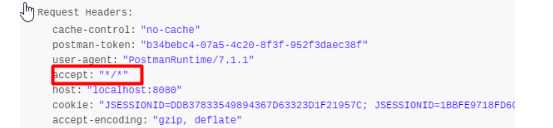
? 1)、浏览器,返回一个默认的错误页面
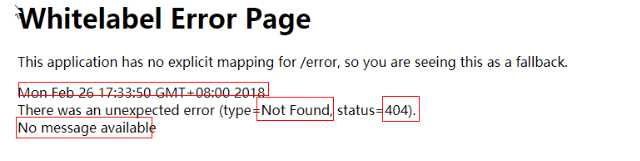
浏览器发送请求的请求头:

? 2)、如果是其他客户端,默认响应一个json数据
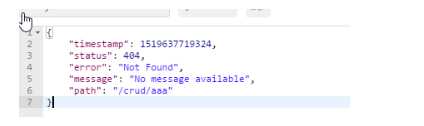
? 
原理:
? 可以参照ErrorMvcAutoConfiguration;错误处理的自动配置;
给容器中添加了以下组件
? 1、DefaultErrorAttributes:
帮我们在页面共享信息;
@Override
	public Map<String, Object> getErrorAttributes(RequestAttributes requestAttributes,
			boolean includeStackTrace) {
		Map<String, Object> errorAttributes = new LinkedHashMap<String, Object>();
		errorAttributes.put("timestamp", new Date());
		addStatus(errorAttributes, requestAttributes);
		addErrorDetails(errorAttributes, requestAttributes, includeStackTrace);
		addPath(errorAttributes, requestAttributes);
		return errorAttributes;
	}
? 2、BasicErrorController:处理默认/error请求
@Controller
@RequestMapping("${server.error.path:${error.path:/error}}")
public class BasicErrorController extends AbstractErrorController {

    @RequestMapping(produces = "text/html")//产生html类型的数据;浏览器发送的请求来到这个方法处理
	public ModelAndView errorHtml(HttpServletRequest request,
			HttpServletResponse response) {
		HttpStatus status = getStatus(request);
		Map<String, Object> model = Collections.unmodifiableMap(getErrorAttributes(
				request, isIncludeStackTrace(request, MediaType.TEXT_HTML)));
		response.setStatus(status.value());

        //去哪个页面作为错误页面;包含页面地址和页面内容
		ModelAndView modelAndView = resolveErrorView(request, response, status, model);
		return (modelAndView == null ? new ModelAndView("error", model) : modelAndView);
	}

	@RequestMapping
	@ResponseBody    //产生json数据,其他客户端来到这个方法处理;
	public ResponseEntity<Map<String, Object>> error(HttpServletRequest request) {
		Map<String, Object> body = getErrorAttributes(request,
				isIncludeStackTrace(request, MediaType.ALL));
		HttpStatus status = getStatus(request);
		return new ResponseEntity<Map<String, Object>>(body, status);
	}
? 3、ErrorPageCustomizer:
	@Value("${error.path:/error}") // 如果没有配置error.path则默认为
	private String path = "/error";  系统出现错误以后来到error请求进行处理;(web.xml注册的错误页面规则)
? 4、DefaultErrorViewResolver:
@Override
	public ModelAndView resolveErrorView(HttpServletRequest request, HttpStatus status,
			Map<String, Object> model) {
		ModelAndView modelAndView = resolve(String.valueOf(status), model);
		if (modelAndView == null && SERIES_VIEWS.containsKey(status.series())) {
			modelAndView = resolve(SERIES_VIEWS.get(status.series()), model);
		}
		return modelAndView;
	}

	private ModelAndView resolve(String viewName, Map<String, Object> model) {
        //默认SpringBoot可以去找到一个页面?  error/状态码
		String errorViewName = "error/" + viewName;

        //模板引擎可以解析这个页面地址就用模板引擎解析
		TemplateAvailabilityProvider provider = this.templateAvailabilityProviders
				.getProvider(errorViewName, this.applicationContext);
		if (provider != null) {
            //模板引擎可用的情况下返回到errorViewName指定的视图地址
			return new ModelAndView(errorViewName, model);
		}
        //模板引擎不可用,就在静态资源文件夹下找errorViewName对应的页面   error/404.html
		return resolveResource(errorViewName, model);
	}
? 步骤:
? 一但系统出现4xx或者5xx之类的错误;ErrorPageCustomizer就会生效(定制错误的响应规则);就会来到/error请求;就会被BasicErrorController处理;
? 1)响应页面;去哪个页面是由DefaultErrorViewResolver解析得到的;
protected ModelAndView resolveErrorView(HttpServletRequest request,
      HttpServletResponse response, HttpStatus status, Map<String, Object> model) {
    //所有的ErrorViewResolver得到ModelAndView
   for (ErrorViewResolver resolver : this.errorViewResolvers) {
      ModelAndView modelAndView = resolver.resolveErrorView(request, status, model);
      if (modelAndView != null) {
         return modelAndView;
      }
   }
   return null;
}
? 1)、有模板引擎的情况下;error/状态码; 【将错误页面命名为 错误状态码.html 放在模板引擎文件夹里面的 error文件夹下】,发生此状态码的错误就会来到 对应的页面;
? 我们可以使用4xx和5xx作为错误页面的文件名来匹配这种类型的所有错误,精确优先(优先寻找精确的状态码.html);
? 页面能获取的信息;
? timestamp:时间戳 在自定义的html页面显示:[[$]]
? status:状态码 在自定义的html页面显示:[[$]]
? error:错误提示 在自定义的html页面显示:[[$]]
? exception:异常对象 在自定义的html页面显示:[[$]]
? message:异常消息 在自定义的html页面显示:[[$]]
? errors:JSR303数据校验的错误都在这里 在自定义的html页面显示:[[$]]
? 2)、没有模板引擎(模板引擎找不到这个错误页面,,错误页面不放在templates目录下),静态资源文件夹下找;
? 3)、以上都没有错误页面,就是默认来到SpringBoot默认的错误提示页面;
? 1)、自定义异常处理&返回定制json数据;
@ControllerAdvice
public class MyExceptionHandler {

    @ResponseBody
    @ExceptionHandler(UserNotExistException.class)
    public Map<String,Object> handleException(Exception e){
        Map<String,Object> map = new HashMap<>();
        map.put("code","user.notexist");
        map.put("message",e.getMessage());
        return map;
    }
}
//没有自适应效果...
? 2)、转发到/error进行自适应响应效果处理。在底层的BasicErrorController下会自动判断后进行响应处理
 @ExceptionHandler(UserNotExistException.class)
    public String handleException(Exception e, HttpServletRequest request){
        Map<String,Object> map = new HashMap<>();
        //传入我们自己的错误状态码  4xx 5xx,否则就默认是200,不会进入定制错误页面的解析流程
        /**
         * Integer statusCode = (Integer) request.getAttribute("javax.servlet.error.status_code");
         */
        request.setAttribute("javax.servlet.error.status_code",500);
        map.put("code","user.notexist");    // 保存到请求域中,供我们自己定义的ErrorAttributes获取
        map.put("message",e.getMessage());
        //转发到/error
        return "forward:/error";
    }
出现错误以后,会来到/error请求,会被BasicErrorController处理,响应出去可以获取的数据是由getErrorAttributes得到的(是AbstractErrorController(ErrorController)规定的方法);
? 1、完全来编写一个ErrorController的实现类【或者是编写AbstractErrorController的子类】,放在容器中;
? 2、页面上能用的数据,或者是json返回能用的数据都是通过errorAttributes.getErrorAttributes得到;
? 容器中DefaultErrorAttributes.getErrorAttributes();默认进行数据处理的;
自定义ErrorAttributes
//给容器中加入我们自己定义的ErrorAttributes
@Component
public class MyErrorAttributes extends DefaultErrorAttributes {
	// 返回的map就是页面和json能获取的字段
    @Override
    public Map<String, Object> getErrorAttributes(RequestAttributes requestAttributes, boolean includeStackTrace) {
        Map<String, Object> map = super.getErrorAttributes(requestAttributes, includeStackTrace);
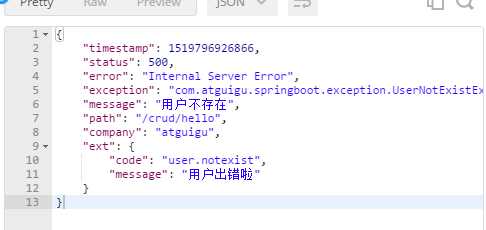
        map.put("company","atguigu");
        // 从请求域中获取由用户自定义异常处理方法handleException中保存的map,map中保存着自定义的json异常信息,0表示request域
        Map<String,Object> ext = (Map<String, Object>) requestAttributes.getAttribute("ext", 0);
        map.put("ext",ext);   // map保存的键值对就可以以json数据返回在客户端
        return map;
    }
}
最终的效果:响应是自适应的,可以通过定制ErrorAttributes改变需要返回的内容,
SpringBoot默认使用Tomcat作为嵌入式的Servlet容器;
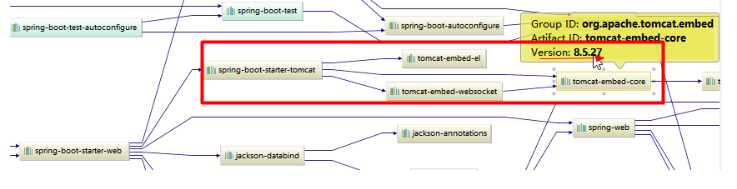
?
方法1、修改和server有关的配置(ServerProperties【也是EmbeddedServletContainerCustomizer】);
server.port=8081
server.context-path=/crud

server.tomcat.uri-encoding=UTF-8

//通用的Servlet容器设置
server.xxx
//Tomcat的设置
server.tomcat.xxx
方法2、编写一个EmbeddedServletContainerCustomizer:嵌入式的Servlet容器的定制器;来修改Servlet容器的配置
@Bean  //一定要将这个定制器加入到容器中
public EmbeddedServletContainerCustomizer embeddedServletContainerCustomizer(){
    return new EmbeddedServletContainerCustomizer() {

        //定制嵌入式的Servlet容器相关的规则
        @Override
        public void customize(ConfigurableEmbeddedServletContainer container) {
            container.setPort(8083);
        }
    };
}
由于SpringBoot默认是以jar包的方式启动嵌入式的Servlet容器来启动SpringBoot的web应用,没有web.xml文件。
注册三大组件用以下方式
ServletRegistrationBean
//注册三大组件
@Bean
public ServletRegistrationBean myServlet(){ // MyServlet() 需extends HttpServlet
    ServletRegistrationBean registrationBean = new ServletRegistrationBean(new MyServlet(),"/myServlet");
    return registrationBean;
}
FilterRegistrationBean
@Bean
public FilterRegistrationBean myFilter(){
    FilterRegistrationBean registrationBean = new FilterRegistrationBean();
    registrationBean.setFilter(new MyFilter());  // MyFilter()需要implements Filter
    registrationBean.setUrlPatterns(Arrays.asList("/hello","/myServlet"));
    return registrationBean;
}
ServletListenerRegistrationBean
@Bean
public ServletListenerRegistrationBean myListener(){ // MyListener() 需要implements ServletContextListener
    ServletListenerRegistrationBean<MyListener> registrationBean = new ServletListenerRegistrationBean<>(new MyListener());
    return registrationBean;
}
SpringBoot帮我们自动配置SpringMVC的时候,自动的注册SpringMVC的前端控制器;DIspatcherServlet;
DispatcherServletAutoConfiguration中:
@Bean(name = DEFAULT_DISPATCHER_SERVLET_REGISTRATION_BEAN_NAME)
@ConditionalOnBean(value = DispatcherServlet.class, name = DEFAULT_DISPATCHER_SERVLET_BEAN_NAME)
public ServletRegistrationBean dispatcherServletRegistration(
      DispatcherServlet dispatcherServlet) {
   ServletRegistrationBean registration = new ServletRegistrationBean(
         dispatcherServlet, this.serverProperties.getServletMapping());
    //默认拦截: /  所有请求;包静态资源,但是不拦截jsp请求;   /*才会拦截jsp
    //可以通过server.servletPath来修改SpringMVC前端控制器默认拦截的请求路径

   registration.setName(DEFAULT_DISPATCHER_SERVLET_BEAN_NAME);
   registration.setLoadOnStartup(
         this.webMvcProperties.getServlet().getLoadOnStartup());
   if (this.multipartConfig != null) {
      registration.setMultipartConfig(this.multipartConfig);
   }
   return registration;
}
2)、SpringBoot能不能支持其他的Servlet容器;
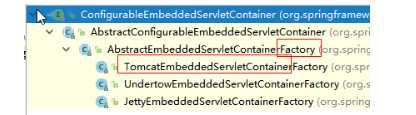
默认支持:
Tomcat(默认使用)
<dependency>
   <groupId>org.springframework.boot</groupId>
   <artifactId>spring-boot-starter-web</artifactId>
   引入web模块默认就是使用嵌入式的Tomcat作为Servlet容器;
</dependency>
Jetty (适合长连接)
<!-- 引入web模块 -->
<dependency>
   <groupId>org.springframework.boot</groupId>
   <artifactId>spring-boot-starter-web</artifactId>
   <exclusions>
      <exclusion>
         <artifactId>spring-boot-starter-tomcat</artifactId>
         <groupId>org.springframework.boot</groupId>
      </exclusion>
   </exclusions>
</dependency>

<!--引入其他的Servlet容器-->
<dependency>
   <artifactId>spring-boot-starter-jetty</artifactId>
   <groupId>org.springframework.boot</groupId>
</dependency>
Undertow(不支持 JSP,适合高并发)
<!--引入其他的Servlet容器-->
<dependency>
   <artifactId>spring-boot-starter-undertow</artifactId>
   <groupId>org.springframework.boot</groupId>
</dependency>
EmbeddedServletContainerAutoConfiguration:嵌入式的Servlet容器自动配置?
@AutoConfigureOrder(Ordered.HIGHEST_PRECEDENCE)
@Configuration
@ConditionalOnWebApplication
@Import(BeanPostProcessorsRegistrar.class)
//导入BeanPostProcessorsRegistrar:Spring注解版;给容器中导入一些组件
//导入了EmbeddedServletContainerCustomizerBeanPostProcessor:
//后置处理器:bean初始化前后(创建完对象,还没属性赋值)执行初始化工作
public class EmbeddedServletContainerAutoConfiguration {

    @Configuration
	@ConditionalOnClass({ Servlet.class, Tomcat.class })//判断当前是否引入了Tomcat依赖;
	@ConditionalOnMissingBean(value = EmbeddedServletContainerFactory.class, search = SearchStrategy.CURRENT)//判断当前容器没有用户自己定义EmbeddedServletContainerFactory:嵌入式的Servlet容器工厂;作用:创建嵌入式的Servlet容器
	public static class EmbeddedTomcat {

		@Bean
		public TomcatEmbeddedServletContainerFactory tomcatEmbeddedServletContainerFactory() {
			return new TomcatEmbeddedServletContainerFactory();
		}
	}
    // Jetty容器生效
	@Configuration
	@ConditionalOnClass({ Servlet.class, Server.class, Loader.class,
			WebAppContext.class })
	@ConditionalOnMissingBean(value = EmbeddedServletContainerFactory.class, search = SearchStrategy.CURRENT)
	public static class EmbeddedJetty {
		@Bean
		public JettyEmbeddedServletContainerFactory jettyEmbeddedServletContainerFactory() {
			return new JettyEmbeddedServletContainerFactory();
		}
	}

	@Configuration
	@ConditionalOnClass({ Servlet.class, Undertow.class, SslClientAuthMode.class })
	@ConditionalOnMissingBean(value = EmbeddedServletContainerFactory.class, search = SearchStrategy.CURRENT)
	public static class EmbeddedUndertow {
		@Bean
		public UndertowEmbeddedServletContainerFactory undertowEmbeddedServletContainerFactory() {
			return new UndertowEmbeddedServletContainerFactory();
		}
	}
1)、EmbeddedServletContainerFactory(嵌入式Servlet容器工厂)
public interface EmbeddedServletContainerFactory {
   //获取嵌入式的Servlet容器
   EmbeddedServletContainer getEmbeddedServletContainer(
         ServletContextInitializer... initializers);
}
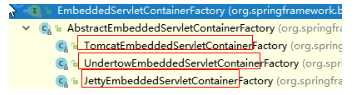
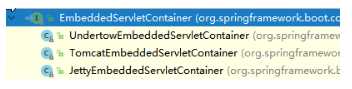
2)、EmbeddedServletContainer:(嵌入式的Servlet容器)
3)、以TomcatEmbeddedServletContainerFactory为例
@Override
public EmbeddedServletContainer getEmbeddedServletContainer(
      ServletContextInitializer... initializers) {
    //创建一个Tomcat
   Tomcat tomcat = new Tomcat();

    //配置Tomcat的基本环节
   File baseDir = (this.baseDirectory != null ? this.baseDirectory
         : createTempDir("tomcat"));
   tomcat.setBaseDir(baseDir.getAbsolutePath());
   Connector connector = new Connector(this.protocol);
   tomcat.getService().addConnector(connector);
   customizeConnector(connector);
   tomcat.setConnector(connector);
   tomcat.getHost().setAutoDeploy(false);
   configureEngine(tomcat.getEngine());
   for (Connector additionalConnector : this.additionalTomcatConnectors) {
      tomcat.getService().addConnector(additionalConnector);
   }
   prepareContext(tomcat.getHost(), initializers);

    //将配置好的Tomcat传入进去,返回一个EmbeddedServletContainer;并且启动Tomcat服务器
   return getTomcatEmbeddedServletContainer(tomcat);
}
4)、我们对嵌入式容器的配置修改是怎么生效?
ServerProperties、EmbeddedServletContainerCustomizer
EmbeddedServletContainerCustomizer:定制器帮我们修改了Servlet容器的配置?
怎么修改的原理?
5)、容器中导入了EmbeddedServletContainerCustomizerBeanPostProcessor
//初始化之前(容器刚创建好,还未进行属性赋值)
@Override
public Object postProcessBeforeInitialization(Object bean, String beanName)
      throws BeansException {
    //如果当前初始化的是一个ConfigurableEmbeddedServletContainer类型的组件
   if (bean instanceof ConfigurableEmbeddedServletContainer) {
      postProcessBeforeInitialization((ConfigurableEmbeddedServletContainer) bean);
   }
   return bean;
}

private void postProcessBeforeInitialization(ConfigurableEmbeddedServletContainer bean) {
    //获取所有的定制器,调用每一个定制器的customize方法来给Servlet容器进行属性赋值;
    for (EmbeddedServletContainerCustomizer customizer : getCustomizers()) {
        customizer.customize(bean);
    }
}

private Collection<EmbeddedServletContainerCustomizer> getCustomizers() {
    if (this.customizers == null) {
        // Look up does not include the parent context
        this.customizers = new ArrayList<EmbeddedServletContainerCustomizer>(
            this.beanFactory
            //从容器中获取所有这个类型的组件:EmbeddedServletContainerCustomizer
            //定制Servlet容器,给容器中可以添加一个EmbeddedServletContainerCustomizer类型的组件
            .getBeansOfType(EmbeddedServletContainerCustomizer.class,
                            false, false)
            .values());
        Collections.sort(this.customizers, AnnotationAwareOrderComparator.INSTANCE);
        this.customizers = Collections.unmodifiableList(this.customizers);
    }
    return this.customizers;
}

ServerProperties也是定制器,它实现了 EmbeddedServletContainerCustomizer
步骤:
1)、SpringBoot根据导入的依赖情况,给容器中添加相应的EmbeddedServletContainerFactory【TomcatEmbeddedServletContainerFactory】
2)、容器中某个组件要创建对象就会惊动后置处理器;EmbeddedServletContainerCustomizerBeanPostProcessor;
只要是嵌入式的Servlet容器工厂,后置处理器就工作;
3)、后置处理器,从容器中获取所有的EmbeddedServletContainerCustomizer,调用定制器的定制方法
什么时候创建嵌入式的Servlet容器工厂?什么时候获取嵌入式的Servlet容器并启动Tomcat;
获取嵌入式的Servlet容器工厂:
1)、SpringBoot应用启动运行run方法
2)、refreshContext(context);SpringBoot刷新IOC容器【创建IOC容器对象,并初始化容器,创建容器中的每一个组件】;如果是web应用创建AnnotationConfigEmbeddedWebApplicationContext,否则:AnnotationConfigApplicationContext
3)、refresh(context);刷新刚才创建好的ioc容器;
public void refresh() throws BeansException, IllegalStateException {
   synchronized (this.startupShutdownMonitor) {
      // Prepare this context for refreshing.
      prepareRefresh();

      // Tell the subclass to refresh the internal bean factory.
      ConfigurableListableBeanFactory beanFactory = obtainFreshBeanFactory();

      // Prepare the bean factory for use in this context.
      prepareBeanFactory(beanFactory);

      try {
         // Allows post-processing of the bean factory in context subclasses.
         postProcessBeanFactory(beanFactory);

         // Invoke factory processors registered as beans in the context.
         invokeBeanFactoryPostProcessors(beanFactory);

         // Register bean processors that intercept bean creation.
         registerBeanPostProcessors(beanFactory);

         // Initialize message source for this context.
         initMessageSource();

         // Initialize event multicaster for this context.
         initApplicationEventMulticaster();

         // Initialize other special beans in specific context subclasses.
         onRefresh(); // 刷新容器:从而创建嵌入式的Servlet容器

         // Check for listener beans and register them.
         registerListeners();

         // Instantiate all remaining (non-lazy-init) singletons.
         finishBeanFactoryInitialization(beanFactory);

         // Last step: publish corresponding event.
         finishRefresh();
      }

      catch (BeansException ex) {
         if (logger.isWarnEnabled()) {
            logger.warn("Exception encountered during context initialization - " +
                  "cancelling refresh attempt: " + ex);
         }

         // Destroy already created singletons to avoid dangling resources.
         destroyBeans();

         // Reset ‘active‘ flag.
         cancelRefresh(ex);

         // Propagate exception to caller.
         throw ex;
      }

      finally {
         // Reset common introspection caches in Spring‘s core, since we
         // might not ever need metadata for singleton beans anymore...
         resetCommonCaches();
      }
   }
}
4)、 onRefresh(); web的ioc容器重写了onRefresh方法
5)、webioc容器会创建嵌入式的Servlet容器;createEmbeddedServletContainer();
6)、获取嵌入式的Servlet容器工厂:
EmbeddedServletContainerFactory containerFactory = getEmbeddedServletContainerFactory();
? 从ioc容器中获取EmbeddedServletContainerFactory 组件;TomcatEmbeddedServletContainerFactory创建对象,后置处理器一看是这个对象,就获取所有的定制器来先定制Servlet容器的相关配置;
7)、使用容器工厂获取嵌入式的Servlet容器:this.embeddedServletContainer = containerFactory.getEmbeddedServletContainer(getSelfInitializer());
8)、嵌入式的Servlet容器创建对象并启动Servlet容器;
先启动嵌入式的Servlet容器,再将ioc容器中剩下没有创建出的对象获取出来;
IOC容器启动创建嵌入式的Servlet容器
嵌入式Servlet容器:应用打成可执行的jar
? 优点:简单、便携;
? 缺点:默认不支持JSP、优化定制比较复杂(使用定制器【ServerProperties、自定义EmbeddedServletContainerCustomizer】,自己编写嵌入式Servlet容器的创建工厂【EmbeddedServletContainerFactory】);
外置的Servlet容器:外面安装Tomcat---应用war包的方式打包;
1)、必须创建一个war项目;(利用idea创建好目录结构)
2)、将嵌入式的Tomcat指定为provided;(目标Tomcat环境已经有了,不需要在打包时带上tomcat)
<dependency>
   <groupId>org.springframework.boot</groupId>
   <artifactId>spring-boot-starter-tomcat</artifactId>
   <scope>provided</scope>
</dependency>
3)、必须编写一个SpringBootServletInitializer的子类,并调用configure方法(固定写法)
public class    extends SpringBootServletInitializer {

   @Override
   protected SpringApplicationBuilder configure(SpringApplicationBuilder application) {
       //传入SpringBoot应用的主程序
      return application.sources(SpringBoot04WebJspApplication.class);
   }

}
4)、启动服务器就可以使用;
jar包:执行SpringBoot主类的main方法,启动ioc容器,创建嵌入式的Servlet容器;
war包:启动服务器,服务器启动SpringBoot应用【SpringBootServletInitializer】,启动ioc容器;
servlet3.0(Spring注解版):
8.2.4 Shared libraries / runtimes pluggability:
规则:
? 1)、服务器启动(web应用启动)会创建当前web应用里面每一个jar包里面ServletContainerInitializer实例:
? 2)、ServletContainerInitializer的实现放在jar包的META-INF/services文件夹下,有一个名为javax.servlet.ServletContainerInitializer的文件,内容就是ServletContainerInitializer的实现类的全类名
? 3)、还可以使用@HandlesTypes,在应用启动的时候加载我们感兴趣的类;
流程:
1)、启动Tomcat
2)、org\springframework\spring-web\4.3.14.RELEASE\spring-web-4.3.14.RELEASE.jar!\META-INF\services\javax.servlet.ServletContainerInitializer:
Spring的web模块里面有这个文件:org.springframework.web.SpringServletContainerInitializer
3)、SpringServletContainerInitializer将@HandlesTypes(WebApplicationInitializer.class)标注的所有这个类型的类都传入到onStartup方法的Set<Class<?>>;为这些WebApplicationInitializer类型的类创建实例;
4)、每一个WebApplicationInitializer都调用自己的onStartup;
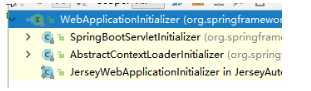
5)、相当于我们自定义的SpringBootServletInitializer的类会被创建对象,并执行onStartup方法
6)、SpringBootServletInitializer实例执行onStartup的时候会createRootApplicationContext;创建容器
protected WebApplicationContext createRootApplicationContext(
      ServletContext servletContext) {
    //1、创建SpringApplicationBuilder
   SpringApplicationBuilder builder = createSpringApplicationBuilder();
   StandardServletEnvironment environment = new StandardServletEnvironment();
   environment.initPropertySources(servletContext, null);
   builder.environment(environment);
   builder.main(getClass());
   ApplicationContext parent = getExistingRootWebApplicationContext(servletContext);
   if (parent != null) {
      this.logger.info("Root context already created (using as parent).");
      servletContext.setAttribute(
            WebApplicationContext.ROOT_WEB_APPLICATION_CONTEXT_ATTRIBUTE, null);
      builder.initializers(new ParentContextApplicationContextInitializer(parent));
   }
   builder.initializers(
         new ServletContextApplicationContextInitializer(servletContext));
   builder.contextClass(AnnotationConfigEmbeddedWebApplicationContext.class);

    //调用configure方法,子类重写了这个方法,将SpringBoot的主程序类传入了进来
   builder = configure(builder);

    //使用builder创建一个Spring应用
   SpringApplication application = builder.build();
   if (application.getSources().isEmpty() && AnnotationUtils
         .findAnnotation(getClass(), Configuration.class) != null) {
      application.getSources().add(getClass());
   }
   Assert.state(!application.getSources().isEmpty(),
         "No SpringApplication sources have been defined. Either override the "
               + "configure method or add an @Configuration annotation");
   // Ensure error pages are registered
   if (this.registerErrorPageFilter) {
      application.getSources().add(ErrorPageFilterConfiguration.class);
   }
    //启动Spring应用
   return run(application);
}
7)、Spring的应用就启动并且创建IOC容器
public ConfigurableApplicationContext run(String... args) {
   StopWatch stopWatch = new StopWatch();
   stopWatch.start();
   ConfigurableApplicationContext context = null;
   FailureAnalyzers analyzers = null;
   configureHeadlessProperty();
   SpringApplicationRunListeners listeners = getRunListeners(args);
   listeners.starting();
   try {
      ApplicationArguments applicationArguments = new DefaultApplicationArguments(
            args);
      ConfigurableEnvironment environment = prepareEnvironment(listeners,
            applicationArguments);
      Banner printedBanner = printBanner(environment);
      context = createApplicationContext();
      analyzers = new FailureAnalyzers(context);
      prepareContext(context, environment, listeners, applicationArguments,
            printedBanner);

       //刷新IOC容器
      refreshContext(context);
      afterRefresh(context, applicationArguments);
      listeners.finished(context, null);
      stopWatch.stop();
      if (this.logStartupInfo) {
         new StartupInfoLogger(this.mainApplicationClass)
               .logStarted(getApplicationLog(), stopWatch);
      }
      return context;
   }
   catch (Throwable ex) {
      handleRunFailure(context, listeners, analyzers, ex);
      throw new IllegalStateException(ex);
   }
}
启动Servlet容器,再启动SpringBoot应用
原文:https://www.cnblogs.com/JayV/p/13678664.html