
TrueFalsestatic:没有定位,元素出现在正常的流中fixed:生成绝对定位的元素,相对于父元素进行定位relative:生成相对定位的元素,相对于元素本身正常位置进行定位absolute:生成绝对定位的元素,相对于 static 定位以外的第一个祖先元素进行定位span 的宽高分别是?<div style="width: 400px;height: 200px;">
<span style="float: left;width: auto;height: 100%;">
<i style="position: absolute;float: left;width: 100px;height: 100px;">hello</i>
</span>
</div>
width = 0px,height = 0pxwidth = 400px,height = 200pxwidth = 100px,height = 50pxwidth = 0px,height = 200px–webkit–trident–ie–ms<div style="clear:both"></div>clearfix类,给父元素添加clearfix类<style>
.list{color:black}
.list>li:nth-child(2n){color:red}
.list>li:nth-child(3n+1){color:green}
.list>li:nth-child(3n+2){color:blue}
</style>
<ul class="list">
<li>1</li>
<li>2</li>
<li>3</li>
<li>4</li>
<li>5</li>
<li>6</li>
<li>7</li>
<li>8</li>
<li>9</li>
<li>10</li>
</ul>
s1.css 和 s2.css 的描述有哪些是正确的?s1.css 和 s2.css 并行加载,先加载完成的优先解析s1.css和s2.css中有相同的选择器规则,那么s2.css中的规则将合并s1.css的规则s2.css只有在s1.css加载并解析后,才开始加载s1.css和s2.css中有相同的选择器规则,那么s2.css中的规则将被忽略<input>元素的type属性的取值可以是?picturecheckboxbuttonselectzoom:1display:inline-blockfloat:leftpoistion : absolutedisplay: flow-root
<span> some long text<span>里面的文本,超出用...替代
50px*50px,hover 时边框变成红色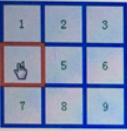
<div class="box"></div>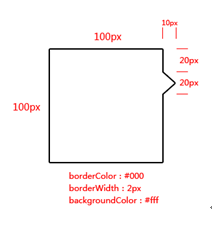
原文:https://www.cnblogs.com/fuyanz/p/14291485.html