
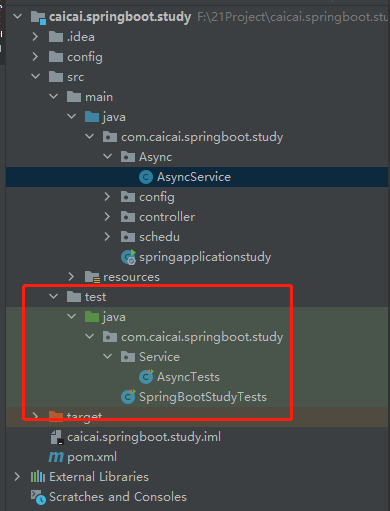
编写功能测试类之前,需要先编写一个验证环境测试方法,来验证当前环境是否正常。
编写测试一般需要声明两个注解
SpringBootTest //带有Springboot 引导程序,可执行的web参数
RunWith //告诉junit,运行Spring 支持测试库
package com.caicai.springboot.study;

import org.junit.Test;
import org.junit.runner.RunWith;
import org.springframework.boot.test.context.SpringBootTest;
import org.springframework.test.context.junit4.SpringRunner;

/*
* SpringBoot 测试类
*
* 环境依赖与主应用配置
* */
@SpringBootTest //带有Spring Boot 的引导程序 可以执行web参数
@RunWith(SpringRunner.class)//告诉JUnit 去运行Spring 测试支持
public class SpringBootStudyTests {
    //校验当前环境是否正常
    @Test
   public void contextLoad(){


   }

}
3.1 新建一个package 例如service
编写正式测试类,同样 需要两个注解,@SpringBootTest @RunWith 这是不变的。
具体实现方式,需要将想测试的功能使用@Autowired 注如当前功能类中
在每一个测试方法,前面加入@Test 注解
package com.caicai.springboot.study.Service;

import com.caicai.springboot.study.Async.AsyncService;
import lombok.extern.slf4j.Slf4j;
import org.junit.Test;
import org.junit.runner.RunWith;
import org.springframework.beans.factory.annotation.Autowired;
import org.springframework.boot.test.context.SpringBootTest;
import org.springframework.test.context.junit4.SpringRunner;

import java.util.concurrent.Future;
import java.util.concurrent.TimeUnit;

/*
* 异步服务功能测试
*
* */
@Slf4j
@SpringBootTest //带有Spring Boot 的引导程序 可以执行web参数
@RunWith(SpringRunner.class)//告诉JUnit 去运行Spring 测试支持
public class AsyncTests {
    @Autowired //自动注入,将AsyncService类注入进来
    private AsyncService asyncService;
    @Test
    public void TestAsyncService() throws InterruptedException {
       asyncService.AsyncProcess();
       log.info("Test AsynServices........");

   }

   @Test
   public void TestAsyncProcessHasReturn() throws Exception  {
      Future<Integer> result =  asyncService.AsyncProcessHasReturn();
      log.info("current start TestAsyncProcessHasReturn ......... ");
      long start = System.currentTimeMillis();
//      log.info("get Async value : {}",result.get());
       log.info("get Async value : {}",result.get(1, TimeUnit.SECONDS));//设置超时时间,如果一秒没有返回,就报异常
      log.info("time elapse for async task: {}ms",System.currentTimeMillis()-start);

   }

}
原文:https://www.cnblogs.com/caicai920/p/14352838.html