
一、验证码类
@WebServlet(urlPatterns = {"/WEB-INF/jsp/authImg.jsp"})
public class AuthImg extends HttpServlet {
    /**
     * 验证码难度级别 Simple-数字 Medium-数字和小写字母 Hard-数字和大小写字母
     */
    public enum SecurityCodeLevel {
        Simple, Medium, Hard
    };
    /**
     * 产生默认验证码,4位中等难度
     *
     * @return
     */
    public static String getSecurityCode() {
        return getSecurityCode(4, SecurityCodeLevel.Medium, false);
    }
    /**
     * 产生长度和难度任意的验证码
     *
     * @param length
     * @param level
     * @param isCanRepeat
     * @return
     */
    public static String getSecurityCode(int length, SecurityCodeLevel level, boolean isCanRepeat) {
        // 随机抽取len个字符
        int len = length;
        // 字符集合(--除去易混淆的数字0,1,字母l,o,O)
        char[] codes = {
                ‘0‘, ‘1‘, ‘2‘, ‘3‘, ‘4‘, ‘5‘, ‘6‘, ‘7‘, ‘8‘, ‘9‘,
                ‘a‘, ‘b‘, ‘c‘, ‘d‘, ‘e‘, ‘f‘, ‘g‘, ‘h‘, ‘i‘, ‘j‘, ‘k‘, ‘l‘, ‘m‘, ‘n‘, ‘o‘, ‘p‘, ‘q‘, ‘r‘, ‘s‘, ‘t‘, ‘u‘, ‘v‘, ‘w‘, ‘x‘, ‘y‘, ‘z‘,
                ‘A‘, ‘B‘, ‘C‘, ‘D‘, ‘E‘, ‘F‘, ‘G‘, ‘H‘, ‘I‘, ‘J‘, ‘K‘, ‘L‘, ‘M‘, ‘N‘, ‘O‘, ‘P‘, ‘Q‘, ‘R‘, ‘S‘, ‘T‘, ‘U‘, ‘V‘, ‘W‘, ‘X‘, ‘Y‘, ‘Z‘
        };
        // 根据不同难度截取字符串
        if (level == SecurityCodeLevel.Simple) {
            codes = Arrays.copyOfRange(codes, 0, 10);
        } else if (level == SecurityCodeLevel.Medium) {
            codes = Arrays.copyOfRange(codes, 0, 36);
        }
        // 字符集和长度
        int n = codes.length;
        // 抛出运行时异常
        if (len > n && isCanRepeat == false) {
            throw new RuntimeException(String.format("调用SecurityCode.getSecurityCode(%1$s,%2$s,%3$s)出现异常," + "当isCanRepeat为%3$s时,传入参数%1$s不能大于%4$s", len, level, isCanRepeat, n));
        }
        // 存放抽取出来的字符
        char[] result = new char[len];
        // 判断能否出现重复字符
        if (isCanRepeat) {
            for (int i = 0; i < result.length; i++) {
                // 索引0 and n-1
                int r = (int) (Math.random() * n);
                // 将result中的第i个元素设置为code[r]存放的数值
                result[i] = codes[r];
            }
        } else {
            for (int i = 0; i < result.length; i++) {
                // 索引0 and n-1
                int r = (int) (Math.random() * n);
                // 将result中的第i个元素设置为code[r]存放的数值
                result[i] = codes[r];
                // 必须确保不会再次抽取到那个字符,这里用数组中最后一个字符改写code[r],并将n-1
                codes[r] = codes[n - 1];
                n--;
            }
        }
        return String.valueOf(result);
    }
    /**
     * 生成验证码图片
     * @param securityCode
     * @return
     */
    public static BufferedImage createImage(String securityCode){
        int codeLength = securityCode.length();//验证码长度
        int fontSize = 18;//字体大小
        int fontWidth = fontSize+1;
        //图片宽高
        int width = codeLength*fontWidth+6;
        int height = fontSize*2+1;
        //图片
        BufferedImage image = new BufferedImage(width, height, BufferedImage.TYPE_INT_RGB);
        Graphics2D g = image.createGraphics();
        g.setColor(Color.WHITE);//设置背景色
        g.fillRect(0, 0, width, height);//填充背景
        g.setColor(Color.LIGHT_GRAY);//设置边框颜色
        g.setFont(new Font("Arial", Font.BOLD, height-2));//边框字体样式
        g.drawRect(0, 0, width-1, height-1);//绘制边框
        //绘制噪点
        Random rand = new Random();
        g.setColor(Color.LIGHT_GRAY);
        for (int i = 0; i < codeLength*6; i++) {
            int x = rand.nextInt(width);
            int y = rand.nextInt(height);
            g.drawRect(x, y, 1, 1);//绘制1*1大小的矩形
        }
        //绘制验证码
        int codeY = height-10;
        g.setColor(new Color(19,148,246));
        //Georgia  是个字体,如果想用中文要指定中文字体;eg:"宋体";
        //g.setFont(new Font("Georgia", Font.BOLD, fontSize));
        g.setFont(new Font("宋体", Font.BOLD, fontSize));
        for(int i=0;i<codeLength;i++){
            double deg=new Random().nextDouble()*20;
            g.rotate(Math.toRadians(deg), i*16+13,codeY-7.5);
            g.drawString(String.valueOf(securityCode.charAt(i)), i*16+5, codeY);
            g.rotate(Math.toRadians(-deg), i*16+13,codeY-7.5);
        }
        g.dispose();//关闭资源
        return image;
    }
}
二、配置控制器
@Controller
@RequestMapping("/user")
public class CommonController {

    //生成验证码
    @GetMapping("authImg")
    public void authImg(HttpSession session, HttpServletResponse response) throws IOException {
        //生成验证码
        String securityCode = AuthImg.getSecurityCode();
        //将验证码放入session
        session.setAttribute("code",securityCode);
        //生成图片
        BufferedImage image = AuthImg.createImage(securityCode);
        //输出图片
        ServletOutputStream outputStream = response.getOutputStream();
        //调用工具类
        ImageIO.write(image,"png",outputStream);
    }
}
三、前端部分
<div class="form-group row">
        <label for="vercode" class="col-sm-2 control-label">验证码:</label>
        <div class="col-sm-4">
          <input type="text" class="form-control" id="vercode"
            name="vercode" placeholder="验证码">
        </div>
        <div class="col-sm-3">
          <img id="num" name="d" src="user/authImg">
          <a href="javascript:;" onclick="document.getElementById(‘num‘).src = ‘/user/authImg?‘+(new Date()).getTime()">换一张</a>
        </div>
      </div>
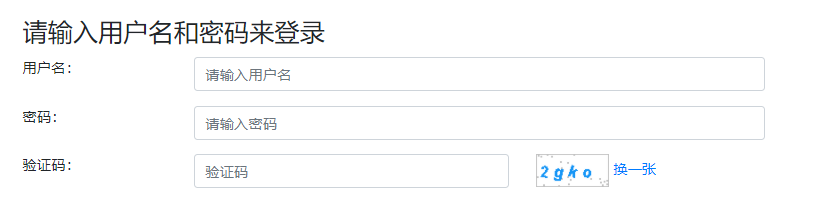
展示效果:
原文:https://www.cnblogs.com/jiujixin/p/14515110.html