
前提:必须先安装了element-ui
自定义开发带分页以及搜索框的select
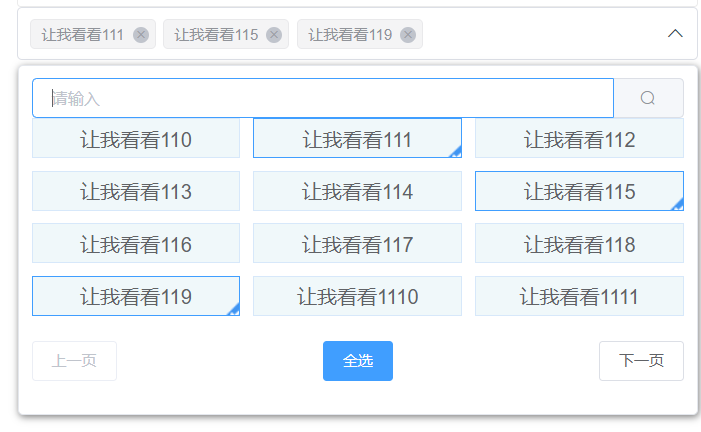
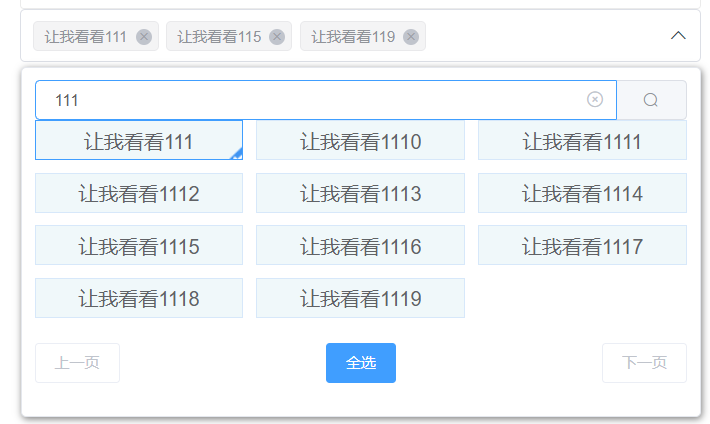
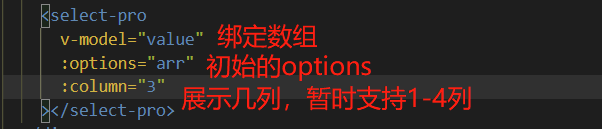
用法
select.vue文件
<template>
  <div v-clickoutside="()=>visible=false" class="com-select">
    <div ref="reference" class="com-select-input" @click="clickSelectInput">
      <div class="one"></div>
      <!-- tags展示 -->
      <div class="two">
        <template v-if="isCheckAll">
          <el-tag
            size="small"
            closable
            hit
            type="info"
            disable-transitions
            @close="cancelCheckAll()">
            <span class="el-select__tags-text">全选</span>
          </el-tag>
        </template>
        <template v-else>
          <el-tag
            v-for="item in selectedArr"
            :key="item.value"
            size="small"
            closable
            hit
            type="info"
            disable-transitions
            @close="deleteTag(item)">
            <span class="el-select__tags-text">{{ item.label }}</span>
          </el-tag>
        </template>
      </div>
      <div
        class="three"
        @mouseenter.stop="inputHovering = true"
        @mouseleave.stop="inputHovering = false"
      >
        <i v-if="showClose" class="el-select__caret el-input__icon el-icon-circle-close" @click.stop="cancelCheckAll"></i>
        <i v-else :class="`el-icon-arrow-${visible ? ‘up‘ : ‘down‘} el-select__caret el-input__icon`"></i>
      </div>
    </div>
    <transition name="el-zoom-in-top">
      <!-- 下拉框 -->
      <the-select-menu
        v-show="visible"
        ref="popper"
        append-to-body>
        <!-- 搜索框 -->
        <el-input v-model="queryVal" placeholder="请输入" size="small" clearable @input="handleSearch" @keyup.enter.native="handleSearch">
          <el-button slot="append" icon="el-icon-search" @click="handleSearch"></el-button>
        </el-input>
        <!-- select选项 -->
        <div class="com-select-body">
          <div
            v-for="(item, i) in list"
            v-show="isShowFilterArr ? item._isShow : item.isShow"
            :key="item.value"
            :title="item.label"
            :style="formatColumn()"
            :class="[‘com-option‘, {‘selected‘: item.selected,}]"
            @click="selectOptionClick(item, i)"
          >
            {{ item.label }}
          </div>
          <div v-if="list.length === 0" class="com-select-nodata">暂无数据</div>
          <template v-if="nextPageStaus">
            <i :style="formatColumn()" v-for="v in 3" :key="‘AA‘ + v"></i>
          </template>
        </div>
        <!-- 分页 -->
        <div class="com-footer-page">
          <el-button size="small" :disabled="prePageStaus" @click="prePage">上一页</el-button>
          <el-button type="primary" size="small" @click="checkAll">全选</el-button>
          <el-button size="small" :disabled="nextPageStaus" @click="nextPage">下一页</el-button>
        </div>
      </the-select-menu>
    </transition>
  </div>
</template>

<script>
import TheSelectMenu from ‘./select-dropdown.vue‘;
import Clickoutside from ‘element-ui/src/utils/clickoutside‘;
export default {
  name: ‘SelectPro‘,
  components: { TheSelectMenu },
  directives: { Clickoutside },
  props: {
    value: {
      type: Array,
      default: () => [],
      required: true
    },
    options: {
      type: Array,
      default: () => []
    },
    column: {
      type: Number,
      default: 3
    }
  },
  data() {
    return {
      optionArr: this.initOptions(),
      inputHovering: false,
      selectedArr: [],
      filterArr: [],
      queryVal: ‘‘,
      visible: false,
      pageSize: this.column * 4,
      currentPage: 1,
      filterCurrentPage: 1
    };
  },
  computed: {
    list() {
      return this.isShowFilterArr ? this.filterArr : this.optionArr;
    },
    isCheckAll() {
      return this.selectedArr.length === this.optionArr.length;
    },
    isShowFilterArr() {
      return this.filterArr.length > 0 || this.queryVal !== ‘‘;
    },
    showClose() {
      return this.selectedArr.length > 0 && this.inputHovering;
    },
    prePageStaus() {
      if (this.isShowFilterArr ? this.filterCurrentPage === 1 : this.currentPage === 1) {
        return true;
      }
      return false;
    },
    nextPageStaus() {
      const len =  Math.ceil(this.list.length / this.pageSize);
      if (len === 0) return true;
      if (this.isShowFilterArr ? this.filterCurrentPage === len : this.currentPage === len) {
        return true;
      }
      return false;
    }
  },
  watch: {
    selectedArr(val) {
      const arr = val.map(item => {
        return item.value;
      });
      this.$emit(‘input‘, arr);
    },
    // value(val, oldVal) {
    //   console.log(‘v-model===>‘,val, oldVal);
    // }
  },
  mounted() {
    // 默认选中
    this.optionArr.forEach(item => {
      if (this.value.includes(item.value)) {
        this.selectedArr.push(item);
      }
    });
  },
  methods: {
    initOptions() {
      return this.options.map((item, i) => {
        return {
          isShow: i < this.column * 4,
          _isShow: false,
          selected: this.value.includes(item.value),
          ...item
        };
      });
    },
    deleteTag(item) { // 删除当前tag
      this.selectedArr.some((v, i) => {
        if (v.value === item.value) {
          item.selected = false;
          this.selectedArr.splice(i, 1);
          return true;
        }
      });
    },
    handleSearch() { // 搜索过滤
      if (this.queryVal === ‘‘) { // 输入框清空时
        this.filterArr = [];
        return;
      }
      console.log(this.queryVal);
      // 搜索前清除之前搜索的
      this.filterArr = [];
      // 重置搜索数组分页
      this.filterCurrentPage = 1;
      let num = 0;
      this.optionArr.forEach(item => {
        if (item.label.indexOf(this.queryVal) !== -1) { // 如果like 输入值
          item._isShow = num < this.pageSize; // 只展示一页的结果
          this.filterArr.push(item);
          num++;
        }
      });
    },
    clickSelectInput() { // 点击输入框
      this.visible = !this.visible;
    },
    selectOptionClick(item, index) { // 单击check
      item.selected = !item.selected;
      // 如果已经选过
      if (this.selectedArr.some(v => v.value === item.value)) {
        this.deleteTag(item);
      } else {
        this.selectedArr.push(item);
      }
    },
    checkAll() { // 全选
      this.selectedArr = [];
      this.optionArr.forEach(item => {
        item.selected = true;
        this.selectedArr.push(item);
      });
    },
    cancelCheckAll() { // 取消全选
      this.optionArr.forEach(item => {
        item.selected = false;
      });
      this.selectedArr = [];
    },
    prePage() { // 上一页
      if (this.isShowFilterArr) { // 搜索展示时
        this.changeFilterPageShow(false);
        this.filterCurrentPage--;
        this.changeFilterPageShow(true);
      } else {
        this.changePageShow(false);
        this.currentPage--;
        this.changePageShow(true);
      }
    },
    nextPage() { // 下一页
      if (this.isShowFilterArr) { // 搜索展示时
        this.changeFilterPageShow(false);
        this.filterCurrentPage++;
        this.changeFilterPageShow(true);
      } else {
        this.changePageShow(false);
        this.currentPage++
        this.changePageShow(true);
      }
    },
    changePageShow(isOrNo) { // 改变当前页状态
      const num = (this.currentPage - 1) * this.pageSize;
      const num2 = num + this.pageSize;
      for (let index = num; index < num2; index++) {
        if (this.optionArr[index]) this.optionArr[index].isShow = isOrNo;
      }
    },
    changeFilterPageShow(isOrNo) { // 改变搜索当前页状态
      const num = (this.filterCurrentPage - 1) * this.pageSize;
      const num2 = num + this.pageSize;
      for (let index = num; index < num2; index++) {
        if (this.filterArr[index]) this.filterArr[index]._isShow = isOrNo;
      }
    },
    formatColumn() {
      // 展示多少列
      if (this.column === 1) {
        return { width: ‘100%‘ };
      } else if (this.column === 2) {
        return { width: ‘49%‘ };
      } else if (this.column === 3) {
        return { width: ‘32%‘ };
      } else {
        return { width: ‘24%‘ };
      }
    }
  }
};
</script>
<style lang="less" scoped>
.com-select {
  box-sizing: border-box;
  border-radius: 4px;
  border: 1px solid #DCDFE6;
  cursor: pointer;
  background: #ffffff;
  .com-select-input {
    display: flex;
    align-items: center;
    .one {
      width: 10px;
    }
    .two {
      flex: 1;
      line-height: 29px;
      padding: 0 0 1px 0;
      /deep/ .el-tag {
        background-color: #f4f4f5;
        border-color: #e9e9eb;
        color: #909399;
        margin-right: 6px;
      }
      /deep/ .el-tag__close.el-icon-close {
        background-color: #C0C4CC;
      }
    }
    .three {
      width: 30px;
    }
  }
}
.el-select-dropdown {
  height: 280px;
  padding: 10px;
  border: 1px solid #E4E7ED;
  border-radius: 4px;
  box-shadow: 1px 2px 6px 0px #7d7d7d;
  box-sizing: border-box;
  cursor: default;
  .com-select-body {
    height: 178px;
    display: flex;
    flex-wrap: wrap;
    justify-content: space-between;
    align-content: flex-start;
    .com-option {
      // width: 32%;
      white-space: nowrap;
      overflow: hidden;
      text-overflow: ellipsis;
      color: #606266;
      background-color: rgb(240, 248, 250);
      border: 1px solid #d7e8fa;
      height: 32px;
      line-height: 32px;
      box-sizing: border-box;
      position: relative;
      text-align: center;
      margin-bottom: 10px;
      cursor: pointer;
    }
    // 选中样式
    .selected {
      border-color: #409EFF;
      &::after{
        content: ‘‘;
        width: 15px;
        height: 14px;
        background: url("./check.png") no-repeat 0 0;
        position: absolute;
        right: 0;
        bottom: 0;
      }
    }
    .com-select-nodata {
      width: 100%;
      text-align: center;
    }
  }
  // 分页样式
  .com-footer-page {
    display: flex;
    justify-content: space-between;
  }
}
</style>
select-down.vue文件
<template>
  <div
    class="el-select-dropdown el-popper"
    :style="{ width: width }">
    <slot></slot>
  </div>
</template>

<script>
export default {
  name: ‘MySelectDropdown‘,
  data() {
    return {
      width: ‘‘
    };
  },
  mounted() {
    this.width = this.$parent.$el.clientWidth + ‘px‘;
    window.addEventListener(‘resize‘, this.resizeWindth);
  },
  methods: {
    resizeWindth() {
      this.width = this.$parent.$el.clientWidth + ‘px‘;
    }
  }
};
</script>
原文:https://www.cnblogs.com/bobo1/p/14998508.html