
$attrs的使用示例(父组件的列表行数据传递给孙子组件展示)<template>
<div>
<el-table :data=‘list‘>
<el-table-column prop="name" label="姓名"></el-table-column>
<el-table-column prop="study" label="学习科目"></el-table-column>
<el-table-column label="操作">
<template slot-scope="scope">
<el-button @click=‘transmitClick(scope.row)‘>传递</el-button>
</template>
</el-table-column>
</el-table>
<!-- 儿子组件 -->
<ChildView :is-show="isOpen" :row="row" :abc="123"></ChildView>
</div>
</template>
<script>
import ChildView from ‘./Child.vue‘
export default {
components: { ChildView },
data() {
return {
isOpen: false,
row: {},
list: [
{ name: ‘王丽‘, study: ‘Java‘ },
{ name: ‘李克‘, study: ‘Python‘ }
]
}
},
methods: {
// 传递事件
transmitClick(row) {
this.isOpen = true;
this.row = row
}
}
}
</script>
v-bind="$attrs",这样孙子组件才能接收到数据。<template>
<div class=‘child-view‘>
<p>儿子组件</p>
<GrandChild v-bind="$attrs"></GrandChild>
</div>
</template>
<script>
import GrandChild from ‘./GrandChild.vue‘
export default {
// 继承所有父组件的内容
inheritAttrs: true,
components: { GrandChild },
data() {
return {}
}
}
</script>
<style>
.child-view {
margin: 20px;
border: 2px solid red;
padding: 20px;
}
</style>
<template>
  <div class=‘grand-child-view‘>
    <p>孙子组件</p>
    <p>传给孙子组件的数据:{{row.name}} {{row.name !== undefined? ‘学习‘ : ‘‘}} {{row.study}}</p>
  </div>
</template>

<script>
export default {
  // 不想继承所有父组件的内容,同时也不在组件根元素dom上显示属性
  inheritAttrs: false,
  // 在本组件中需要接收从父组件传递过来的数据,注意props里的参数名称不能改变,必须和父组件传递过来的是一样的
  props: {
    isShow: {
      type: Boolean,
      dedault: false
    },
    row: {
      type: Object,
      dedault: () => { }
    }
  }
}
</script>

<style>
.grand-child-view {
  border: 2px solid green;
  padding: 20px;
  margin: 20px;
}
</style>
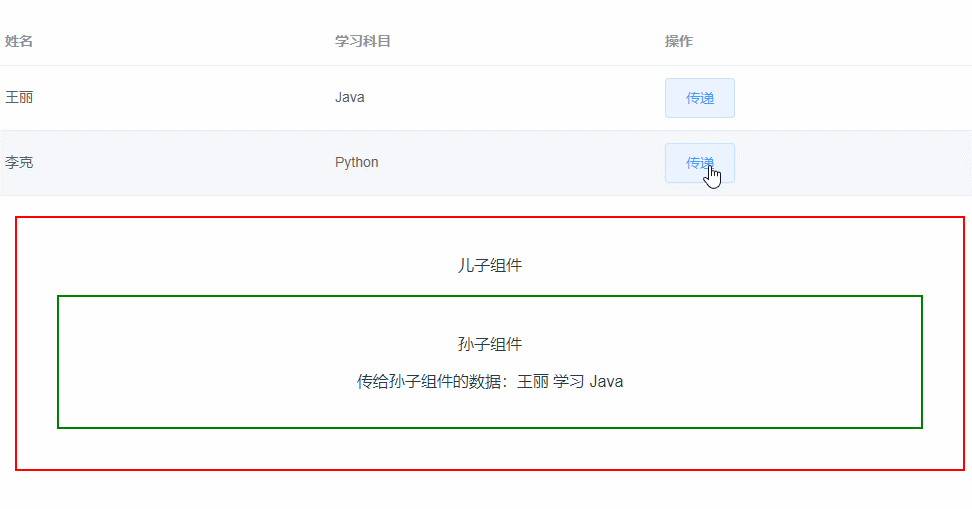
结果:
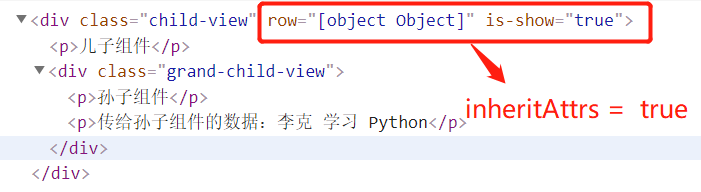
在上面提过,如果给子组件传递的数据,子组件不使用props接收,那么这些数据将作为子组件的特性,这些特性绑定在组件的HTML根元素上,在vue2.40版本之后,可以通过inheritAttrs = false 来控制这些特性是否显示在dom元素上 如:案例中父组件给子组件传递的row和isShow,子组件没有使用props接收,这个2个数据直接作为HTML的特殊属性。子组件使用inheritAttrs = true,那么特性显示在dom上,如果设置为false,那么特性不显示在dom上。
原文:https://www.cnblogs.com/zjianfei/p/15035832.html