
简述:公司已经有mrtg画流量图了,这里需要对现有的流量图汇总。想利用rrdtool画出总流量图。
1.了解mrtg log格式:
2.汇总mrtg日志:
[root@hj addflow]# cat addflow.sh
#!/bin/sh
if [ $# -ne 3 ] ; then
    echo "usage: $0 log_file log_dir swfile"
    echo "Example usage: $0 all_sw.log all all_sw"
    exit 1
fi
curdir="/usr/local/NetFlow/All_mrtg_log"
vlan1="$curdir/$1"
swfile="$curdir/$2"
swlog=`cat $swfile`
log_dir=$3
for i in $swlog
do
  rsync -avL --timeout=120 $curdir/log/$i $curdir/addflow/$log_dir
done
#getti()
#{
#    ti=$1
#}
#while read LINE
#do
#    getti $LINE
#    break
#done < $vlan1
addto()
{
    to1=`expr $to1 + $2 `
    to2=`expr $to3 + $3 `
}
addport()
{
    ti1=`expr $ti1 + $2 `
    ti2=`expr $ti2 + $3 `
    ti3=`expr $ti3 + $4 `
    ti4=`expr $ti4 + $5 `
}
sumport()
{
    file="$dir/$1"
    num=0
    while read PORT
    do
        if [ $num -gt 1 ]; then
            break
        fi
        if [ $num -lt 1 ]; then
            addto $PORT
        else
            addport $PORT
        fi
        num=`expr $num + 1 `
    done < $file
}
ti=`date +%s`
port=`ls $curdir/addflow/$log_dir/*.log`
for i in $port
do
    sumport $i
done
sed -i ‘1,2d‘ $vlan1
sed -i "1 i$ti $ti1 $ti2 $ti3 $ti4" $vlan1
sed -i "1 i$ti $to1 $to2" $vlan1
3.创建rrd文件
这里选用GAUGE类型,计算的数据直接存入rrd。
[root@hj NetFlow]# cat create_rrd.sh
#!/bin/bash
/usr/bin/rrdtool create all_sw.rrd --step 300 DS:input:GAUGE:600:0:U DS:output:GAUGE:600:0:U RRA:AVERAGE:0.5:1:2400 RRA:AVERAGE:0.5:4:2400 RRA:AVERAGE:0.5:24:2400 RRA:AVERAGE:0.5:288:2400
update rrd和画图都写到一个bash脚本。
4.更新rrd文件函数
update_rrd()
{
   rrdfile=$1
   log_file=$2
   STEP=2
   HEARTBEAT=4
   now=`date +%s`
   input=`less $log_file|awk ‘{if( NR == 2) print $2}‘`
   output=`less $log_file|awk ‘{if( NR == 2) print $3}‘`
   echo -e "input:$input\noutput:$output"
   /usr/bin/rrdtool updatev $rrdfile $now:$input:$output
}
5.rrdtool画过去24小时的图
update_png()
{
  DIR=$1
  image_path="${DIR}/$2"
  rrdfile="${DIR}/$3"
  PIC=${image_path}/$4
  dk=$5
  title1=$6
  now=`date "+%Y/%m/%d %H\:%M\:%S"`
 rrdtool graph $PIC  --title "$title1"  --vertical-label "单位:(Bits per Second)"  --end now --start end-86400  -w 700 -h 200   -Y -X 9 -b 1000  --x-grid MINUTE:12:HOUR:1:HOUR:1:0:‘%H‘  --lower-limit=0  --font TITLE:10:   --font AXIS:7:   --font LEGEND:8:   --font UNIT:7:   DEF:in=$rrdfile:input:AVERAGE  DEF:out=$rrdfile:output:AVERAGE  CDEF:v1=in,8,*  CDEF:v2=out,8,*  AREA:v1#00FF00:"上传"   GPRINT:v1:LAST:"当前:%8.2lf%s"   GPRINT:v1:MAX:"最大:%8.2lf%s"   GPRINT:v1:MIN:"最小:%8.2lf%s"   GPRINT:v1:AVERAGE:"平均:%8.2lf%s\n"   LINE1:v2#0000ff:"下载"   GPRINT:v2:LAST:"当前:%8.2lf%s"   GPRINT:v2:MAX:"最大:%8.2lf%s"   GPRINT:v2:MIN:"最小:%8.2lf%s"   GPRINT:v2:AVERAGE:"平均:%8.2lf%s\n"   COMMENT:"总采购带宽 ${dk} G\t\t\t\t\tLast Updated\: $now"
}
6.rrdtool画过去一周的图
update_week_png()
{
  DIR=$1
  image_path="${DIR}/$2"
  rrdfile="${DIR}/$3"
  PIC=${image_path}/$4
  dk=$5
  title1=$6
  now=`date "+%Y/%m/%d %H\:%M\:%S"`
  etime=`date +%s`
  stime=`expr $etime - 604800`
  echo "etime:$etime stime:$stime"
 rrdtool graph $PIC  --title "$title1"  --vertical-label "单位:(Bits per Second)"#  -s `date -d "-1 week" +%s`   --start=$stime  --end=$etime  -w 700 -h 200   -Y -X 9 -b 1000  --lower-limit=0  --font TITLE:10:   --font AXIS:7:   --font LEGEND:8:   --font UNIT:7:   DEF:in=$rrdfile:input:AVERAGE  DEF:out=$rrdfile:output:AVERAGE  CDEF:v1=in,8,*  CDEF:v2=out,8,*  AREA:v1#00FF00:"上传"   GPRINT:v1:LAST:"当前:%8.2lf%s"   GPRINT:v1:MAX:"最大:%8.2lf%s"   GPRINT:v1:MIN:"最小:%8.2lf%s"   GPRINT:v1:AVERAGE:"平均:%8.2lf%s\n"   LINE1:v2#0000ff:"下载"   GPRINT:v2:LAST:"当前:%8.2lf%s"   GPRINT:v2:MAX:"最大:%8.2lf%s"   GPRINT:v2:MIN:"最小:%8.2lf%s"   GPRINT:v2:AVERAGE:"平均:%8.2lf%s\n"   COMMENT:"总采购带宽 ${dk} G\t\t\t\t\tLast Updated\: $now"
}
7.函数调用
M_DIR=/usr/local/NetFlow
update_rrd $M_DIR/all_sw.rrd $M_DIR/All_mrtg_log/all_sw.log
update_png $M_DIR images all_sw.rrd all_sw.png 1024 "过去 24 小时离线和云播总流量"
update_week_png $M_DIR images all_sw.rrd all_sw_week.png 1024 "过去  一周  离线和云播总流量"
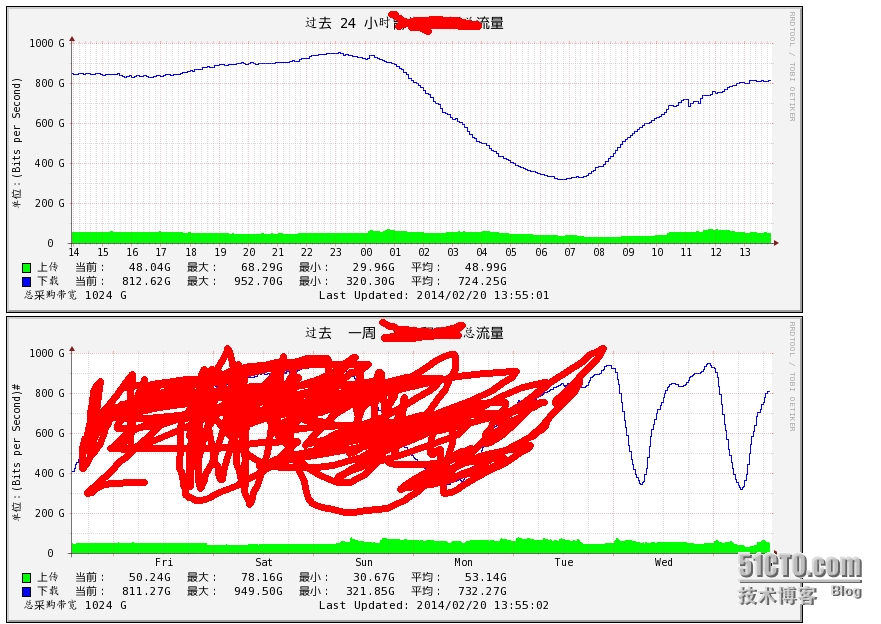
8.效果图展示:
本文出自 “网络空间” 博客,谢绝转载!
原文:http://netspace.blog.51cto.com/1069106/1361122