
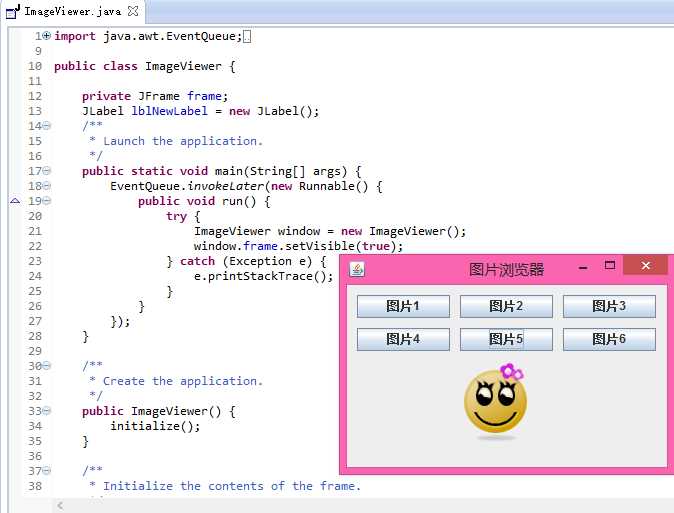
在查看数码相片时,通常会使用一款图片查看软件,该软件应该能遍历文件夹下的所有图片并进行显示。编写程序,实现一个图片查看软件,它可以支持6张图片,通过单击不同的按钮就可以查看不同的图片。
思路分析:就是通过Window Builder组件新建个Application Window,在上面部署一些按钮,给按钮添加事件。需要注意的是,显示图片的方法是使用JLabel类的setIcon(new ImageIcon("图片路径"))方法。
代码如下:
|
1
2
3
4
5
6
7
8
9
10
11
12
13
14
15
16
17
18
19
20
21
22
23
24
25
26
27
28
29
30
31
32
33
34
35
36
37
38
39
40
41
42
43
44
45
46
47
48
49
50
51
52
53
54
55
56
57
58
59
60
61
62
63
64
65
66
67
68
69
70
71
72
73
74
75
76
77
78
79
80
81
82
83
84
85
86
87
88
89
90
91
92
93
94
95
96 |
import java.awt.EventQueue;public class ImageViewer { private
JFrame frame; JLabel lblNewLabel = new
JLabel(); /** * Launch the application. */ public
static void main(String[] args) { EventQueue.invokeLater(new
Runnable() { public
void run() { try
{ ImageViewer window = new
ImageViewer(); window.frame.setVisible(true); } catch
(Exception e) { e.printStackTrace(); } } }); } /** * Create the application. */ public
ImageViewer() { initialize(); } /** * Initialize the contents of the frame. */ private
void initialize() { frame = new
JFrame("图片浏览器"); frame.setBounds(100, 100, 336, 221); frame.setDefaultCloseOperation(JFrame.EXIT_ON_CLOSE); frame.getContentPane().setLayout(null); lblNewLabel.setBounds(101, 75, 117, 86); frame.getContentPane().add(lblNewLabel); JButton button = new
JButton("\u56FE\u72471"); button.addActionListener(new
ActionListener() { public
void actionPerformed(ActionEvent e) { lblNewLabel.setIcon(new
ImageIcon("src/images/1.png")); } }); button.setBounds(10, 10, 93, 23); frame.getContentPane().add(button); JButton button_1 = new
JButton("\u56FE\u72472"); button_1.addActionListener(new
ActionListener() { public
void actionPerformed(ActionEvent e) { lblNewLabel.setIcon(new
ImageIcon("src/images/2.png")); } }); button_1.setBounds(113, 10, 93, 23); frame.getContentPane().add(button_1); JButton button_2 = new
JButton("\u56FE\u72473"); button_2.addActionListener(new
ActionListener() { public
void actionPerformed(ActionEvent e) { lblNewLabel.setIcon(new
ImageIcon("src/images/3.png")); } }); button_2.setBounds(216, 10, 93, 23); frame.getContentPane().add(button_2); JButton button_3 = new
JButton("\u56FE\u72474"); button_3.addActionListener(new
ActionListener() { public
void actionPerformed(ActionEvent e) { lblNewLabel.setIcon(new
ImageIcon("src/images/4.png")); } }); button_3.setBounds(10, 43, 93, 23); frame.getContentPane().add(button_3); JButton button_4 = new
JButton("\u56FE\u72475"); button_4.addActionListener(new
ActionListener() { public
void actionPerformed(ActionEvent e) { lblNewLabel.setIcon(new
ImageIcon("src/images/5.png")); } }); button_4.setBounds(113, 43, 93, 23); frame.getContentPane().add(button_4); JButton button_5 = new
JButton("\u56FE\u72476"); button_5.addActionListener(new
ActionListener() { public
void actionPerformed(ActionEvent e) { lblNewLabel.setIcon(new
ImageIcon("src/images/6.png")); } }); button_5.setBounds(216, 43, 93, 23); frame.getContentPane().add(button_5); }} |
效果如图:
原文:http://www.cnblogs.com/cysolo/p/3561950.html