
这个小东西是之前小项目上临时增加功能的产物,那时候在网上找了很久都没有能用的插件,要么是数据残缺少得可怜,还有就是实现手段非常低效不可维护那种,各种奇拔问题!反正就没有逞心如意!那时候又急需要这样一个功能,百般无奈后灵机一动,想起某企鹅功能选项不是有这样的世界国家级联功能嚒!那肯定有地方存着这数据的哇!嘿嘿!心里突然暗喜,终于有方向,然后就是向这企鹅开刀找!在某个i18n国际化文件夹中找到了!立马放下心头大石!
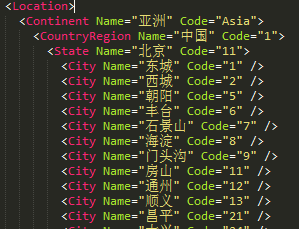
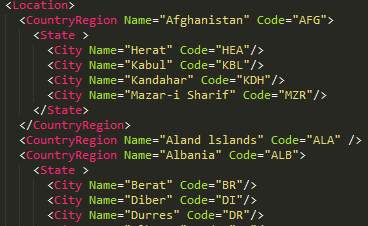
这样子中英文版本的数据都有了!但是问题又来了!该怎么开始做呢?
怎么去调用这个数据呢?
想法一:把数据拆分出来导入数据库,然后Ajax级联获取数据
想法二:把数据转换成熟悉的格式,在前端获取后递归拆分
想法三:直接利用jquery读取xml然后捉取数据(这是完成这插件后很久回头想到!逼于屌丝项目时间赶没多考虑的结果)
后来我是选择了第二种方案,转换成json对象,在前端递归获取数据;
其实这个方案也是不错的!JS对象属性查找效率是非常不错的!
那这个方案要怎么转换成又方便又简单的数组数据呢?又地让国家、省份、城市、区级之间又有关联
那时候是直接用元素名作为keyName关联;
其实那时候具体过程已经忘记了,直接贴那时候PHP的代码,
<?php
if(true)
{
	$file = dirname(__FILE__).‘/LocList_en.xml‘;
	$obj  = simplexml_load_file($file);

	$CountryArr = array();
	$StateArr   = array();
	$CityArr    = array();
	$RegionArr  = array();

	$cCode = 1; $cState = 1; $cCity = 1; $cRegion = 1;

	foreach ( $obj as $CountryRegion ) {

		$CountryArr[] = array(‘Name‘=>(string)$CountryRegion[‘Name‘],‘Code‘=>‘c‘.$cCode);

		foreach ( $CountryRegion as $State ) {

			if(!empty($State[‘Name‘]))
			{
				$StateArr[‘c‘.$cCode][] = array(‘Name‘=>(string)$State[‘Name‘],‘Code‘=>‘s‘.$cState);
			}

			foreach ( $State as $City ) {

				if(!empty($City[‘Name‘]))
				{
					if(!empty($State[‘Code‘]))
						$CityArr[‘s‘.$cState][] = array(‘Name‘=>(string)$City[‘Name‘],‘Code‘=>‘c‘.$cCity);
					else
						$CityArr[‘c‘.$cCode][] = array(‘Name‘=>(string)$City[‘Name‘],‘Code‘=>‘c‘.$cCity);
				}

				foreach ( $City as $Region ) {

					if(!empty($Region[‘Name‘]))
					{
						if(!empty($City[‘Code‘]))
							$RegionArr[‘c‘.$cCity][] = array(‘Name‘=>(string)$Region[‘Name‘],‘Code‘=>‘r‘.$cRegion);
					}
					#县级代码
					$cRegion++;
				}
				#城市代码
				$cCity++;
			}
			#省份代码
			$cState++;
		}
		#国家代码
		$cCode++;
	}
	//echo ‘<pre>‘;print_r(array(‘country‘=>$CountryArr,‘state‘=>$StateArr,‘city‘=>$CityArr,‘region‘=>$RegionArr));exit;
	echo(json_encode(array(‘country‘=>$CountryArr,‘state‘=>$StateArr,‘city‘=>$CityArr,‘region‘=>$RegionArr)));exit;
}
?>
JSON数据的样子
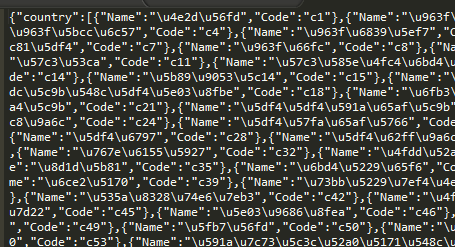
接着就是前段JS的编写!碍于当时没多少时间去写!代码非常糟糕!哎!算是一个工程版!
用jquery框架辅助!开发效率十分高!执行效率也还行!就是需要加载完整的地理数据稍稍慢!320kb的数据还能接受吧!对于客户突来的需求!
(function($){
	$.fn.extend({
		GlobalGeography:function(){

			/* ._GlobalGeography_ { width:282px; height:30px !important; position:relative; left:-282px; top:2px; } */

			var relatedObj = [‘div[id="country"]‘,‘div[id="state"]‘,‘div[id="city"]‘,‘div[id="region"]‘];
			var excludeObj = [‘div[id="region"]‘];
			var selectmenu = [‘country‘,‘state‘,‘city‘,‘region‘];
			var selector   = this.selector;

			/*输出下拉列表*/
			function _traversal(source,type){
				if(typeof(source)!=‘undefined‘){
					var _select_  = ‘<select class="_GlobalGeography_">‘;
						_select_ += ‘<option value=""></option>‘;
					$.each(source,function(i,v){
						_select_ += ‘<option value="‘+v.Code+‘">‘+v.Name+‘</option>‘;
					});
					_select_ += ‘</select>‘;
					return _select_;
				}
				return false;
			};

			/*清除/还原下级关联下拉菜单*/
			function cleanNextMenu(index){
				for(var i=index;i<relatedObj.length;i++){
					if(typeof(relatedObj[(i+1)])!=‘undefined‘){
						$(relatedObj[(i+1)]).find(‘._GlobalGeography_‘).remove();
						$(relatedObj[(i+1)]).find(‘input‘).val(‘‘);
					}
				}
			}

			/*遍历获取下拉菜单内容*/
			function checkMenu(json){
				/*遍历赋值所有类型*/
				$.each(relatedObj,function(i,v){
					if($.inArray(v,excludeObj)==-1){
						$(v).find(‘select‘).bind(‘change‘,function(){
							var _code_ = $(this).val(); cleanNextMenu(i);
							if(typeof(json[selectmenu[(i+1)]][_code_])!=‘undefined‘){
								$(relatedObj[(i+1)]).append(_traversal(json[selectmenu[(i+1)]][_code_],selectmenu[(i+1)]));
								/*绑定方法*/
								$(relatedObj[(i+1)]).find(‘._GlobalGeography_‘).bind(‘change‘,function(){
									$(relatedObj[(i+1)]).find(‘input‘).val($(this).find(‘option:selected‘).text());
								});
								checkMenu(json);
							} else {
								$(relatedObj[(i+2)]).append(_traversal(json[selectmenu[(i+2)]][_code_]));
								/*绑定方法*/
								$(relatedObj[(i+2)]).find(‘._GlobalGeography_‘).bind(‘change‘,function(){
									$(relatedObj[(i+2)]).find(‘input‘).val($(this).find(‘option:selected‘).text());
								});
							}
						});
					}
				});
			}

			/*加载世界国家城市数据*/
			$.getJSON("db_en.dat",function(json){
				/*输出国家列表*/
				$(selector).append(_traversal(json.country,‘country‘));
				$(selector).find(‘._GlobalGeography_‘).bind(‘change‘,function(){
					$(selector).find(‘input‘).val($(this).find(‘option:selected‘).text());
				});
				checkMenu(json);
			});
		}
	})
})(jQuery);
html代码
<!DOCTYPE>
<html>
	<head>
		<meta charset="utf-8">
		<script src="jquery.js"></script>
		<script src="country_noinv.js"></script>
		<style type="text/css">
			._GlobalGeography_ { width:200px; }
		</style>
	</head>
	<body>
		<div id="country"></div>
		<div id="state"></div>
		<div id="city"></div>
		<div id="region"></div>
	</body>
</html>
<script>
$(document).ready(function(){
	$(‘#country‘).GlobalGeography();
});
</script>
执行效果,这里有一个问题,就是英文版只去到城市就没了!所以数据包大小也减半只有148kb
//这里主要是用了非入侵方式,数组元素分别对应selectmenu
var relatedObj = [‘div[id="country"]‘,‘div[id="state"]‘,‘div[id="city"]‘,‘div[id="region"]‘];
//这里主要控制级联到哪个级别就不再继续执行
var excludeObj = [‘div[id="region"]‘];
var selectmenu = [‘country‘,‘state‘,‘city‘,‘region‘];

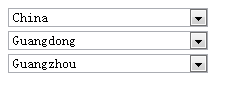
这个小东西是抛砖引玉了!实现手段并不高效!代码有很多地方可以改进!
整理代码时候翻出来,希望能帮助到有需要的人!
原文:http://my.oschina.net/Jacker/blog/339857