
网易在2012年底推出的聚合阅读界面很炫,我想研究学习下

说道研究前端源码,有几点小心得:
定制下自己的数据系列和数据内容,或者定制颜色,定制数据模板,更深度的定制比如布局算法。。。
最终今天下午实现的效果如下:
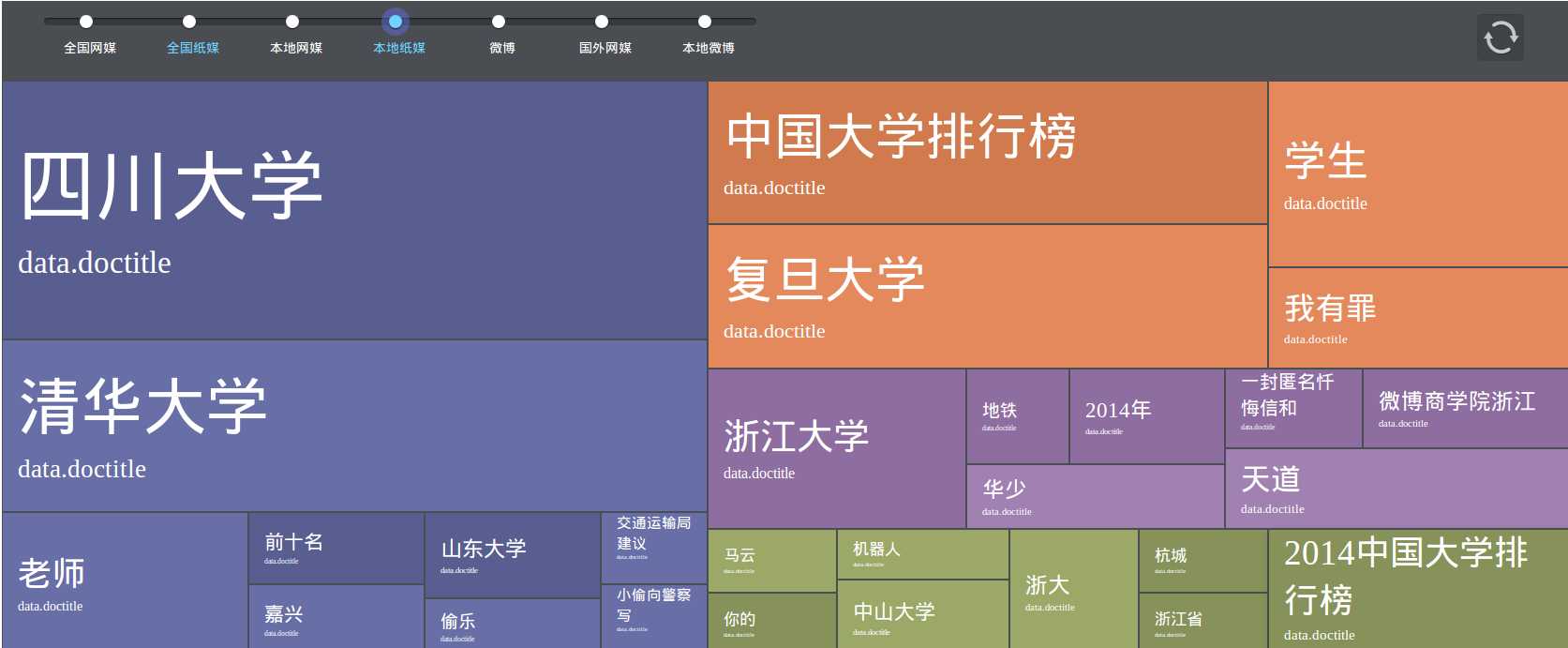
下面一一实现:
1,数据系列 index2.js 和 index.html
|
1
2
3
4
5 |
2 window.tagConfig.navConfig = { 1 currentPos : ‘news‘, 2 dataNames : [‘tagDataNews‘, ‘tagDataMoney‘, ‘tagDataTech‘, ‘tagDataSports‘, ‘tagDataAuto‘, ‘tagDataEnt‘], 3 hashReg : /news|money|tech|sports|auto|ent/ 4 } |
|
1
2
3
4
5
6
7 |
<span id="nav_current"><i></i></span><a target="_self"
hidefocus="true"
href="#news"
class="news"><i></i><label>新闻</label></a><a target="_self"
hidefocus="true"
href="#money"
class="money"><i></i><label>财经</label></a><a target="_self"
hidefocus="true"
href="#tech"
class="tech"><i></i><label>科技</label></a><a target="_self"
hidefocus="true"
href="#sports"
class="sports"><i></i><label>体育</label></a><a target="_self"
hidefocus="true"
href="#auto"
class="auto"><i></i><label>汽车</label></a><a target="_self"
hidefocus="true"
href="#ent"
class="ent"><i></i><label>娱乐</label></a> |
数据内容 index.html
|
1
2
3
4
5
6 |
|
2,定制每一个tag的模板,index.html
|
1
2
3
4
5
6
7
8
9
10
11
12
13 |
<script id="tag_template"
type="text/x-micro-template"> <% var
doctitle = data.doctitle, title = doctitle || ‘‘; %> <a href="<%=data.url%>?from=tagwall"
title="<%=title%>"
> <span class="inner"><%=data.name%> <% if(doctitle) { %> <span class="doc-title"><%=doctitle%></span> <% } %> </span><i></i> </a></script> |
这个tag很有意思,在index2.js里面有一段用正则替换的代码,将这些script转换为纯javascript
|
1
2
3
4
5
6
7
8
9
10
11
12
13
14
15 |
5 "var p=[];"
+~ 4 3 // Introduce the data as local variables using with(){} 2 "p.push(‘"
+~ 1 0 // Convert the template into pure JavaScript 1 str 2 .replace(/[\r\t\n]/g, " ") 3 .split("<%").join("\t") 4 .replace(/((^|%>)[^\t]*)‘/g, "$1\r") 5 .replace(/\t=(.*?)%>/g, "‘,$1,‘") 6 .split("\t").join("‘);") 7 .split("%>").join("p.push(‘") 8 .split("\r").join("\\‘") 9 + "‘);return p.join(‘‘);"); |
3,定制颜色,看index2.min.js里面的 window.tagConfig.colorPatterns = []
4,定制布局,看index2.min.js里面的 window.tagConfig.pageLayout = [] 和 window.tagConfig = []
原创文章,转载请注明:http://www.cnblogs.com/phpgcs
研究源码会另外写一篇文章: ”网易聚合阅读“的前端研究【源码篇】
有几个地方要千万小心,
1,一般会自定义数据系列的名字,这个名字的定义在index2.js的部分是:
|
1
2
3
4
5 |
<br class="Apple-interchange-newline"> 1 window.tagConfig.navConfig = { 0 currentPos : ‘news‘, 4 dataNames : [‘tagData_news‘, ‘tagData_newspaper‘, ‘tagData_news_local‘, ‘tagData_newspaper_local‘, ‘tagData_weibo‘, ‘tagData_foreign_media‘], 5 hashReg : /news|newspaper|news_local|newspaper_local|weibo|foreign_media/ 6 } |
上面的数据定义没有错,但是要小心后面的正则匹配会导致很难发现的错误
|
1 |
buttonPosition = location.hash.match(window.tagConfig.navConfig.hashReg), |
hashReg里面的第一个news就导致了跟后面的newspaper,newspaper_local,的混淆;要避免这样有相同substring的hashReg
正确的写法应该是
|
1
2
3
4
5 |
1 window.tagConfig.navConfig = {0 currentPos : ‘news_all‘,4 dataNames : [‘tagData_news‘, ‘tagData_newspaper‘, ‘tagData_news_local‘, ‘tagData_newspaper_local‘, ‘tagData_weibo‘, ‘tagData_foreign_media‘],5 hashReg : /news_all|newspaper|news_local|newspaper_local|weibo_all|foreign_media/6 } |
这样用以个 news_all 就避免了跟后面的 newpaper 混淆
2,还有一个亟待解决的问题,就是画图程序读取数据的问题。
163网站本身是加载了现成的js文件,将数据注册到全局变量,不存在这个问题。
|
1
2
3
4
5
6 |
|
其中第一个文件如下:
结构如图:
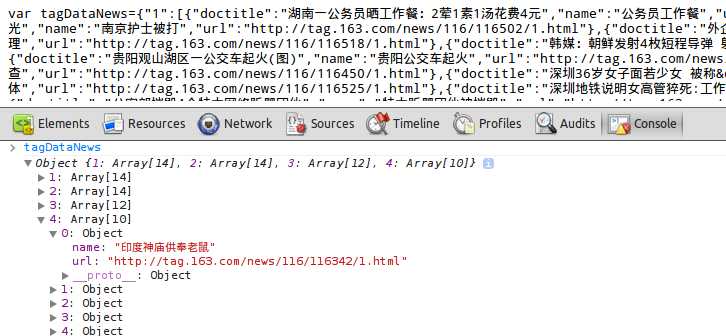
这个 tagDataNews 变量是直接加载在全局 的,被画图程序读到,并且画图。
而我现在觉得从数据库读出数据再生成到js文件不方便,我想直接处理完数据之后将变量注册到window
其实,最好还是生成文件比较好,这样相当于是文件缓存了,速度也快,比如163这种新闻网站,一天数据一变的。
但是,如果数据变化频繁,比如要按用户输入的关键词来检索数据,并呈现成今天这个解决方案,保存成文件并不见得好。
这里也是为了探讨下方法--数据动态生成的情况在这里要怎么来实现在画图之前数据的完全加载?
不怕见笑,其实,我的js水平也就是1年。。。
原创文章,转载请注明:http://www.cnblogs.com/phpgcs
看看163网站本身的核心js画图文件为:
|
1
2 |
<script src="http://img4.cache.netease.com/service/combo?3.7.3/build/yui/yui-min.js&3.7.3/build/loader/loader-min.js"
charset="utf-8"></script><script type="text/javascript"
src="http://img1.cache.netease.com/product/tag/2.2/js/index2.min.js"></script> |
假设我们处理数据的文件为 custom.js,当然要放在上面的2行代码之前,因为要先有数据才可以做图
|
1
2
3
4 |
<script src="http://img4.cache.netease.com/service/combo?3.7.3/build/yui/yui-min.js&3.7.3/build/loader/loader-min.js"
charset="utf-8"></script><script type="text/javascript"
src="http://img1.cache.netease.com/product/tag/2.2/js/index2.min.js"></script> |
|
1
2
3
4
5
6
7
8
9
10
11
12
13
14
15
16
17
18
19
20 |
1 $.getJSON(url, {"kdval":kdval}, function
(data) { 0 var
result = []; 1 for(var
type in
data){ 2 var
rawdata = data[type]; 3 result[type] = []; 4 result[type][1] = rawdata.slice(0, 14); 5 result[type][2] = rawdata.slice(14, 28); 6 result[type][3] = rawdata.slice(28, 40); 7 result[type][4] = rawdata.slice(40, 50); 8 var
arr = result[type]; 9 var
rv = {};10 for
(var
i = 1; i < arr.length; ++i)11 {12 rv[i] = arr[i];13 }14 tagData = rv;15 window[‘tagData‘+‘_‘+type] = tagData;16 console.log(tagData);17 }18 }); |
通过这段代码,就把数据读取出来并且也处理成了14,14,12,10的对象,并且注册到 window[‘tagData_news‘],window[‘tagData_newspaper‘],.....可以在console控制台直接打印看看window.tagData_news......
看似是没有问题的,但是其实会报错,因为.getJSON请求了http是耗时间的,在请求返回数据之前,做图程序就会报错。
文章明天继续更新。
原文:http://www.cnblogs.com/intval/p/3574190.html