
在我的上一篇文章中我介绍了windows phone 7的gb2312解码,
http://www.cnblogs.com/qingci/archive/2011/11/25/2263124.html
解决了下载的Html乱码问题,这一篇,我将介绍关于windows phone 7解析html数据,以便我们获得想要的数据.
这里,我先介绍一个类库HtmlAgilityPack,(上一篇文章也是通过这个工具来解码的). 类库的dll文件我会随demo一起提供
这里,我以新浪新闻为例来解析数据
先看看网页版的新浪新闻
http://news.sina.com.cn/w/sd/2011-11-27/070023531646.shtml
然后我们看一下他的源文件,
发现新闻内容的结构是
<div class="blkContainerSblk"> <h1 id="artibodyTitle"
pid="1"
tid="1"
did="23531646"
fid="1666">title</h1> <div class="artInfo"><span id="art_source"><a href="http://www.sina.com.cn">http://www.sina.com.cn</a></span> <span id="pub_date">pub_date</span> <span id="media_name"><a href="">media_name</a> <a href=""></a> </span></div> <!-- 正文内容 begin --> <!-- google_ad_section_start --> <div class="blkContainerSblkCon"
id="artibody"></div></div> |
大部分还有ID属性,这更适合我们去解析了。
接下来我们开始去解析
第一: 引用HtmlAgilityPack.dll文件
第二:用WebClient或者WebRequest类来下载HTML页面然后处理成字符串。
public
delegate void CallbackEvent(object
sender, DownloadEventArgs e); public
event CallbackEvent DownloadCallbackEvent; public
void HttpWebRequestDownloadGet(string
url) { Thread _thread = new
Thread(delegate() { Uri _uri = new
Uri(url, UriKind.RelativeOrAbsolute); HttpWebRequest _httpWebRequest = (HttpWebRequest)WebRequest.Create(_uri); _httpWebRequest.Method="Get"; _httpWebRequest.BeginGetResponse(new
AsyncCallback(delegate(IAsyncResult result) { HttpWebRequest _httpWebRequestCallback = (HttpWebRequest)result.AsyncState; HttpWebResponse _httpWebResponseCallback = (HttpWebResponse)_httpWebRequestCallback.EndGetResponse(result); Stream _streamCallback = _httpWebResponseCallback.GetResponseStream(); StreamReader _streamReader = new
StreamReader(_streamCallback,new
HtmlAgilityPack.Gb2312Encoding()); string
_stringCallback = _streamReader.ReadToEnd(); Deployment.Current.Dispatcher.BeginInvoke(new
Action(() => { if
(DownloadCallbackEvent != null) { DownloadEventArgs _downloadEventArgs = new
DownloadEventArgs(); _downloadEventArgs._DownloadStream = _streamCallback; _downloadEventArgs._DownloadString = _stringCallback; DownloadCallbackEvent(this, _downloadEventArgs); } })); }), _httpWebRequest); }) ; _thread.Start(); } // } |
O(∩_∩)O! 我这个比较复杂, 总之我们下载了html的数据就行了。
贴一个简单的下载方式吧
WebClient webClenet=new
WebClient(); webClenet.Encoding = new
HtmlAgilityPack.Gb2312Encoding(); //加入这句设定编码 webClenet.DownloadStringAsync(new
Uri("http://news.sina.com.cn/s/2011-11-25/120923524756.shtml", UriKind.RelativeOrAbsolute)); webClenet.DownloadStringCompleted += new
DownloadStringCompletedEventHandler(webClenet_DownloadStringCompleted); |
现在处理回调函数的 e.Result
string
_result = e._DownloadString; HtmlDocument _doc = new
HtmlDocument(); //实例化HtmlAgilityPack.HtmlDocument对象 _doc.LoadHtml(_result); //载入HTML HtmlNode _htmlNode01 = _doc.GetElementbyId("artibodyTitle"); //新闻标题的Div string
_title = _htmlNode01.InnerText; HtmlNode _htmlNode02 = _doc.GetElementbyId("artibody"); //获取内容的div string
_content = _htmlNode02.InnerText; // int _count= _htmlNode02.ChildNodes.Where(new Func<HtmlNode,bool>("div")); int
_divIndex = _content.IndexOf(" .blkComment"); _content= _content.Substring(0,_divIndex); #region 新浪标签 HtmlNode _htmlNodo03 = _doc.GetElementbyId("art_source"); string
_www = _htmlNodo03.FirstChild.InnerText; string
_wwwInt = _htmlNodo03.FirstChild.Attributes[0].Value; #endregion // string _source = _htmlNodo03; //_htmlNodo03.ChildNodes #region 发布时间 HtmlNode _htmlNodo04 = _doc.GetElementbyId("pub_date"); string
_pub_date = _htmlNodo04.InnerText; #endregion #region 来源网站信息 HtmlNode _htmlNodo05 = _doc.GetElementbyId("media_name"); string
_media_name = _htmlNodo05.FirstChild.InnerText; string
_modia_source = _htmlNodo05.FirstChild.Attributes[0].Value; #endregion Media_nameHyperlinkButton.Content = _pub_date + " "
+ _media_name; Media_nameHyperlinkButton.NavigateUri = new
Uri(_modia_source, UriKind.RelativeOrAbsolute); TitleTextBlock.Text = _title; ContentTextBlock.Text = _content; |
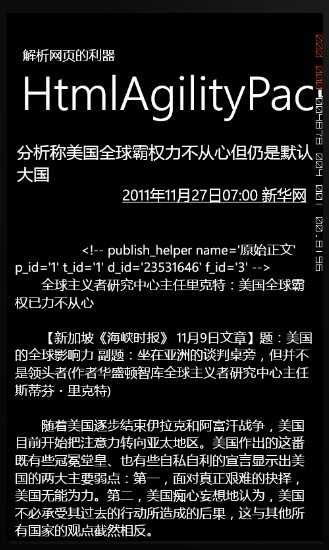
结果如下图所示:
网页的大部分标签是没有ID属性的,不过幸运的是HtmlAgilityPack支持XPath
那就需要通过XPATH语言来查找匹配所需节点
XPath教程:http://www.w3school.com.cn/xpath/index.asp
案例下载:
http://115.com/file/dn87dl2d#
MyFramework_Test.zip
wIndows phone 7 解析Html数据,布布扣,bubuko.com
原文:http://www.cnblogs.com/lonelyxmas/p/3581473.html