ASIHTTPRequest虽然很久没有更新了,但是他仍然是一个非常流行的iOS平台网络通信类库,使用ASIHTTPRequest之后,大大简化了iOS平台的网络编程。其以方便的接口对同步、异步的网络传输进行了传输,将ASIHTTPRequest添加到自己的项目也非常方便,将类库中所有文件拷贝到一个文件夹中,然后将此文件夹添加到项目中,同时要添加如下图CFNetWork之下所示的类库,就可以使用ASIHTTPRequest了:
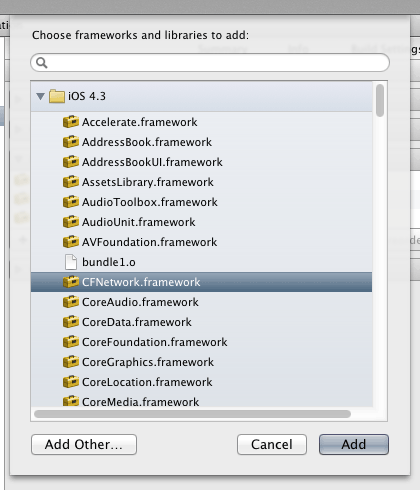
使用ASIHTTPRequest步骤非常简答,在一般应用开发中,网络连接基本上使用的都是异步方式,下面简单演示一下最简单的异步通讯方法
-
#import "ASIHTTPRequest.h"
-
-
- (void) requestDataFromServer
-
{
-
NSAutoreleasePool * pool = [[NSAutoreleasePool alloc] init];
-
NSURL* url = [NSURL URLWithString: @"www.fakeurl.com"];
-
ASIHTTPRequest* request = [ASIHTTPRequest requestWithURL: url];
-
[request setTag: 1024];
-
[request setTimeOutSeconds: 3];
-
[request setAllowCompressedResponse:YES];
-
[request setDelegate:self];
-
[request startAsynchronous];
-
[pool drain];
-
}
-
-
- (void)requestFinished:(ASIHTTPRequest *)request
-
{
-
NSString* rawString = [request responseString];
-
if (request.tag == 1024) {
-
-
}
-
}
-
-
- (void)requestFailed:(ASIHTTPRequest *)request
-
{
-
if (request.tag == 1024) {
-
-
}
-
}
注意上面的两个函数中,后面连个为ASIHTTPRequest的delegate函数,其声明类型不能改变,只要在生成ASIHTTPRequest时的deleage设成了self,那么最后返回结果,不管是成功调用还是网络失败,都会调用这两个函数中的对应的一个。开源类库之一 (ASIHTTPRequest)
原文:http://blog.csdn.net/hnjyzqq/article/details/43328261
