
提一个很人性化的需求:
在自己的app里使用PC里的图片。
关键点:传输。怎么把图片从PC导入自己的APP。
因为iOS的封闭性,一般用户不能很方便把图片导入手机相册。笔者稍微想了下,实现功能其实也有不少办法。
就一般用户而言,可以通过第三方app中转一下,比如某Q,传到手机,再保存到相册,再从相册中导入。
针对开发自己的app,也有通过上传到服务器中转,ftp直连等等。都可以实现,从中,笔者选择自以为最简单的方式进行了实现。
流程大概如下:
1、通过iTunes将图片上传到app的document里
2、遍历document文件,将图片保存至相册后清除沙盒图片
3、使用系统UIImagePickerController读取图片。
解释一下,虽然可以直接读取document图片,但是那样得自己画界面,麻烦。加载到系统相册,然后甚至可以专门自定义一个图片目录。一目了然,而且对于用户来说,使用自己添加的图片和使用系统相册图片一样,没有学习成本。
主要步骤:
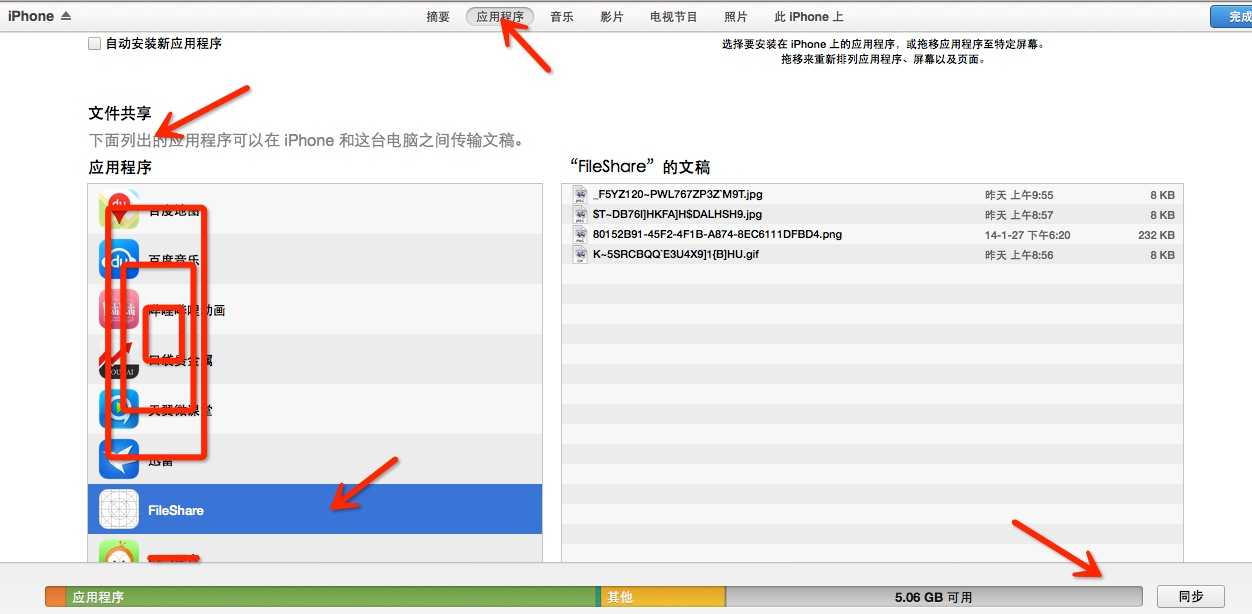
1、通过iTunes将图片上传到app的document里:
要让自己的app可以使用iTunes添加图片,需要在-info.plist里添加配置
Application supports iTunes file sharing -> YES
然后打开iTunes,找到设备,在应用程序的文件共享里可以找到自己的app,右下角添加图片。
2、遍历document文件,将图片保存至相册后清除沙盒图片
iTunes里添加的文件的路径其实就是放在app沙盒的document目录。明确了这一点。我们就可以把文件便利出来了。
|
1
2
3
4
5
6
7
8 |
NSString
*filePath = [NSSearchPathForDirectoriesInDomains(NSDocumentDirectory, NSUserDomainMask, YES) objectAtIndex:0]; NSFileManager
*fileManager = [NSFileManager
defaultManager];//注意://这个会遍历出文件夹的子目录NSDirectoryEnumerator
*dirEnum = [fileManager enumeratorAtPath:filePath];//这个只会在根目录遍历文件 NSArray
*dirContents = [fileManager contentsOfDirectoryAtPath:filePath error:nil]; |
把图片保存到相册的方法是
|
1
2
3
4
5
6 |
void UIImageWriteToSavedPhotosAlbum ( UIImage *image, id
completionTarget, SEL
completionSelector, void
*contextInfo); |
你可以直接
|
1 |
UIImageWriteToSavedPhotosAlbum(img, nil, nil, nil); |
一般来说没问题,但图片多了可能会出现丢失的现象,所以我借鉴大家的做法做一个优化
|
1
2
3
4
5
6
7
8
9
10
11
12
13
14
15
16
17
18
19 |
-(void) saveNext{ if
(listOfImages.count > 0) { UIImage *image = [listOfImages objectAtIndex:0]; UIImageWriteToSavedPhotosAlbum(image, self, @selector(savedPhotoImage:didFinishSavingWithError:contextInfo:), nil); } else
{ [self
allDone]; }}-(void) savedPhotoImage:(UIImage*)image didFinishSavingWithError: (NSError
*)error contextInfo: (void
*)contextInfo { if
(error) { //NSLog(@"%@", error.localizedDescription); } else
{ [listOfImages removeObjectAtIndex:0]; } [self
saveNext];} |
优化的原理是进行了一个递归,确保一次完成再进行下一次。
这样,document下的图片便都保存至了系统的相册。但是我觉得还不够,我希望能够将自己从iTunes里添加的图片,专门放在一个目录下,方便查阅。于是,就上面的方法,我再次进行了一点改造。
这一次,我们使用到了AssetsLibrary。
|
1
2
3
4
5
6
7
8
9
10
11
12
13
14
15
16
17
18
19
20
21
22
23
24
25
26
27
28
29
30
31
32
33
34
35
36
37
38
39
40
41
42
43
44
45
46
47
48
49
50
51
52
53
54
55
56
57
58 |
-(void)saveImage:(UIImage*)image toAlbum:(NSString*)albumName withCompletionBlock:(SaveImageCompletion)completionBlock{ //write the image data to the assets library (camera roll) [self
writeImageToSavedPhotosAlbum:image.CGImage orientation:(ALAssetOrientation)image.imageOrientation completionBlock:^(NSURL* assetURL, NSError* error) { //error handling if
(error!=nil) { completionBlock(error); return; } //add the asset to the custom photo album [self
addAssetURL: assetURL toAlbum:albumName withCompletionBlock:completionBlock]; }];}-(void)addAssetURL:(NSURL*)assetURL toAlbum:(NSString*)albumName withCompletionBlock:(SaveImageCompletion)completionBlock{ __block BOOL
albumWasFound = NO; //search all photo albums in the library [self
enumerateGroupsWithTypes:ALAssetsGroupAlbum usingBlock:^(ALAssetsGroup *group, BOOL
*stop) { //compare the names of the albums if
([albumName compare: [group valueForProperty:ALAssetsGroupPropertyName]]==NSOrderedSame) { //target album is found albumWasFound = YES; //get a hold of the photo‘s asset instance [self
assetForURL: assetURL resultBlock:^(ALAsset *asset) { //add photo to the target album [group addAsset: asset]; //run the completion block completionBlock(nil); } failureBlock: completionBlock]; //album was found, bail out of the method return; } if
(group==nil
&& albumWasFound==NO) { //photo albums are over, target album does not exist, thus create it __weak ALAssetsLibrary* weakSelf = self; //create new assets album [self
addAssetsGroupAlbumWithName:albumName resultBlock:^(ALAssetsGroup *group) { //get the photo‘s instance [weakSelf assetForURL: assetURL resultBlock:^(ALAsset *asset) { //add photo to the newly created album [group addAsset: asset]; //call the completion block completionBlock(nil); } failureBlock: completionBlock]; } failureBlock: completionBlock]; //should be the last iteration anyway, but just in case return; } } failureBlock: completionBlock];} |
AssetsLibrary笔者写文时了解不深,能实现功能,其他不深入讨论。
使用:
|
1
2
3
4
5
6
7 |
[self.library saveImage:image toAlbum:@"File Share"
withCompletionBlock:^(NSError
*error) { if
(error!=nil) { NSLog(@"Big error: %@", [error description]); } [listOfImages removeObjectAtIndex:0]; [self
saveNext]; }]; |
3、使用系统UIImagePickerController读取图片。这个也不多说,固定套路。
|
1
2
3
4
5
6
7
8
9
10
11
12
13
14
15
16
17
18
19
20
21
22
23
24
25
26 |
- (void)getImagePicker:(NSUInteger)sourceType { UIImagePickerController *imagePickerController = [[UIImagePickerController alloc] init]; imagePickerController.delegate = self; imagePickerController.allowsEditing = YES; imagePickerController.sourceType = sourceType; [self
presentViewController:imagePickerController animated:YES
completion:^{}];}#pragma mark - image picker delegte- (void)imagePickerController:(UIImagePickerController *)picker didFinishPickingMediaWithInfo:(NSDictionary
*)info{ [picker dismissViewControllerAnimated:YES
completion:^{}]; NSLog(@"did");}- (void)imagePickerControllerDidCancel:(UIImagePickerController *)picker{ [self
dismissViewControllerAnimated:YES
completion:^{}]; NSLog(@"didn‘t");} |
使用
|
1 |
[self
getImagePicker:UIImagePickerControllerSourceTypePhotoLibrary]; |
最终效果
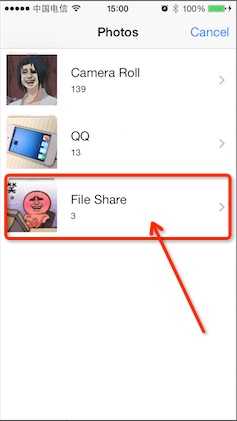
PS:其实真是简单实现,写了很多其实是自己的分析过程。实现功能几十行代码就能搞定。
另外,之所以iTunes里上传了四张图片而最终只有三张,不是图片丢失,而是我判断图片文件的时候通过后缀,并且抛弃了gif。也不知道有没有更好的方法。
我想过直接把遍历的所有文件全部转成Image,然后通过!(image)来判断。但感觉会很费内存。恕笔者无知。欢迎大神斧正。
附上demo。 http://pan.baidu.com/s/1hqHXBE0 真尴尬,CSDN上传不上去,大家凑合这用吧
原文:http://www.cnblogs.com/anjohnlv/p/3584606.html