
So for example the goal was to have a site: www.site.com expose a www.site.com/company1 and a www.site.com/company2 and have the content from “www.company1.com” served for the first one and “www.company2.com” served in the second one. Furthermore we would like to have the responses cached in the server for performance reasons. The following image shows a simple diagram of this:
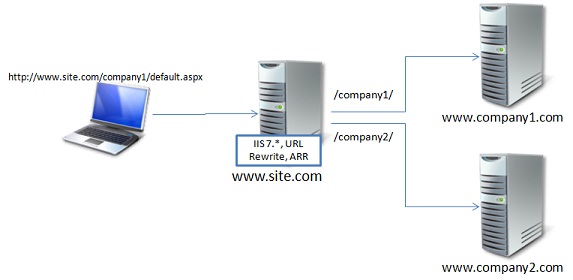
This sounds easy since its just about routing or proxying every single request to the correct servers, right? Wrong!!! If it only it was that easy. Turns out the most challenging thing is that in this case we are modifying the structure of the underlying URLs and the original layout in the servers which makes relative paths break and of course images, Stylesheets (css), javascripts and other resources are not shown correctly.
To try to clarify this, imagine that a user requests using his browser the page at http://www.site.com/company1/default.aspx, and so based on the specification above the request is proxied/routed to http://www.company1.com/default.aspx on the server-side. So far so good, however, imagine that the markup returned by this HTML turns out to have an image tag like “<img src=/some-image.png />”, well the problem is that now the browser will resolve that relative path using the base path on the original request he made which was http://www.site.com/company1/default.aspx resulting in a request for the image at http://www.site.com/some-image.png instead of the right “company1” folder that would be http://www.site.com/company1/some-image.png .
Do you see it? Basically the problem is that any relative path or for that matter absolute paths as well need to be translated to the new URL structure imposed by the original goal.
So how do we do it then?
URL Rewrite 2.0 includes the ability to rewrite the content of a response as it is getting served back to the client which will allow us to rewrite those links without having to touch the actual application.
Software Required:
Steps
<rule name="Route the requests for Company1" stopProcessing="true"> <match url="^company1/(.*)" /> <conditions> <add input="{CACHE_URL}" pattern="^(https?)://" /> </conditions> <action type="Rewrite" url="{C:1}://www.company1.com/{R:1}" /> <serverVariables> <set name="HTTP_ACCEPT_ENCODING" value="" /> </serverVariables> </rule>
The first rule is an inbound rewrite rule that basically captures all the requests to the root folder /company1/*, so if using Default Web Site, anything going to http://localhost/company1/* will be matched by this rule and it will rewrite it to www.company1.com respecting the HTTP vs HTTPS traffic.
One thing to highlight which is what took me a bit of time is the “serverVariables” entry in that rule that basically is overwriting the Accept-Encoding header, the reason I do this is because if you do not remove that header then the response will likely be compressed (Gzip or deflate) and Output Rewriting is not supported on that case, and you will end up with an error message like:
HTTP Error 500.52 - URL Rewrite Module Error. Outbound rewrite rules cannot be applied when the content of the HTTP response is encoded ("gzip").
Also note that to be able to use this feature for security reasons you need to explicitly enable this by allowing the server variable. See enabling server variables here.
The last two rules just rewrite the links and scripts and other resources so that the URLs are translated to the right structure. The first one rewrites absolute paths, and the last one rewrites the relative paths. Note that if you use relative paths using “..” this will not work, but you can easily fix the rule above, I was too lazy to do that and since I never use those when I create a site it works for me :)
A huge added value of using ARR is that now we can with a couple of clicks enable disk caching so that the requests are cached locally in the www.site.com, so that not every single request ends up paying the price to go to the backend servers.
As easy as that now you will see caching working and your site will act as a container of other servers in the internet. Pretty cool hah! :)
So in this post we saw how with literally few lines of XML, URL Rewrite and ARR we were able to enable a proxy/routing scenario with the ability to rewrite links and furthermore with caching support.
Setting up a Reverse Proxy using IIS, URL Rewrite and ARR,布布扣,bubuko.com
Setting up a Reverse Proxy using IIS, URL Rewrite and ARR
原文:http://www.cnblogs.com/happy-Chen/p/3591389.html

