


1)AppDelegate.m文件
 1 #import "AppDelegate.h"
 2 #import "ViewController.h"
 3 @interface AppDelegate ()
 4
 5 @end
 6
 7 @implementation AppDelegate
 8
 9
10 - (BOOL)application:(UIApplication *)application didFinishLaunchingWithOptions:(NSDictionary *)launchOptions {
11     // Override point for customization after application launch.
12     self.window = [[UIWindow alloc] initWithFrame:[[UIScreen mainScreen] bounds]];
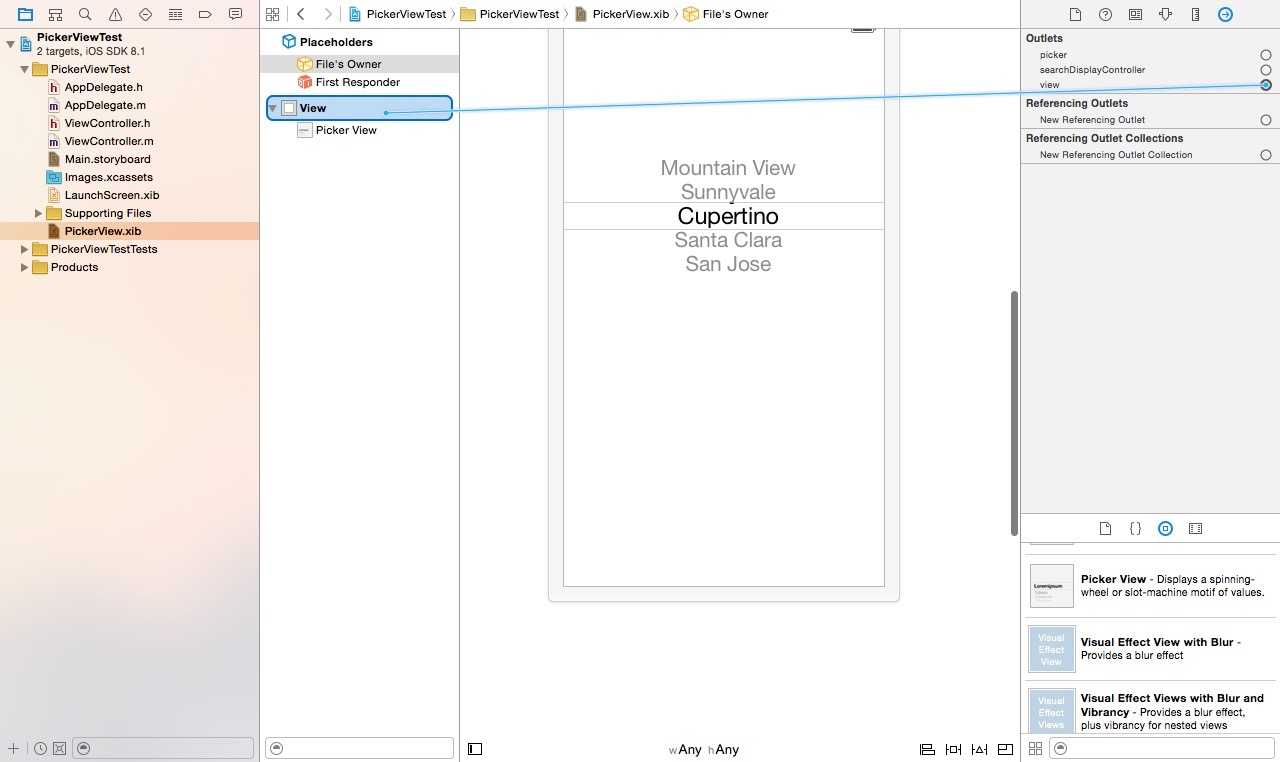
13     ViewController *pickerController = [[ViewController alloc] initWithNibName:@"PickerView" bundle:nil];
14     self.window.rootViewController = pickerController;
15     self.window.backgroundColor = [UIColor whiteColor];
16     [self.window makeKeyAndVisible];
17     return YES;
18 }
19
20 - (void)applicationWillResignActive:(UIApplication *)application {
21     // Sent when the application is about to move from active to inactive state. This can occur for certain types of temporary interruptions (such as an incoming phone call or SMS message) or when the user quits the application and it begins the transition to the background state.
22     // Use this method to pause ongoing tasks, disable timers, and throttle down OpenGL ES frame rates. Games should use this method to pause the game.
23 }
24
25 - (void)applicationDidEnterBackground:(UIApplication *)application {
26     // Use this method to release shared resources, save user data, invalidate timers, and store enough application state information to restore your application to its current state in case it is terminated later.
27     // If your application supports background execution, this method is called instead of applicationWillTerminate: when the user quits.
28 }
29
30 - (void)applicationWillEnterForeground:(UIApplication *)application {
31     // Called as part of the transition from the background to the inactive state; here you can undo many of the changes made on entering the background.
32 }
33
34 - (void)applicationDidBecomeActive:(UIApplication *)application {
35     // Restart any tasks that were paused (or not yet started) while the application was inactive. If the application was previously in the background, optionally refresh the user interface.
36 }
37
38 - (void)applicationWillTerminate:(UIApplication *)application {
39     // Called when the application is about to terminate. Save data if appropriate. See also applicationDidEnterBackground:.
40 }
41
42 @end
2)ViewController.h文件
#import <UIKit/UIKit.h>

@interface ViewController : UIViewController <UIPickerViewDataSource, UIPickerViewDelegate>
//必须遵循数据源和委托协议,并实现其相关方法
@property (strong, nonatomic) NSArray *pickerData;
//picker的数据源

@property (weak, nonatomic) IBOutlet UIPickerView *picker;
//辅助编辑器关联picker view的输出口时自动生成
- (IBAction)pickerSelectedValue:(UIButton *)sender;
//辅助编辑器关联button的动作方法时自动生成
@end
3)ViewController.m文件
#import "ViewController.h"

@interface ViewController ()

@end

@implementation ViewController

- (void)viewDidLoad {
    [super viewDidLoad];
    // Do any additional setup after loading the view, typically from a nib.
    self.pickerData = @[@"gthr", @"asdf", @"ghrt", @"bre", @"vew", @"adf", @"wrfe", @"vwfe", @"veww3", @"werw", @"dsfs"];
    self.pickerData = [self.pickerData sortedArrayUsingSelector:@selector(compare:)];
}

- (void)didReceiveMemoryWarning {
    [super didReceiveMemoryWarning];
    // Dispose of any resources that can be recreated.
}

- (NSInteger)numberOfComponentsInPickerView:(UIPickerView *)pickerView {
    //该方法返回选择器的组件个数
    return 1;
}

- (NSInteger)pickerView:(UIPickerView *)pickerView numberOfRowsInComponent:(NSInteger)component {
    //该方法返回组件的行数
    return [self.pickerData count];
}

- (NSString *)pickerView:(UIPickerView *)pickerView titleForRow:(NSInteger)row forComponent:(NSInteger)component {
    //该方法返回数据源的值
    return self.pickerData[row];
}

- (IBAction)pickerSelectedValue:(UIButton *)sender {
    //测试值是否选择正确
    NSInteger row = [self.picker selectedRowInComponent:0];
    UIAlertView *alert = [[UIAlertView alloc] initWithTitle:@"Picker Data" message:[NSString stringWithFormat:@"Picker Select %@", self.pickerData[row]] delegate:nil cancelButtonTitle:@"YES" otherButtonTitles:nil];
    [alert show];
}

@end
- (NSInteger)numberOfComponentsInPickerView:(UIPickerView *)pickerView
- (NSInteger)pickerView:(UIPickerView *)pickerView numberOfRowsInComponent:(NSInteger)component
- (NSString *)pickerView:(UIPickerView *)pickerView titleForRow:(NSInteger)row forComponent:(NSInteger)component 三个方法
- (NSInteger)numberOfComponentsInPickerView:(UIPickerView *)pickerView 返回组件个数
原文:http://www.cnblogs.com/nycoder/p/4368071.html