
打包场景的代码,比较简单.
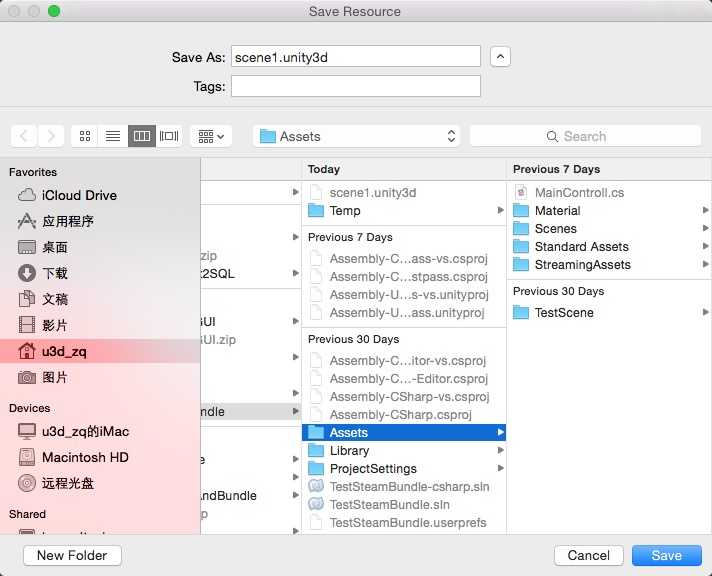
主要是调用 BuildStreamedSceneAssetBundle 方法,执行命令后会弹出默认当前场景名字的菜单,选择路径,即可生成.unity3d资源包.
备案可查.
 1 using UnityEngine;
 2 using UnityEditor;
 3
 4 public class ExportAssetBundles
 5 {
 6     [MenuItem("Assets/Build iOS Streamed")]
 7     static void ExportAsset()
 8     {
 9         //Clean Cache
10         Caching.CleanCache ();
11
12         string[] levels = new string[] {EditorApplication.currentScene};  // Assets/CurrentSceneName.unity
13
14         int length = EditorApplication.currentScene.Split (‘/‘).Length;
15
16         string editorPath = EditorApplication.currentScene.Split (‘/‘) [length - 1];
17
18         //Get current scene name
19         string Name = editorPath.Substring (0, editorPath.Length - 6);
20
21         string Path = EditorUtility.SaveFilePanel ("Save Resource", "", Name, "unity3d");
22
23         if (!Path.Equals(string.Empty) && !Name.Equals(string.Empty) ) {
24             BuildPipeline.BuildStreamedSceneAssetBundle (levels, Path, BuildTarget.iPhone);
25             Debug.Log(Name + " 打包成功!  存放路径是 " + Path);
26             AssetDatabase.Refresh ();
27         }
28     }
29 }
原文:http://www.cnblogs.com/leesymbol/p/4389658.html