
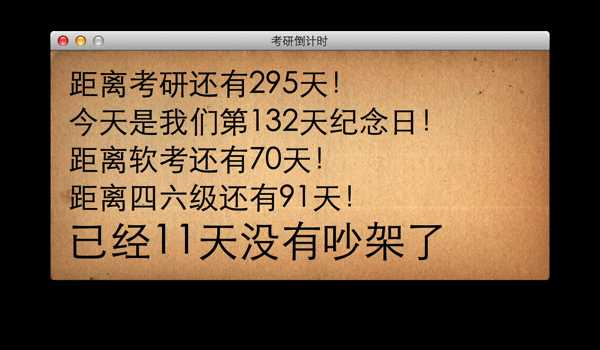
首先放上xib界面图
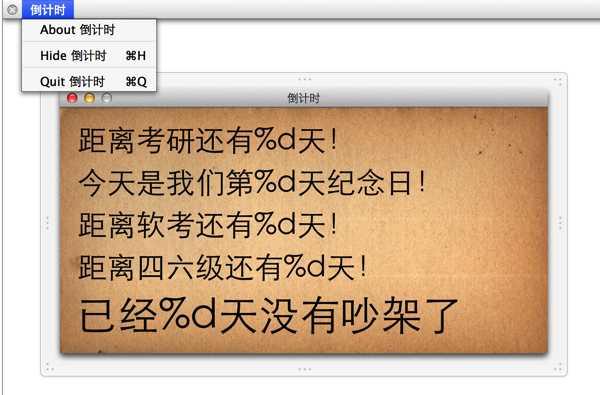
建项目的过程中一开始不小心取了个没有远见的名字“考研倒计时”,后来改成了倒计时。怎么改呢?我是这样改的:(比如程序的window,上面的menuitem类同)
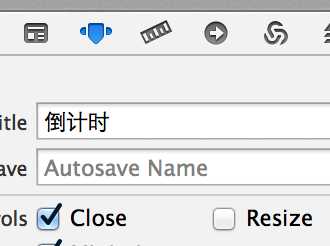
顺手把Resize的钩钩去掉

把Full Screen改成Primary Window蛮有意思的。(试试把Resize勾上再全屏)
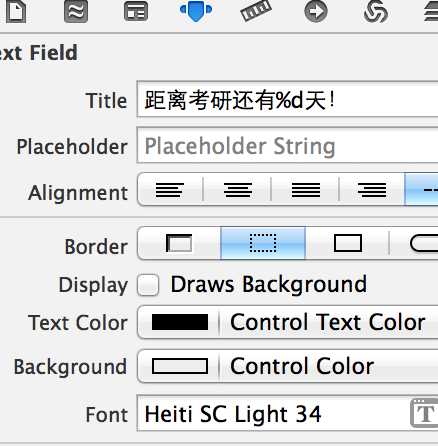
这里我一开始只拖进去这5句话(NSTextField),双击控件先把文字改个样子做个效果。在右边顺便把字体改了。
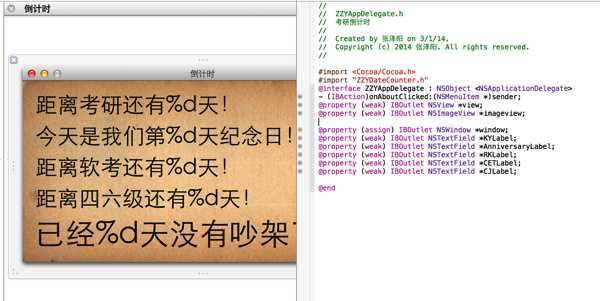
后来如图又加入了一个NSImageView 以作背景
在Attribute Inspector中改成我事先找好的图,并把Scaling改成AxesIndependently 这样图片就可以适当的放缩了。
一开始我的代码是这样的,后来又加了纪念日、软考等,代码是直接“拷贝”复用的。
#pragma mark - 设置 -NSDateComponents *components=[[NSDateComponents alloc]init];//创建组件#pragma mark 考研[components setMonth:1];
[components setDay:4];
[components setYear:2015];
[components setHour:7];
NSDate *targetDate = [[NSCalendar currentCalendar] dateFromComponents:components];
NSTimeInterval targetInteval = [targetDate timeIntervalSinceNow];
// NSLog(@"%f",KYinteval);NSLog(@"%d",(int)targetInteval/60/60/24);
[_KYLabel setStringValue:[NSString stringWithFormat:@"距离考研还有%d天!",(int)targetInteval/60/60/24]];
v2版把倒计时计算抽成了一个类,提高程序的复用性。
用法如下:(使用了Delegate思想和静态实例化思想)
ZZYDateCounter*dc=[ZZYDateCounter CounterWithTargetYear:2015mounth:1day:4hour:7andSentence:@"距离考研还有%d天!"];dc.textDelegate=_KYLabel;
[dc say];
ZZYDateCounter源代码如下:(提供了使用NSDate初始化和直接使用年月日小时直接初始化的两个接口,为以后的扩展预留接口)
//// ZZYDateCounter.h// 考研倒计时//// Created by 张泽阳 on 3/14/14.// Copyright (c) 2014 张泽阳. All rights reserved.//#import <Foundation/Foundation.h>
@interface ZZYDateCounter : NSObject@property NSTextField* textDelegate;
-(void)say;+(ZZYDateCounter*)CounterWithTargetDate:(NSDate*)targetDate andTargetSentence:(NSString*)targetSentence;
+(ZZYDateCounter*)CounterWithTargetYear:(int)y mounth:(int)m day:(int)d hour:(int)h andSentence:(NSString*)targetSentence;
@end
//// ZZYDateCounter.m// 考研倒计时//// Created by 张泽阳 on 3/14/14.// Copyright (c) 2014 张泽阳. All rights reserved.// #import "ZZYDateCounter.h" @implementation ZZYDateCounter{NSDateComponents *components;
NSString* counterSentence;
NSTimeInterval targetInteval;
NSDate *targetDate ;
}
-(id)init{ if (self=[super init]) { components=[[NSDateComponentsalloc]init];//创建组件}
returnself;
}
-(id)initWithDate:(NSDate*)date andSentence:(NSString*)sentence{ if ((self=self.init)) {// form http://blog.sina.com.cn/s/blog_8732f19301010fxd.html// NSDate 相互转换// // NSDateComponents *comps = [[NSDateComponents alloc] init];// // [comps setDay:6];// // [comps setMonth:5];// // [comps setYear:2004];// // NSCalendar *gregorian = [[NSCalendar alloc]// // initWithCalendarIdentifier:NSGregorianCalendar];// // NSDate *date = [gregorian dateFromComponents:comps];// // [comps release];// // NSDateComponents *weekdayComponents =// // [gregorian components:NSWeekdayCalendarUnit fromDate:date];// // int weekday = [weekdayComponents weekday];NSCalendar *gregorian = [[NSCalendar alloc]
initWithCalendarIdentifier:NSGregorianCalendar];
components=[gregorian components:NSYearCalendarUnit | NSMonthCalendarUnit | NSDayCalendarUnit |NSHourCalendarUnitfromDate:date];
counterSentence=[NSString stringWithString:sentence];
} ;
returnself;
}
-(void)say{targetDate = [[NSCalendarcurrentCalendar] dateFromComponents:components];
targetInteval = [targetDatetimeIntervalSinceNow];
if (targetInteval<0) {targetInteval=-targetInteval;
}
[_textDelegatesetStringValue:[NSStringstringWithFormat:counterSentence,(int)targetInteval/60/60/24]];}
-(id)initWithYear:(int)y mounth:(int)m day:(int)d hour:(int)hour andSentence:(NSString*)sentence{
if ((self=self.init)) {[components setMonth:m];
[components setDay:d];
[components setYear:y];
[components setHour:hour];
counterSentence=[NSString stringWithString:sentence];
}
returnself;
}
+(ZZYDateCounter *)CounterWithTargetDate:(NSDate *)targetDate andTargetSentence:(NSString *)targetSentence{ZZYDateCounter* counter = [[ZZYDateCounteralloc] init];
return [counter initWithDate:targetDate andSentence:targetSentence];}
+(ZZYDateCounter*)CounterWithTargetYear:(int)y mounth:(int)m day:(int)d hour:(int)h andSentence:(NSString *)targetSentence{
ZZYDateCounter* counter = [[ZZYDateCounteralloc] init];
return [counter initWithYear:y mounth:m day:d hour:h andSentence:targetSentence];}
@end
在AppDelegate中添加下面两个方法:
//关闭Window后退出程序-(BOOL)applicationShouldTerminateAfterLastWindowClosed:(NSApplication *)sender{ NSLog(@"ttt");returnYES;
}
//当然少不了彩蛋了!- (IBAction)onAboutClicked:(NSMenuItem *)sender {NSAlert *alert = [NSAlertalertWithMessageText:@"关于这个软件"defaultButton:@"我也爱你" alternateButton:nilotherButton:nilinformativeTextWithFormat:@"为我家亲爱的编写,祝我们都能考上好研究生,一辈子在一起!\n永远爱我家文儿!"];
[alert beginSheetModalForWindow:_windowcompletionHandler:nil];
}
最后,别忘了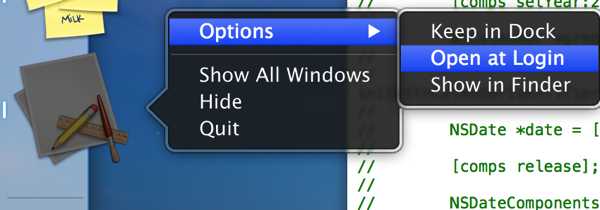
设置为开机自启:)
Mac下开发果然特别舒服,和IOS一脉相承。了解了NSImageView和NSTextView和NSWindow 等控件。
计划以后继续深入了解如:
改变部分字体颜色和文字大小、
改进NSWindow的外观、
使用快捷键进出全屏
等。
还有,感觉排版很渣。。。MarsEdit还不是很熟。。继续努力!
用Windows Live Writer修饰了一下,下次用word试一下~
参考连接:
图-http://www.tutu001.com/JPG/sc_back/jpg_11564.html
NSDateComponents与NSDate 相互转换-http://blog.sina.com.cn/s/blog_8732f19301010fxd.html
第一个Mac程序——倒计时v1&v2,布布扣,bubuko.com
原文:http://www.cnblogs.com/zeyang/p/3601340.html