using System;
using UIKit;
using CoreGraphics;
using Foundation;
namespace GraphicsAnimation
{
public class TriangleView : UIView
{
CGPath path;
public TriangleView ()
{
BackgroundColor = UIColor.White;
}
public override void Draw(CGRect rect)
{
base.Draw (rect);
using(var g=UIGraphics.GetCurrentContext()){
//set up drawing attributes
g.SetLineWidth(10);
UIColor.Blue.SetFill ();
//UIColor.Purple.SetFill ();
//UIColor.Black.SetStroke ();
UIColor.Red.SetStroke();
//create geometry
path = new CGPath ();
path.AddLines (new CGPoint[]{new CGPoint(100,200),new CGPoint(160,100),new CGPoint(220,200)});
path.CloseSubpath();
//use a dashed line
g.SetLineDash(0, new nfloat[]{10,4});
//add geometry to graphics context and draw it
g.AddPath(path);
g.DrawPath(CGPathDrawingMode.FillStroke);
// add the path back to the graphics context so that it is the current path
g.AddPath (path);
// set the current path to be the clipping path
g.Clip ();
using (CGColorSpace rgb = CGColorSpace.CreateDeviceRGB()) {
CGGradient gradient = new CGGradient (rgb, new CGColor[] {
UIColor.Blue.CGColor,
UIColor.Yellow.CGColor
});
// draw a linear gradient
g.DrawLinearGradient (
gradient,
new CGPoint (path.BoundingBox.Left, path.BoundingBox.Top),
new CGPoint (path.BoundingBox.Right, path.BoundingBox.Bottom),
CGGradientDrawingOptions.DrawsBeforeStartLocation);
}
}
}
}
}
——————————————————————————————
#region View lifecycle
public override void ViewDidLoad ()
{
base.ViewDidLoad ();
// Perform any additional setup after loading the view, typically from a nib.
TriangleView triangleView=new TriangleView{Frame=UIScreen.MainScreen.Bounds};
View.AddSubview (triangleView);
}
运行结果
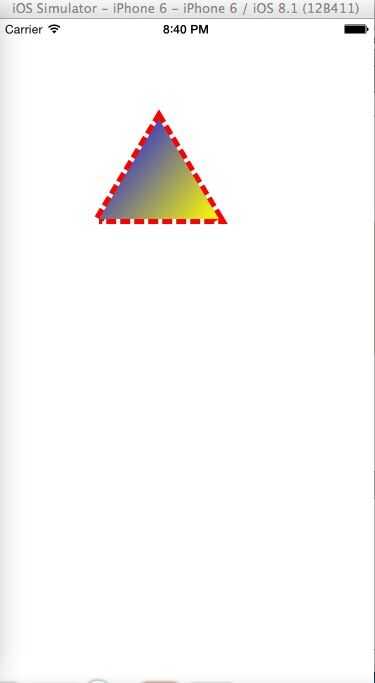
Graphics and Animation in iOS
原文:http://www.cnblogs.com/bubugao/p/4483111.html

_}([$SW[`1OI}5S.jpg)