
WPF写的全局动画控制,鼠标移上去会改变Ellipse的颜色,可以用checkbox取消动画显示。
效果如图:
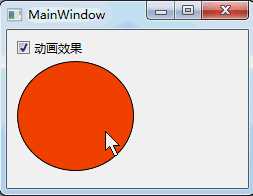
1.新建wpf项目,新建一个文件夹,命名为:Res,在里面添加两个资源字典,分别命名为:Dictionary1.xaml和Dictionary2.xaml;
2.添加一个wpf窗体,命名为:MainWindow;
3.Dictionary2.xaml代码:
<ResourceDictionary xmlns="http://schemas.microsoft.com/winfx/2006/xaml/presentation"
                    xmlns:x="http://schemas.microsoft.com/winfx/2006/xaml">
	<Storyboard x:Key="Storyboard1">
		<ColorAnimationUsingKeyFrames Storyboard.TargetProperty="(Shape.Fill).(SolidColorBrush.Color)" Storyboard.TargetName="rectangle">
			<EasingColorKeyFrame KeyTime="0:0:0.5" Value="Yellow"/>
		</ColorAnimationUsingKeyFrames>
	</Storyboard>
	<Storyboard x:Key="Storyboard2">
		<ColorAnimationUsingKeyFrames Storyboard.TargetProperty="(Shape.Fill).(SolidColorBrush.Color)" Storyboard.TargetName="rectangle">
			<EasingColorKeyFrame KeyTime="0" Value="Yellow"/>
			<EasingColorKeyFrame KeyTime="0:0:0.5" Value="Red"/>
		</ColorAnimationUsingKeyFrames>
	</Storyboard>
</ResourceDictionary><ResourceDictionary xmlns="http://schemas.microsoft.com/winfx/2006/xaml/presentation"
xmlns:x="http://schemas.microsoft.com/winfx/2006/xaml">
<Storyboard x:Key="Storyboard1">
</Storyboard>
<Storyboard x:Key="Storyboard2">
</Storyboard>
</ResourceDictionary>using System;
using System.Collections.Generic;
using System.Configuration;
using System.Data;
using System.Linq;
using System.Windows;
namespace WPF动画控制 {
/// <summary>
/// App.xaml 的交互逻辑
/// </summary>
public partial class App : Application {
protected override void OnStartup(StartupEventArgs e)
{
base.OnStartup(e);
App.LoadResources(true);
}
public static void LoadResources(bool allowStoryboard)
{
string resFilename = "/Res/" + (allowStoryboard ? "Dictionary2.xaml" : "Dictionary1.xaml");
ResourceDictionary resDic = new ResourceDictionary {Source = new Uri(resFilename, UriKind.Relative)};
Application.Current.Resources.MergedDictionaries.Clear();
Application.Current.Resources.MergedDictionaries.Add(resDic);
}
}
}
<Window xmlns="http://schemas.microsoft.com/winfx/2006/xaml/presentation"
        xmlns:x="http://schemas.microsoft.com/winfx/2006/xaml"
        xmlns:d="http://schemas.microsoft.com/expression/blend/2008"
        xmlns:mc="http://schemas.openxmlformats.org/markup-compatibility/2006"
        mc:Ignorable="d"
        x:Class="WPF动画控制.MainWindow"
        Title="MainWindow" Height="196" Width="257">
    <Window.Resources>
    </Window.Resources>
    <Window.Triggers>
        <EventTrigger RoutedEvent="Mouse.MouseEnter" SourceName="rectangle">
            <BeginStoryboard Storyboard="{DynamicResource Storyboard1}"/>
        </EventTrigger>
        <EventTrigger RoutedEvent="Mouse.MouseLeave" SourceName="rectangle">
            <BeginStoryboard Storyboard="{DynamicResource Storyboard2}"/>
        </EventTrigger>
    </Window.Triggers>
    <Grid>
        <Ellipse x:Name="rectangle" HorizontalAlignment="Left" Margin="10,31,0,0" Stroke="Black" Width="117" Fill="#FFFF2800" Height="110" VerticalAlignment="Top" />
        <CheckBox Content="动画效果" HorizontalAlignment="Left" Margin="10,10,0,0" VerticalAlignment="Top" IsChecked="True" Width="80" Click="CheckBox_Click" RenderTransformOrigin="0.338,0.75" />
    </Grid>
</Window>
using System;
using System.Collections.Generic;
using System.Linq;
using System.Text;
using System.Windows;
using System.Windows.Controls;
using System.Windows.Data;
using System.Windows.Documents;
using System.Windows.Input;
using System.Windows.Media;
using System.Windows.Media.Imaging;
using System.Windows.Navigation;
using System.Windows.Shapes;

namespace WPF动画控制 {
	/// <summary>
	/// MainWindow.xaml 的交互逻辑
	/// </summary>
	public partial class MainWindow : Window {
		public MainWindow() {
			InitializeComponent();
		}

		private void CheckBox_Click(object sender, RoutedEventArgs e) {
			CheckBox checkBox=sender as CheckBox;
			App.LoadResources(checkBox.IsChecked.Value);
		}

	}
}
代码下载地址
原文:http://blog.csdn.net/lisenyang/article/details/18351977
