首页 > 系统服务 > 详细

Linux watch 监控系统状态

时间:2015-07-22 20:29:19      阅读:365      评论:0      收藏:0      [点我收藏+]

1、linux下watch命令的基本用法

# watch --help
Usage: watch [-dhntv] [--differences[=cumulative]] [--help] [--interval=<n>] [--no-title] [--version] <command>
-d, --differences[=cumulative] highlight changes between updates
(cumulative means highlighting is cumulative)
-h, --help print a summary of the options
-n, --interval=<seconds> seconds to wait between updates
-v, --version print the version number
-t, --no-title turns off showing the header

  -d 启用对比功能,当监控的状态发生变化的时候,会标示出发生变化的位置

  -h 输出上面的帮助信息

  -n 设置刷新时间,默认是2.0秒,可以设置为0.5秒等时间

  -v 显示本watch的版本号

  -t 取消显示watch软件的提示标题


2、用法实例

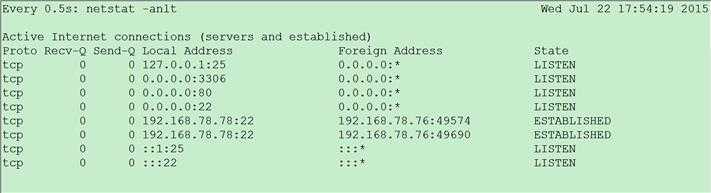
  2.1)监控我们的网络状态

# watch -n 0.5 -d netstat -anlt
技术分享


Linux watch 监控系统状态

原文:http://www.cnblogs.com/fengbohello/p/4668164.html

(0)
(0)
   
举报
评论 一句话评论(0
关于我们 - 联系我们 - 留言反馈 - 联系我们:wmxa8@hotmail.com
© 2014 bubuko.com 版权所有
打开技术之扣,分享程序人生!